Windows 11 Pro OEM Key: Unlock All Features with This Simple Activation
Rs23,284.13 Original price was: Rs23,284.13.Rs594.00Current price is: Rs594.00.
Unlock the full potential of Windows 11 Pro with a genuine OEM key. This cost-effective activation key allows you to access premium features like BitLocker encryption, Remote Desktop, Hyper-V virtualization, and Windows Sandbox on your new or custom-built PC. Whether you’re upgrading from Windows 10 or setting up a new system, the Windows 11 Pro OEM Key offers a secure, affordable solution for activating your operating system. Learn how to easily activate your Windows 11 Pro OEM Key and take advantage of all the advanced tools and security features Windows 11 has to offer.
Introduction to Windows 11 Pro OEM Key
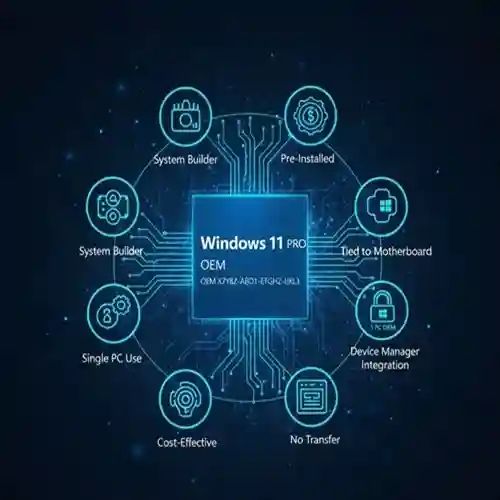
A Windows 11 Pro OEM Key is a product key that allows you to activate the Pro version of Windows 11. OEM, which stands for Original Equipment Manufacturer, means that the key is typically provided by PC manufacturers or resellers and is most commonly used with new or custom-built PCs. Windows 11 Pro offers a range of features designed for business, power users, and IT professionals, including advanced security, remote desktop capabilities, and powerful administrative tools.
One of the biggest advantages of Windows 11 Pro OEM is its affordability. Unlike retail keys, which are priced higher and can be transferred to multiple devices, OEM keys are tied to the first device they are activated on. However, despite the lower cost, the OEM key still unlocks all of the premium features of Windows 11 Pro, ensuring a seamless user experience.
This guide will help you understand how to easily activate your Windows 11 Pro OEM Key, what features you can unlock, and how it compares to other versions of Windows 11.
Key Features of Windows 11 Pro OEM Key
1. Improved Security Features
-
Windows 11 Pro comes with built-in security features like BitLocker encryption, which helps protect your data by encrypting the entire drive, and Windows Defender, which provides real-time protection against malware, ransomware, and other online threats.
-
Secure Boot is also included, ensuring that only trusted software can run during the boot process, enhancing system integrity.
2. Remote Desktop
-
One of the standout features of Windows 11 Pro is Remote Desktop, allowing users to remotely access their device from anywhere. This feature is especially useful for professionals working from home, businesses with remote employees, or IT administrators who need to manage systems remotely.
3. Hyper-V Virtualization
-
Hyper-V is Windows 11 Pro’s virtualization technology, allowing users to run multiple operating systems on the same device simultaneously. This is a key feature for developers, testers, and IT professionals who need to simulate different environments on a single PC.
4. Group Policy Management
-
Group Policy is a tool that gives administrators the ability to manage users and computers within a network. Windows 11 Pro supports advanced Group Policy features, making it the ideal choice for businesses and IT departments who need to manage large numbers of devices.
5. Windows Sandbox
-
The Windows Sandbox feature provides a safe environment to run untrusted applications without worrying about damaging the main system. This is an important security feature for users who frequently test new software or browse unfamiliar websites.
6. Domain Join and Azure Active Directory
-
Windows 11 Pro supports Domain Join, allowing users to join a corporate network and access company resources. Additionally, Azure Active Directory integration enables businesses to manage user access to cloud resources and services securely.
7. Assigned Access
-
Assigned Access allows administrators to restrict users to a single application, useful for kiosks, point-of-sale systems, or any device that needs to be dedicated to a single task.
8. Windows Update for Business
-
Windows Update for Business allows IT administrators to control the deployment of updates, ensuring that important updates are applied without disrupting workflows.
How to Use Windows 11 Pro OEM Key
Activating your Windows 11 Pro OEM Key is a simple process. Below are the steps to guide you through the activation process:
Step 1: Purchase a Windows 11 Pro OEM Key
-
The first step is to purchase a genuine Windows 11 Pro OEM key from a trusted retailer or reseller. Make sure the key is legitimate and not counterfeit to avoid activation issues.
Step 2: Install Windows 11 Pro
-
If you have not already installed Windows 11 Pro, you will need to use the Media Creation Tool provided by Microsoft to download and install the operating system. This tool will allow you to create a bootable USB drive or DVD and install Windows 11 Pro on your system.
Step 3: Enter the OEM Key
-
Once Windows 11 Pro is installed, launch the Activation Wizard. During the installation process, you will be prompted to enter your OEM key. Simply type in your Windows 11 Pro OEM Key when prompted.
Step 4: Complete Activation
-
After entering your key, Windows 11 Pro will automatically activate, provided the key is valid. You can confirm this by navigating to Settings > Update & Security > Activation.
Comparison Table: Windows 11 Pro OEM Key vs. Retail Key
| Feature | Windows 11 Pro OEM Key | Windows 11 Pro Retail Key |
|---|---|---|
| Price | Lower cost | Higher cost |
| Transferability | Tied to the first device | Can be transferred to a new device |
| Activation | One-time activation on one device | Can be used on multiple devices |
| Support | Limited support from Microsoft | Full support from Microsoft |
| Usage | New or custom-built systems | Available for upgrading existing systems |
| Update Access | Full access to Windows updates | Full access to Windows updates |
| License Type | OEM (Original Equipment Manufacturer) | Retail (Reseller, Full Version) |
| Features | Includes all features of Windows 11 | Includes all features of Windows 11 |
Conclusion
The Windows 11 Pro OEM Key is a cost-effective option for activating the professional version of Windows 11. It provides users with all the advanced features necessary for business and professional use, including enhanced security, Remote Desktop, BitLocker encryption, and more. While the OEM version is tied to the first device it’s activated on, it offers the same functionality as the Retail key at a lower price.
For users setting up new PCs or custom-built systems, the Windows 11 Pro OEM Key is an excellent choice. It allows you to unlock all the features of Windows 11 Pro while saving money compared to the more expensive Retail version. Whether you’re a business, developer, or power user, Windows 11 Pro provides everything you need to work more efficiently, securely, and productively.
5 reviews for Windows 11 Pro OEM Key: Unlock All Features with This Simple Activation
For best deal kindly contact us - info@esoftwarestore.com or WhatsApp +16315053545
Digital Download – No Physical Shipment
This is a digital-only product. After purchase, the download link and activation key will be sent via email. No CD, DVD, or USB will be shipped.
• License valid for 1 PC only
• Microsoft 2024 Professional Plus for Windows
• it is a LTSC version ,supports both 32-bit and 64-bit Windows systems
Related products
Microsoft 365 Business Premium | All-in-One Productivity & Security
Empower your business with a complete productivity and collaboration solution designed for modern workplaces. Microsoft 365 Business Standard (1-Year Subscription) provides professional-grade tools that help teams communicate, collaborate, and stay productive from anywhere.
This subscription includes premium desktop versions of Word, Excel, PowerPoint, Outlook, Publisher, and Access, along with powerful cloud services such as Exchange business email, OneDrive cloud storage (1TB per user), SharePoint, and Microsoft Teams. Whether your team works in the office, remotely, or in a hybrid setup, Microsoft 365 ensures seamless connectivity across devices including Windows, macOS, iOS, and Android.
Microsoft Office 2024 Home & Business for Mac
Microsoft Office 2024 Home & Business for Mac offers everything you need to enhance your productivity at home or work. This suite includes the latest versions of essential Office applications like Word, Excel, PowerPoint, Outlook, and OneNote, designed to make your daily tasks more efficient. Whether you're managing emails, creating stunning presentations, or analyzing data, Office 2024 is equipped with powerful tools to help you perform at your best.
Microsoft Office 2024, Project 2024 & Visio 2024 | 3-in-1 Super Savings
Microsoft Outlook 2024 | Lifetime Activation Code
Microsoft Outlook has been a cornerstone for both personal and business communication for decades. As one of the most powerful email management tools available, it continues to evolve with each new version, providing users with robust features for managing emails, calendars, tasks, and contacts. The release of Microsoft Outlook 2024 brings a new set of features designed to enhance productivity, improve security, and integrate seamlessly with other Microsoft tools.
The Microsoft Outlook 2024 Lifetime Activation Code offers a one-time purchase solution, giving users permanent access to all the premium features Outlook has to offer without the need for a recurring subscription. In this article, we will explore the features, uses, and benefits of Microsoft Outlook 2024, compare it with previous versions, and explain why the lifetime activation code might be the best choice for both individuals and businesses.
Microsoft Project 2024 | Lifetime | Activation Code
Project management has always been an essential element of success in both business and personal endeavors. With the constant need to meet deadlines, manage resources, and ensure smooth operations, using the right project management software can make a significant difference in efficiency and results. Microsoft Project 2024 is the latest version of the industry-leading project management software, providing a comprehensive suite of tools designed to help you plan, execute, and track projects of all sizes.
The Lifetime Activation Code for Microsoft Project 2024 offers an excellent alternative to subscription-based models like Microsoft 365, providing you with a one-time payment for perpetual access to all the features of Project 2024. Whether you’re managing a small team, large organization, or a personal project, this version of Microsoft Project is designed to meet your needs and help you stay organized and on track.
SQL Server 2017 Standard
Learn how to maximize features such as In-Memory OLTP, advanced security, reporting services (SSRS), and integration services (SSIS). Perfect for small businesses, developers, and enterprise deployments, this guide ensures smooth installation and activation of your retail key.
Activate SQL Server 2017 Standard quickly with your retail key. Step-by-step guide, troubleshooting, and licensing tips for developers and businesses.
SQL Server 2019 Standard | Secure, Scalable, and AI-Ready Infrastructure Retail Key
Experience secure, scalable, and AI-ready database management with the SQL Server 2019 Standard Retail Key. Designed for businesses and developers, it provides high-performance data processing, advanced analytics, and robust security. Activate your official retail key instantly and streamline your database operations with confidence.
Windows 11 Home | Modernize Your Devices with the Latest OS
Windows 11 Home is the latest consumer-focused operating system from Microsoft, designed for personal use. It offers a sleek, modern interface that brings ease of use, performance enhancements, and security features tailored for everyday users, home offices, and casual gaming. With Windows 11 Home, Microsoft has focused on enhancing the overall user experience with a fresh design and a more intuitive workflow, all while maintaining compatibility with a wide range of apps and hardware.

Lucinda (verified owner) –
Been using it for a while, I usually don’t write a review but this time I am truly convinced to write.
Elvis (verified owner) –
I got excellent support for this item. They were patient with me, and helped me solve my issue. I recommend this company 100%
Rosendo (verified owner) –
I received a personalized and attentive treatment. Thanks to this deal, I was able to find a solution to my problem in a short time. 🙂
Shakira (verified owner) –
It’s far better than those similar products, while the price is still acceptable.
Magdalen (verified owner) –
This is the coolest thing I’ve found on here! Will keep using your products in the future!