

Blog
Microsoft 365 2026 Update: Smarter Features, Enhanced Security & Pricing Changes Explained

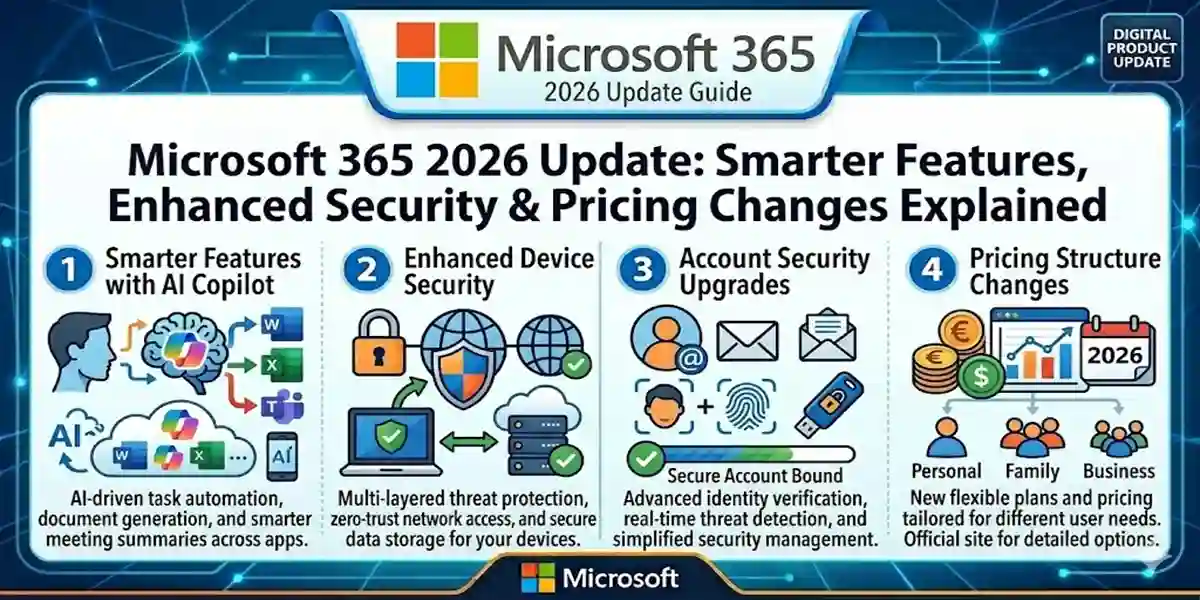
Introduction
In 2026 Microsoft is rolling out a major update to its flagship productivity suite, Microsoft 365 — introducing smarter cloud tools, enhanced security protections, deeper AI integration, and revised pricing for all major subscription tiers. These updates aim to empower users across business, enterprise, education, and personal productivity environments while reflecting the value delivered through ongoing investments in AI, security, and management capabilities.
As Microsoft prepares to adjust pricing effective July 1, 2026, both existing and new customers are encouraged to understand how the enhanced feature set and commercial model will affect workflow, budgets, and IT strategy. These updates help organizations stay secure in a rapidly evolving threat landscape, streamline IT operations, and embrace future work models supported by AI‑powered productivity tools.
Whether you’re a business owner, professional, or regular user, this guide walks through what’s new in Microsoft 365 for 2026, how it impacts activation and licensing, common hiccups you might face, and practical solutions you can use to get the most out of your subscription.
Smarter Features in Microsoft 365 (2026 Update)
Microsoft’s 2026 update brings a host of new capabilities designed to improve productivity, collaboration, security, and management:
1. AI‑Enhanced Productivity Across Apps
Microsoft continues to embed AI into core Microsoft 365 apps — Word, Excel, PowerPoint, Outlook, and Teams — using Microsoft Copilot technologies that assist with drafting content, data analysis, email summarization, and workflow automation. These AI enhancements allow users to accomplish tasks faster and more intuitively than ever before.
2. Enhanced Email Security
All major subscription tiers, including Business Basic and Standard, will receive improved email security features such as URL checks and protections against phishing, malware, and malicious links — previously reserved for higher tiers. These safeguards help prevent users from executing unsafe actions in email and collaboration tools.
3. Integrated Endpoint Management
Microsoft 365 E3 and E5 customers benefit from deeper endpoint management capabilities through tools like Microsoft Intune Remote Help, Advanced Analytics, and Intune Plan 2. These features help IT teams resolve issues faster, proactively detect vulnerabilities, and maintain compliance across devices.
4. Built‑In Security Agents
Security Copilot agents are now embedded directly into Microsoft Defender, Microsoft Purview, and Intune workflows. This brings contextual security insights, automated threat detection, and remediation directly into the flow‑of‑work for security teams.
5. Copilot Chat and AI Workflows
Microsoft is expanding Copilot Chat across Microsoft 365 apps, enabling a unified AI chat assistant that helps users draft content, find insights, and interact with apps using natural language within their workflow. This aligns productivity work more closely with AI assistive capabilities.
6. Cloud‑Focused Collaboration Improvements
Features like Microsoft Loop and cloud attachments for email and chats enhance distributed collaboration, sync changes in real time, and provide stronger integration between messaging, files, and scheduled work.
These and other improvements position Microsoft 365 as a more deeply intelligent and secure productivity ecosystem for 2026 and beyond.
Updated Pricing: What It Means for You
One of the most impactful aspects of the 2026 update is pricing changes that take effect July 1, 2026. Microsoft has stated that commercial pricing for suites like Microsoft 365 E3 and E5 will be adjusted upward to reflect the broader value of added security, AI, and management features.
Pricing Change Highlights (Commercial Plans)
| Plan | Old Price | New Price (Effective July 1, 2026) |
|---|---|---|
| Office 365 E3 | $23.00 | $26.00 |
| Microsoft 365 E3 | $36.00 | $39.00 |
| Microsoft 365 E5 | $57.00 | $60.00 |
| (Various SKUs without Teams and other modifications also adjusted) | … | … |
These price adjustments reflect Microsoft’s integration of advanced security and AI tools into base subscriptions, improving baseline capabilities without requiring separate add‑ons. However, consumers and enterprise administrators should plan for these changes when budgeting for renewals or new deployments.
How to Activate Microsoft 365 in 2026
Activating Microsoft 365 remains a straightforward process, whether you’re a new subscriber or renewing an existing one.
Method 1: Microsoft Account Activation (Recommended)
- Go to the Microsoft 365 setup portal.
- Sign in with your Microsoft account.
- Choose your subscription plan (e.g., Microsoft 365 Business, E3/E5).
- Complete payment and install apps.
- Once installed, open an app and sign in — activation is automatic.
This method securely ties your subscription to your Microsoft account and streamlines license management.
Method 2: Organization or Enterprise Deployment
For businesses using volume licensing or centralized IT deployment:
- Admins purchase Microsoft 365 subscriptions through Microsoft 365 Admin Center.
- Licenses are assigned to users via the admin portal.
- Users sign in with their Azure AD or Microsoft accounts to activate services and apps.
This method offers centralized control over licensing, security policies, and application rollout.
Method 3: Mobile & Device Activation
Microsoft 365 provides apps for iOS and Android:
- Download Microsoft 365 apps (Word, Excel, etc.) from Apple App Store or Google Play.
- Sign in with your Microsoft 365 account credentials.
- The app automatically activates based on your subscription.
Mobile activation is especially helpful for users who rely on phones and tablets for productivity.
Common Issues When Activating Microsoft 365 & Fixes
Even with improved activations, occasional issues may arise. Here are common problems and how to fix them:
Error: Account Not Recognized or Sign‑In Fails
Cause: Incorrect Microsoft account, expired credentials, or authentication issues.
Fix:
✔ Ensure the correct email is used.
✔ Reset password if needed.
✔ Enable multi‑factor authentication for better security.
Error: License Not Assigned (Admin Only)
Cause: User hasn’t been assigned a Microsoft 365 license in Admin Center.
Fix:
✔ Admins should assign licenses at under Users → Active users → Licenses.
✔ Confirm user’s email is correct.
Error: Credential Prompt Loops
Cause: Corrupted cache or outdated credentials.
Fix:
✔ Sign out across all Microsoft 365 apps.
✔ Clear cached credentials in OS settings.
✔ Sign in again with updated credentials.
Error: Feature Not Available or Disabled
Cause: Certain features like Defender or Copilot may require higher tier plans.
Fix:
✔ Review plan entitlements in Admin Center.
✔ Upgrade to a plan that includes desired services (e.g., E5 for advanced Copilot and security).
✔ Verify licenses.
Licensing & What Changed in 2026
Understanding Microsoft 365’s licensing model is more important than ever with the 2026 updates.
Subscription Types
Microsoft 365 Business: Ideal for small and medium organizations, includes core productivity tools, email, and Teams.
Microsoft 365 Enterprise (E3/E5): Advanced security, compliance, analytics, and greater enterprise tools.
Standalone Services: Specific services like Exchange Online or Teams can carry separate licenses depending on organization needs.
Microsoft’s pricing update carries global effect but local currency adjustments may apply, and customers will receive notice before packaging changes are reflected in their tenant.
Licensing choices now must also consider the inclusion of AI tools like Copilot and Defender security features in standard subscription packages — eliminating many add‑on purchases and consolidating value, though at slightly higher subscription costs.
Microsoft 365 Use Cases & Helpful Formulas (Excel Productivity)
If you use Microsoft 365 extensively in Excel, here are some productivity‑boosting formulas that are widely used by professionals:
1. SUMIF – Add values meeting a condition
2. VLOOKUP – Look up data vertically
3. IFERROR – Error handling in formulas
4. CONCATENATE / TEXTJOIN – Combine text
5. XLOOKUP (modern alternative)
These formulas help users automate analysis and reporting tasks. Microsoft provides more Excel guidance.
Conclusion
The Microsoft 365 2026 update reflects Microsoft’s strategy to integrate smarter AI tools, enhanced security, and richer management capabilities across its productivity ecosystem. Though pricing will increase as of July 1, 2026, the addition of advanced features — including Copilot experiences, Microsoft Defender protections, and Intune endpoint management — showcases significant value that goes beyond traditional productivity.
Whether you’re activating Microsoft 365 for business, education, or personal use, understanding the updated feature set, activation methods, pricing impacts, and licensing options ensures you can plan effectively and take full advantage of the platform’s capabilities.
Frequently Asked Questions (FAQs)
Q1: When do the new Microsoft 365 prices take effect?
A: Pricing changes go live on July 1, 2026, with packaging updates starting earlier in 2026.
Q2: Does every user receive the new features automatically?
A: Yes, most new features roll out to eligible plans throughout 2026.
Q3: Are personal and family Microsoft 365 plans affected?
A: Commercial pricing changes apply primarily to business and enterprise plans, though personal plans may also change over time. Check your subscription details.
Q4: How do I activate Microsoft 365 on multiple devices?
A: Sign in with the same Microsoft account across devices; activation stays linked to your subscription.
Q5: Can I keep using older Microsoft 365 features?
A: Some legacy features may be retired in favor of modern replacements; review Microsoft’s roadmap to stay updated.