

Blog
How to Activate Microsoft Office 2024 Home & Business | Step-by-Step Guide for PC & Mac

Introduction
Microsoft Office remains the industry standard for productivity, and the 2024 Home & Business edition delivers a modern, cross-platform experience. Office 2024 includes Word, Excel, PowerPoint, Outlook, and OneNote, designed for professional and personal use. To enjoy the full features, activation is essential. Activation ensures your Office copy is genuine, licensed, and eligible for updates. This guide walks you through activation methods, error fixes, licensing details, and troubleshooting, so you can get started without interruptions.
Key Features of Microsoft Office 2024 Home & Business
- Cross-Platform Compatibility: Works seamlessly on Windows and Mac, allowing multi-device access.
- Word: Enhanced document creation, AI-powered editing, and professional templates.
- Excel: Advanced formulas, dynamic charts, and data analysis tools.
- PowerPoint: Stunning presentations with transitions, animations, and AI-enhanced suggestions.
- Outlook: Manage emails, tasks, and calendars efficiently.
- OneNote: Capture, organize, and share notes across devices.
- Cloud Integration: Real-time collaboration via OneDrive for secure storage.
- Security: Regular updates and malware protection for your documents.
Common Activation Errors & Fixes
Even official Office users sometimes face errors. Here are the most frequent issues and solutions:
- Error 0xC004F074 – Key Not Found
- Cause: Incorrect or expired product key.
- Fix: Verify the key, use an official Microsoft account, and retry online activation.
- Error 0xC004F212 – License Mismatch
- Cause: Trying to activate Home & Business key on incompatible edition.
- Fix: Ensure the Office version matches the purchased license.
- Error 0xC004F034 – Server Not Available
- Cause: Microsoft activation server unreachable.
- Fix: Check internet connection, try later, or use offline activation method.
- Product Already Used
- Cause: Key activated on another device or exceeded license limit.
- Fix: Sign in with your Microsoft account and manage devices, or request support for key transfer.
- Activation Failed After Update
- Cause: Version mismatch or corrupted files.
- Fix: Repair Office installation via Settings → Apps → Microsoft Office → Repair.
Methods to Activate Microsoft Office 2024 Home & Business
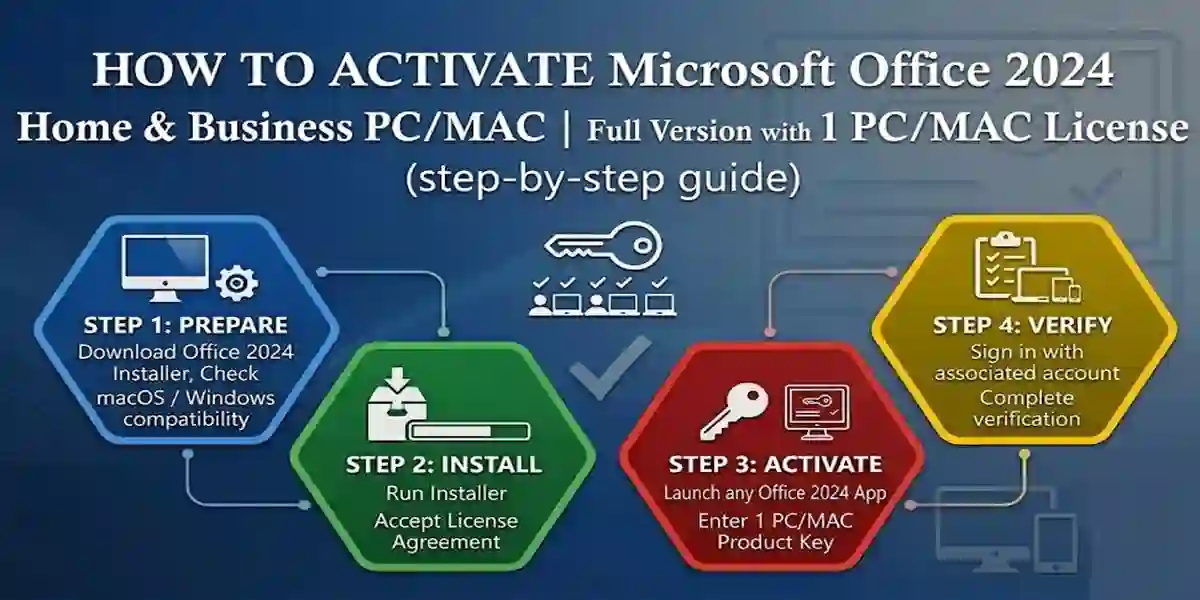
1. Online Activation via Microsoft Account
- Open any Office app, click Activate.
- Enter your product key.
- Sign in with your Microsoft account.
- Office verifies the key and activates the suite online.
2. Manual Product Key Activation
- Go to Microsoft Office Setup.
- Enter your 25-character product key.
- Create or sign in to your Microsoft account.
- Follow the on-screen instructions to complete activation.
3. Phone Activation
- Open Office → Activate.
- Choose Phone Activation.
- Call the automated Microsoft number and provide your installation ID.
- Enter the confirmation ID given to activate Office.
4. Using Microsoft 365 Subscription
- Sign in with your Microsoft 365 account.
- The license automatically activates Office 2024 linked to your account.
Licensing Information
- Single-Device License: Activate on one PC or Mac.
- Microsoft Account Required: Your license is linked to your account.
- Genuine Office Guarantee: Activation ensures updates, security patches, and support.
- Home & Business vs Professional: The Home & Business edition includes core apps, while Professional adds Access and Publisher.
Comparison Table: Office 2024 vs Previous Editions
| Feature | Office 2024 Home & Business | Office 2021 Home & Business | Office 2019 |
|---|---|---|---|
| Apps Included | Word, Excel, PowerPoint, Outlook, OneNote | Word, Excel, PowerPoint, Outlook, OneNote | Word, Excel, PowerPoint, Outlook |
| Cloud Integration | Yes, OneDrive & Co-authoring | Limited | Limited |
| AI Features | Enhanced AI tools & suggestions | Basic templates | None |
| Platform Compatibility | Windows & Mac | Windows & Mac | Windows & Mac |
| Security Updates | Automatic, regular | Standard | Limited |
Conclusion
Activating Microsoft Office 2024 Home & Business ensures that you enjoy the full potential of the professional suite on both Windows and Mac. With genuine activation, you can unlock advanced features, real-time collaboration, AI tools, and cloud integration. Troubleshoot common errors using the solutions above, and always use official Microsoft methods to maintain security and compliance. Office 2024 provides a robust, reliable, and versatile productivity environment for home users, students, and small business professionals.
FAQ
Q1: Can I activate Office 2024 Home & Business on multiple devices?
A: No, single license works on one PC or Mac. Use Microsoft 365 subscription for multi-device access.
Q2: What if my product key doesn’t work?
A: Ensure it’s entered correctly, matches the edition, and hasn’t exceeded activation limits. Contact Microsoft support if issues persist.
Q3: Can I switch devices after activation?
A: Yes, deactivate the current device through your Microsoft account and reactivate on a new device.
Q4: Is internet required for activation?
A: Online activation needs an internet connection. Phone activation works offline.
Q5: Will activated Office 2024 receive updates?
A: Yes, genuine activated Office 2024 receives regular feature and security updates from Microsoft.