

Blog
How to Activate Microsoft Office 2021 Professional Plus | Phone Key with CID on Windows

Introduction
Microsoft Office 2021 Professional Plus is one of the most widely used productivity suites for businesses, schools, and individual professionals. Designed to provide enhanced efficiency, advanced features, and a stable platform, this suite includes essential applications like Word, Excel, PowerPoint, Outlook, Access, Publisher, and OneNote. Unlike subscription-based Office 365 or Microsoft 365, the Professional Plus edition can be activated using a Phone Key with CID, making it ideal for offline activation, environments with limited internet access, and large-scale deployments.
This article will provide a comprehensive, step-by-step guide to activating Office 2021 Professional Plus on Windows using a Phone Key with CID, including key features, common errors and fixes, activation methods, licensing information, and frequently asked questions.
Key Features of Microsoft Office 2021 Professional Plus
Office 2021 Professional Plus offers a wide range of features designed to improve productivity, collaboration, and data management for Windows users.
1. Complete Productivity Suite
- Includes Word, Excel, PowerPoint, Outlook, Access, Publisher, and OneNote.
- Perfect for creating professional documents, analyzing data, presenting information, managing emails, and taking notes.
2. Phone Key Activation with CID
- Enables offline, legal activation using a phone-based system.
- Ideal for businesses or schools with multiple PCs.
3. Enhanced Collaboration
- Real-time editing and collaboration in Word, Excel, and PowerPoint.
- Cloud support optional for OneDrive integration.
4. Advanced Data Analysis Tools
- Excel 2021 includes Power Query, LET function, XLOOKUP, dynamic arrays, and Pivot Tables.
5. Security Enhancements
- Stronger encryption and protection for sensitive data.
- Compliance with enterprise security standards.
6. Improved Presentation Tools
- PowerPoint 2021 offers Morph transitions, Presenter Coach, Ink Replay, and Design Ideas.
7. User-Friendly Interface
- Modern, clean, and consistent design that matches Windows 10 & 11.
- Customizable ribbon layout and themes for workflow optimization.
Methods to Activate Office 2021 Professional Plus – Phone Key with CID
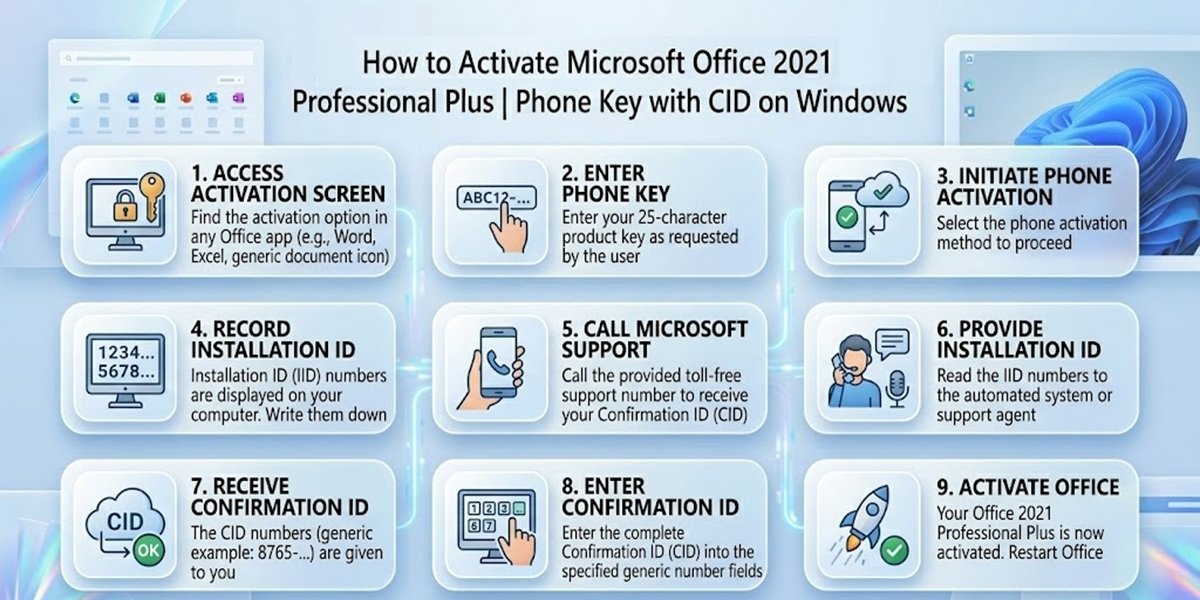
Activating Office 2021 Professional Plus legally ensures full functionality, security, and compliance. The Phone Key with CID method is particularly useful for offline activation or controlled deployment.
Method 1 – Activation During Installation
- Download the Office 2021 Professional Plus installer from an authorized source like esoftwarestore.
- Run the installer and follow the prompts.
- When prompted, choose Phone Key Activation.
- Dial the Microsoft activation number provided.
- Enter the CID (Confirmation ID) when prompted.
- Confirm activation and restart Office apps to verify.
Method 2 – Activation After Installation
- Open any Office application (Word, Excel, PowerPoint).
- Go to File > Account > Change Product Key.
- Select Phone Activation and follow the prompts.
- Use the CID provided by Microsoft.
- Click Activate to complete the process.
Common Activation Errors and Fixes
Even with Phone Key activation, users can experience some common issues.
Error 1: Invalid Product Key
Cause: Typo or wrong edition.
Fix: Double-check the key and confirm it is for Office 2021 Professional Plus.
Error 2: Activation Limit Reached
Cause: CID/Phone Key already used on maximum PCs.
Fix: Request additional CID/keys from Microsoft or esoftwarestore.
Error 3: Cannot Connect to Microsoft
Cause: Network or firewall issues.
Fix: Temporarily disable firewall, ensure stable connection, and retry.
Error 4: Mismatch Between Product and Version
Cause: Attempting to activate a different edition of Office with the wrong key.
Fix: Ensure the correct Office edition is installed.
Error 5: Office Shows Trial or Read-Only Mode
Cause: Incomplete activation.
Fix: Re-run the Phone Key activation process and confirm CID entry.
Licensing Information – Phone Key with CID
The Phone Key with CID is a legal method of activation designed for controlled environments.
Advantages:
- Legal, secure activation for single or multiple PCs.
- Offline capability for environments with limited internet.
- Fully unlocks Office 2021 Professional Plus applications.
- Ensures compliance with Microsoft licensing standards.
Enterprise & Educational Deployment
- Ideal for businesses, schools, and organizations deploying multiple Office copies.
- Simplifies auditing and tracking licenses.
Conclusion
Microsoft Office 2021 Professional Plus with Phone Key and CID provides a secure, reliable, and legal activation method for Windows users. Whether for businesses, schools, or individuals, it ensures all Office applications are fully functional, compliant with licensing, and ready for offline or online use. With this activation method, users can enjoy Word, Excel, PowerPoint, Outlook, Access, Publisher, and OneNote with no subscription required, enhanced security, and flexibility. Using authorized vendors like esoftwarestore ensures a smooth, risk-free experience, allowing organizations to deploy Office across multiple PCs efficiently.
Frequently Asked Questions (FAQ)
Q1: How many PCs can I activate with one Phone Key?
A: One Phone Key typically activates one PC. Multiple keys are required for multiple devices.
Q2: Do I need an internet connection?
A: No, initial offline activation is possible via the CID. Internet may be required for updates.
Q3: What applications are included?
A: Word, Excel, PowerPoint, Outlook, Access, Publisher, and OneNote.
Q4: Is this activation method legal?
A: Yes, using Phone Key with CID from authorized vendors like esoftwarestore is fully compliant.
Q5: What if activation fails?
A: Follow troubleshooting steps or contact support from Microsoft or esoftwarestore.
Q6: Can I transfer Office to a new PC?
A: Yes, if you have a valid unused Phone Key or obtain a new CID.