

Blog
How to Activate Microsoft Office 2021 LTSC Professional Plus | MAK Key for 100 PCs on Windows

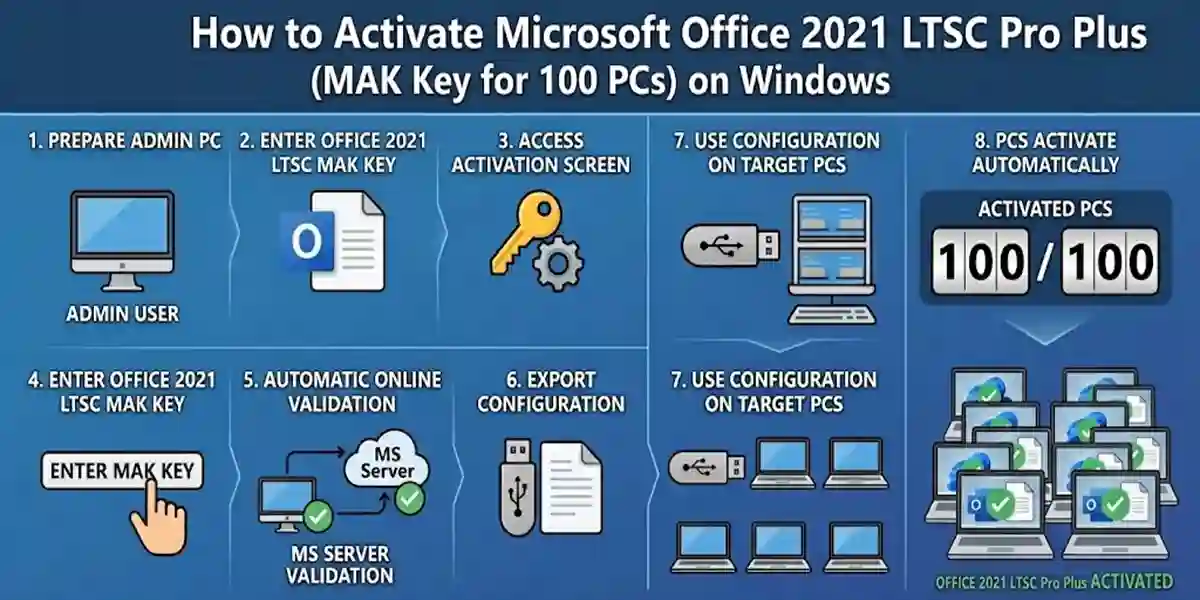
Introduction
Microsoft Office 2021 LTSC (Long-Term Servicing Channel) Professional Plus is the ultimate productivity suite for enterprises, organizations, and large businesses. Designed for stability, security, and efficiency, it includes essential Office applications such as Word, Excel, PowerPoint, Outlook, Access, Publisher, and OneNote. Unlike subscription-based Office 365 or Microsoft 365, the LTSC edition provides a one-time purchase license with long-term support, minimal feature updates, and predictable performance — perfect for enterprise deployment.
The MAK (Multiple Activation Key) system allows activation on up to 100 Windows PCs, simplifying license management and ensuring all workstations have fully functional Office apps.
Key Features of Microsoft Office 2021 LTSC Professional Plus
Microsoft Office 2021 LTSC Professional Plus is tailored for enterprise needs, combining advanced functionality with a stable, long-term release. Key features include:
1. Complete Productivity Suite
- Includes Word, Excel, PowerPoint, Outlook, Access, Publisher, and OneNote.
- Enables professional document creation, data analysis, presentations, email management, and note-taking.
2. Volume Activation with MAK Key
- Supports activation on up to 100 PCs using a single Multiple Activation Key.
- Simplifies enterprise deployment and license management for large organizations.
3. LTSC Stability
- Long-Term Servicing Channel ensures minimal feature changes.
- Ideal for organizations that require predictable performance and controlled updates.
4. Security Updates
- Receive essential security updates to protect sensitive business data.
- Reliable for enterprise-grade security compliance.
5. Offline & Online Capabilities
- Full functionality offline.
- Cloud support optional for syncing files via OneDrive.
6. Enhanced Collaboration
- Outlook and Teams integration allow seamless communication.
- SharePoint compatibility for document collaboration across teams.
7. Enterprise Deployment Ready
- Volume deployment support with centralized management tools.
- Simplifies installation, activation, and updates across multiple devices.
Methods to Activate Microsoft Office 2021 LTSC Professional Plus
Activating Office 2021 LTSC Pro Plus legally is crucial to unlock all features and maintain enterprise compliance. There are two main activation methods:
Method 1 – Activation During Installation
- Download the Office 2021 LTSC installation package from Microsoft or authorized vendor (e.g., esoftwarestore).
- Run the installer and follow on-screen instructions.
- When prompted, enter your MAK key.
- Select Activate.
- Wait for confirmation.
This method is ideal for IT admins deploying Office on multiple machines simultaneously.
Method 2 – Activation After Installation
For Windows PCs:
- Open any Office app (Word, Excel, PowerPoint).
- Go to File → Account → Change Product Key.
- Enter the MAK key provided for your enterprise.
- Click Activate.
- Verify activation status.
Tips for Smooth Activation:
- Ensure PCs are connected to the internet.
- Disable firewall or antivirus temporarily if activation fails.
- Always use a MAK key purchased from an authorized vendor.
Common Errors & Fixes
Even with proper procedures, some users encounter activation issues. Here are the most common errors and solutions:
Error 1: Invalid Product Key
Cause: Typo, wrong edition, or already used key.
Fix:
- Re-enter the key carefully.
- Confirm that the MAK key corresponds to Office 2021 LTSC Professional Plus.
- Contact the authorized vendor if necessary.
Error 2: Activation Failed – Sign In Required
Cause: Microsoft Account mismatch or login required.
Fix:
- Sign out and sign in with the correct account.
- Use the account associated with the license.
Error 3: Office Cannot Connect to Your Account
Cause: Internet connection issues or firewall blocking.
Fix:
- Check network connectivity.
- Allow Office through the firewall.
- Try activation later.
Error 4: Subscription Required Message
Cause: Confusion between LTSC (one-time purchase) and Microsoft 365 subscription.
Fix:
- Ensure you are using an LTSC MAK key, not a subscription key.
- Cancel any subscription prompts and re-enter the MAK key.
Error 5: MAK Key Limit Reached
Cause: Key already activated on maximum allowed PCs.
Fix:
- Check the number of activations via the Microsoft Volume Licensing Service Center (VLSC).
- Purchase additional MAK keys if needed.
Licensing Explained
What is a MAK Key?
MAK (Multiple Activation Key) is a type of volume license key allowing multiple activations of the same Office product. It’s ideal for enterprise environments where IT admins need to deploy Office on numerous devices efficiently.
Advantages of MAK Keys for Office 2021 LTSC Pro Plus
- Bulk Deployment: Install and activate Office on multiple devices.
- Centralized License Management: Track activations via Microsoft Volume Licensing Service Center.
- Stability: One-time purchase license avoids subscription renewals.
- Compliance: Legal activation ensures enterprise compliance and audit readiness.
Number of PCs Supported
- One MAK key can activate up to 100 Windows PCs.
- Administrators can request additional keys if the organization exceeds this limit.
Conclusion
Microsoft Office 2021 LTSC Professional Plus with MAK key is the ideal solution for enterprises requiring stable, secure, and scalable productivity tools. Supporting activation on up to 100 Windows PCs, it provides access to Word, Excel, PowerPoint, Outlook, Access, Publisher, and OneNote. LTSC ensures minimal feature changes while maintaining long-term support, making it perfect for large organizations and educational institutions. With MAK keys, IT administrators can easily deploy and manage licenses across multiple systems, reducing errors and maximizing productivity. This suite guarantees reliability, legal compliance, and a professional-grade Office experience across all workstations.
Frequently Asked Questions (FAQ)
Q1: How many PCs can I activate with one MAK key?
A: Up to 100 Windows PCs with Office 2021 LTSC Professional Plus.
Q2: Do I need an internet connection to activate Office?
A: Yes, initial activation requires internet access.
Q3: Can I transfer Office 2021 LTSC to a new PC?
A: Yes, but the MAK key must have remaining activations available.
Q4: What should I do if the MAK key limit is reached?
A: Contact Microsoft or your authorized vendor to request additional keys.
Q5: Can I activate Office offline?
A: Offline activation is possible using Microsoft Volume Licensing Service Center, but initial online activation is recommended.