

Blog
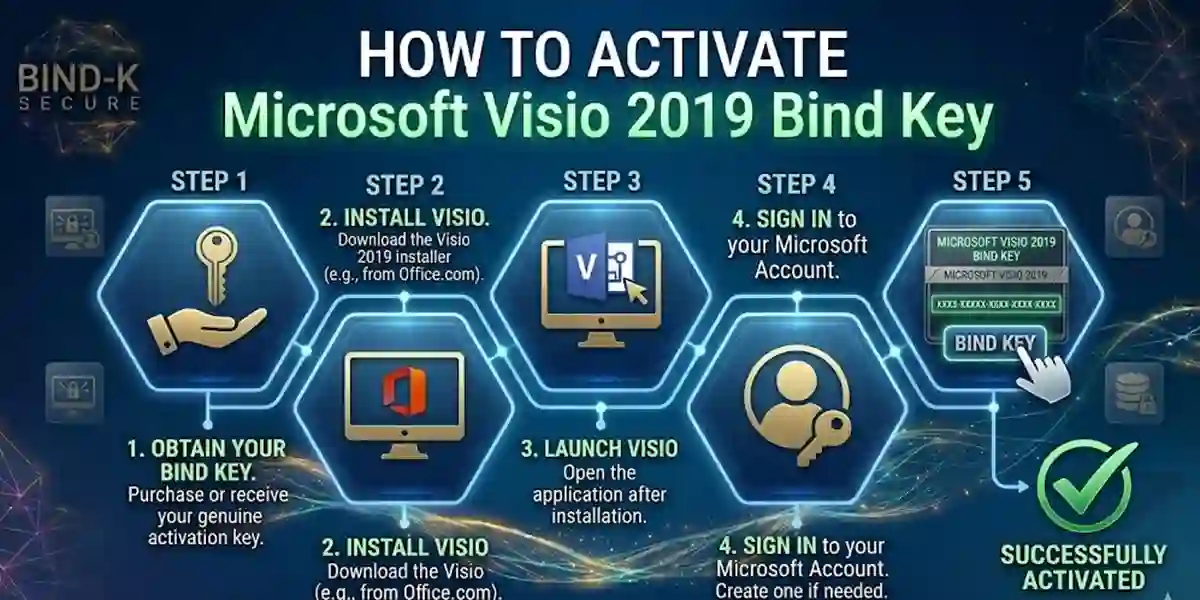
How to Activate Microsoft Visio 2019 Bind Key | Step-by-Step Guide

Introduction
Microsoft Visio 2019 is the industry-standard software for creating professional diagrams, flowcharts, organizational charts, and technical schematics. To unlock all its features on Windows, activation via a bind key is required. A bind key ensures your software is genuine, fully licensed, and eligible for updates, protecting your investment while enabling uninterrupted workflow.
This guide provides a complete walkthrough for activating Microsoft Visio 2019 using a bind key, covering common errors, troubleshooting tips, licensing details, and FAQs to help both individual users and IT administrators.
Key Features of Microsoft Visio 2019
1. Secure Activation with Bind Key
Activating Visio 2019 via bind key ensures your installation is genuine and compliant with Microsoft policies, protecting against unauthorized use and software piracy.
2. Professional Diagramming Tools
Visio 2019 provides advanced tools for creating flowcharts, network diagrams, org charts, process diagrams, and technical schematics. Users can leverage smart shapes, connectors, and formatting tools for precise, professional results.
3. Extensive Templates and Shapes
Access a vast library of templates and shapes for business, IT, engineering, and project management diagrams. This saves time and ensures consistency across designs.
4. Seamless Integration with Microsoft Office
Visio 2019 integrates with Word, Excel, PowerPoint, and SharePoint, allowing you to import data, link diagrams, and collaborate efficiently across Microsoft Office applications.
5. Enhanced Productivity Features
Features like auto-alignment, smart guides, automatic formatting, and data-driven diagrams help users complete projects faster while maintaining accuracy and professionalism.
6. Collaboration & Cloud Integration
Share and collaborate on diagrams securely through Microsoft 365 and OneDrive, enabling teams to co-author diagrams in real time.
7. Updates and Support
Activation ensures access to Microsoft updates, security patches, and technical support, keeping your software up-to-date and secure.
Common Activation Errors & How to Fix Them
1. Invalid or Already Used Key
- Cause: Typing errors or using a key that is already activated.
- Fix: Double-check the key and ensure it matches the correct edition. Contact Microsoft support if the issue persists.
2. Activation Server Not Available
- Cause: Temporary connectivity issues or firewall restrictions.
- Fix: Check your internet connection, disable VPN/firewall temporarily, or try phone activation.
3. Software Crashes During Activation
- Cause: Conflicting software, insufficient permissions, or corrupted installer.
- Fix: Run the installer as administrator, close unnecessary programs, or reinstall Visio 2019.
4. Activation Failed After System Update
- Cause: Changes to system files may interfere with license verification.
- Fix: Repair the installation via Control Panel → Programs → Microsoft Visio 2019 → Repair.
5. License Exceeded
- Cause: The bind key has reached its maximum allowed activations.
- Fix: Manage activations via your Microsoft Volume Licensing account or contact support for reassignment.
Methods to Activate Microsoft Visio 2019 Bind Key
1. Online Activation (Recommended)
- Open Visio 2019 and select Activate Product.
- Enter your 25-character bind key.
- Connect to the internet; Microsoft validates your license automatically.
2. Offline/Manual Activation
- Open Visio → Activate → choose Offline Activation.
- Generate a request code and submit it on Microsoft’s activation portal.
- Enter the response code provided to complete activation.
3. Phone Activation
- Launch Visio → Activate → choose Phone Activation.
- Call the Microsoft automated system and provide the installation ID.
- Enter the confirmation ID received to activate your software.
4. Volume Licensing (Enterprise)
- For organizations deploying Visio across multiple devices, Microsoft Volume Licensing (MAK or KMS) allows centralized activation and tracking of licenses.
Licensing Information
- Bind Key: Activates a specific edition of Visio 2019 for Windows.
- Perpetual License: One-time purchase for indefinite use on a single device.
- Volume Licensing: Ideal for enterprises requiring multiple activations and centralized license management.
- Microsoft Account Integration: Track activations, manage licenses, and access updates easily.
Conclusion
The Microsoft Visio 2019 Bind Key is essential for professionals, IT teams, and businesses that rely on secure, compliant, and fully licensed diagramming software. Activating with a bind key ensures full access to Visio’s extensive templates, professional diagramming tools, integration with Office apps, and collaboration features. Proper activation not only protects your investment but also ensures access to updates and Microsoft support. Whether for corporate planning, IT network diagrams, or project workflow charts, Visio 2019 combined with a bind key provides efficiency, productivity, and security for all users.
FAQ
Q1: Can I activate Visio 2019 Bind Key on multiple PCs?
- A: Single bind keys are limited to one device. For multiple devices, use volume licensing.
Q2: What if my bind key is invalid?
- A: Double-check the key entry. Ensure it matches the edition. Contact Microsoft support if needed.
Q3: Is internet required for activation?
- A: Online activation requires an internet connection. Offline or phone activation can work without internet.
Q4: Can I transfer the license to another PC?
- A: Yes, but deactivate the original device and follow Microsoft’s license reassignment process.
Q5: Will activation provide updates?
- A: Yes, a genuine bind key ensures access to security updates, feature updates, and Microsoft support.