

Blog
How to Activate Microsoft Office 2021 Professional Plus Key (1PC BIND to Account) | Step by Step Guide

Introduction
Microsoft Office 2021 Professional Plus is a widely used productivity suite for home, professional, and educational purposes. With enhanced features and a modern interface, it includes Word, Excel, PowerPoint, Outlook, Access, and Publisher. This guide explains how to activate your Office 2021 Professional Plus Key (1PC BIND to Account) safely, troubleshoot common errors, explore activation methods, and understand licensing. Following this guide ensures a fully licensed Office experience without interruptions.
Key Features of Microsoft Office 2021 Professional Plus
- Lifetime activation bound to your Microsoft account
- Full suite of apps: Word, Excel, PowerPoint, Outlook, Access, Publisher
- Enhanced collaboration with real-time file sharing
- Advanced tools for presentations, spreadsheets, and data analysis
- Secure account binding for easy reinstallation
- Compatible with Windows 10 and windows 11
- Suitable for personal, professional, or educational use
- Regular updates with new features and security patches
Methods to Activate Office 2021 Professional Plus (1PC BIND to Account)
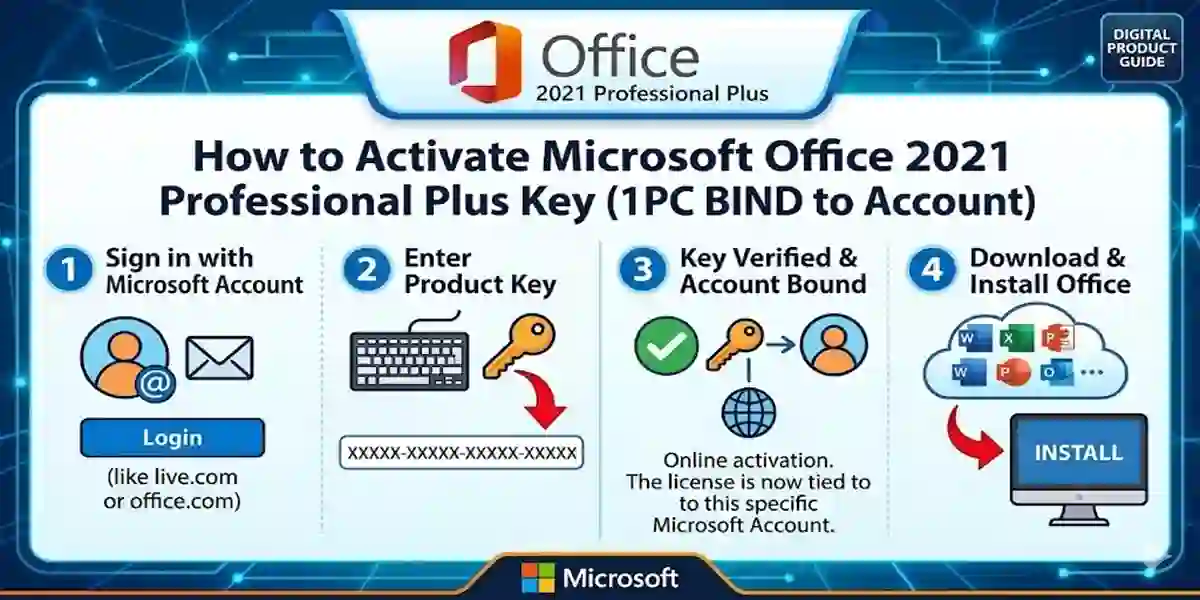
Method 1: Activate via Microsoft Account
- Install Office 2021 from the setup file.
- Open any Office app and click Sign In.
- Enter your Microsoft account credentials.
- Input your 25-character product key when prompted.
- Follow the on-screen instructions to complete activation.
Method 2: Activate Using Command Prompt
- Open Command Prompt as Administrator.
- Navigate to Office installation path, e.g.,
C:\Program Files\Microsoft Office\Office16 - Type
cscript ospp.vbs /inpkey:XXXXX-XXXXX-XXXXX-XXXXX-XXXXX(replace Xs with your key). - Type
cscript ospp.vbs /actand press Enter. - Wait for confirmation of successful activation.
Method 3: Using Office Deployment Tool (ODT)
- For enterprise users, ODT allows deployment and activation across multiple PCs using account binding.
Common Activation Errors and Fixes
- Error 0xC004F074: Key not recognized → Check internet connection and account binding
- Error 0x80070005: Permission denied → Run installer as Administrator
- Error 0xC004C003: Key already used → Contact Microsoft Support
- Error 0xC004F210: Wrong product edition → Confirm using Office 2021 Professional Plus key
Office 2021 Professional Plus Licensing
The license is a one-time purchase bound to your Microsoft account, providing lifetime access. Unlike Microsoft 365 subscriptions, you pay only once. Licenses from esoftwarestore are verified and safe for personal and professional use.
Comparison with Other Office Versions
| Feature | Office 2021 Pro Plus (1PC BIND) | Office 2019 Pro Plus | Microsoft 365 Subscription |
|---|---|---|---|
| License Type | One-time, account-bound | One-time, device-bound | Subscription |
| Included Apps | Word, Excel, PowerPoint, Outlook, Access, Publisher | Word, Excel, PowerPoint, Outlook, Access, Publisher | All Office apps + cloud |
| Lifetime Use | Yes | Yes | No |
| Updates | Security & feature updates | Security only | Continuous updates & new features |
| Collaboration | Real-time via Microsoft account | Limited | Advanced collaboration & cloud storage |
| Price | One-time cost | One-time cost | Recurring cost |
Conclusion
Activating Microsoft Office 2021 Professional Plus (1PC BIND to Account) is straightforward with proper guidance. This lifetime license ensures secure activation and full access to Office apps. Using this official key from esoftwarestore guarantees verified, safe activation and instant delivery, enhancing productivity for personal, educational, and professional tasks.
FAQs
Q1: Can I use the Office 2021 key on multiple PCs?
A1: No, it binds to a single Microsoft account for one PC.
Q2: Do I need internet to activate Office 2021?
A2: Yes, internet is required for account verification.
Q3: What if my key shows an error?
A3: Check the errors & fixes section or contact Microsoft Support.
Q4: Can I reinstall Office after activation?
A4: Yes, as long as the same Microsoft account is used.
Q5: How is Office 2021 different from Microsoft 365?
A5: Office 2021 is a one-time purchase; Microsoft 365 requires a subscription with cloud features.