

Blog
Autodesk AutoCAD Civil 3D: The Ultimate BIM Solution for Infrastructure Design


Introduction to AutoCAD Civil 3D by Autodesk
Modern infrastructure projects are more complex than ever. From highways and rail corridors to land development, drainage systems, and utilities, civil engineers must manage vast amounts of data while ensuring accuracy, sustainability, and regulatory compliance. To meet these demands, Autodesk developed AutoCAD Civil 3D, a powerful Building Information Modeling (BIM) solution tailored specifically for civil engineering and infrastructure design.
AutoCAD Civil 3D goes far beyond traditional drafting. It provides intelligent, data-driven tools that help engineers design, analyze, document, and deliver infrastructure projects more efficiently. With dynamic models, automated documentation, and integrated analysis, Civil 3D has become an industry standard for civil engineers, surveyors, and infrastructure professionals worldwide.
This comprehensive guide explores AutoCAD Civil 3D features, uses, benefits, licensing options, FAQs, and a final conclusion, helping you understand why it remains one of the most essential civil engineering software solutions in 2026 and beyond.
What Is AutoCAD Civil 3D?
AutoCAD Civil 3D is a civil engineering design and documentation software developed by Autodesk. Built on the AutoCAD platform, it uses BIM for civil infrastructure, enabling intelligent, model-based design rather than static 2D drawings.
Civil 3D supports workflows for:
-
Roads and highways
-
Land development
-
Grading and earthworks
-
Stormwater and drainage design
-
Utilities and pipe networks
-
Surveying and mapping
-
Rail and transportation infrastructure
Unlike basic CAD tools, Civil 3D creates dynamic objects—such as alignments, surfaces, corridors, and pipe networks—that update automatically when changes are made. This reduces errors, improves coordination, and significantly speeds up project delivery.
Key Features of AutoCAD Civil 3D (Detailed Explanation)
AutoCAD Civil 3D is a powerful civil engineering design and documentation solution used for infrastructure, transportation, and land development projects. Its intelligent, model-based approach allows engineers to design, analyze, and document projects with greater accuracy, efficiency, and collaboration. Below is a detailed explanation of its most important features.
1. Dynamic Model-Based Design (BIM)
One of the most defining features of AutoCAD Civil 3D is its dynamic, model-based design environment, which follows Building Information Modeling (BIM) principles for civil infrastructure.
In Civil 3D, all design elements—such as alignments, profiles, corridors, surfaces, and pipe networks—are intelligently linked. When a change is made in one part of the design, the entire model updates automatically.
Key advantages include:
-
Automatic updates across the entire project model
-
Significant reduction in manual rework and design errors
-
Improved consistency across drawings and design components
-
Real-time visualization of design changes
For example, when a roadway alignment is modified, related profiles, cross-sections, earthwork volumes, and plan views update instantly. This dynamic behavior improves design accuracy and speeds up project revisions.
2. Surveying and Mapping Tools
AutoCAD Civil 3D provides advanced surveying and mapping tools that allow engineers and surveyors to work with accurate real-world data.
Key surveying capabilities include:
-
Importing raw field survey data from total stations and GPS equipment
-
Managing survey databases and point groups
-
Creating surfaces from point clouds and survey points
-
Handling coordinate systems, datums, and map projections
These tools ensure that designs are grounded in accurate site conditions, reducing the risk of costly errors during construction. Civil 3D’s ability to manage large datasets makes it ideal for infrastructure and land development projects.
3. Surface Modeling and Terrain Analysis
Surface modeling is a core strength of AutoCAD Civil 3D and is essential for site grading, drainage design, and earthwork planning.
Surface modeling features include:
-
Creating TIN (Triangulated Irregular Network) surfaces from survey data
-
Generating contour lines, slope arrows, and elevation labels
-
Performing cut-and-fill volume calculations
-
Comparing existing and proposed surfaces
These tools allow engineers to analyze terrain conditions, optimize grading designs, and minimize earthwork costs. Accurate surface analysis improves drainage performance and site usability.
4. Alignment, Profile, and Corridor Design
AutoCAD Civil 3D excels in transportation and corridor-based infrastructure design, making it a preferred tool for roads, highways, railways, and utility corridors.
Key features include:
-
Creation of horizontal and vertical alignments
-
Profile views with design checks and constraints
-
Corridor modeling using assemblies and subassemblies
-
Automated cross-section generation
-
Superelevation design tools for roadway curves
Civil 3D allows engineers to comply with engineering standards while designing complex linear infrastructure efficiently.
5. Grading and Earthworks
Civil 3D simplifies grading design for land development and site planning projects.
Grading tools include:
-
Feature lines and grading objects
-
Automated grading solutions
-
Earthwork volume calculations
-
Slope control and drainage optimization
Engineers can quickly explore multiple grading scenarios, evaluate design alternatives, and optimize land use while maintaining proper drainage and slope requirements.
6. Pipe Networks and Utilities Design
AutoCAD Civil 3D includes powerful tools for designing underground utility networks.
Supported utility systems include:
-
Stormwater drainage systems
-
Sanitary sewer networks
-
Water distribution systems
-
Gravity and pressure pipe networks
Key capabilities include:
-
Rules-based pipe sizing and layout
-
Hydraulic analysis support
-
Clash detection with other infrastructure
-
Automatic labeling and documentation
These features improve coordination between disciplines and reduce construction conflicts.
7. Automated Documentation and Plan Production
Manual drafting is time-consuming and prone to errors. Civil 3D automates the creation of construction-ready documentation.
Benefits include:
-
Automatic generation of plan, profile, and section views
-
Dynamic labels, tables, and annotations
-
Consistent drawing standards across projects
-
Faster design-to-delivery timelines
This automation significantly improves productivity while maintaining high documentation accuracy.
8. Quantity Takeoffs and Cost Estimation
Civil 3D allows engineers and contractors to generate accurate quantity takeoffs early in the design process.
Key capabilities include:
-
Earthwork volume calculations
-
Material quantity reports
-
Corridor and surface quantity analysis
-
Integration with cost estimation tools
Early access to quantity data supports better budgeting, bidding, and project planning.
9. Collaboration and Data Integration
AutoCAD Civil 3D integrates seamlessly with other Autodesk tools and cloud-based platforms, enabling efficient collaboration.
Integration options include:
-
Autodesk Construction Cloud
-
AutoCAD
-
InfraWorks
-
Revit
-
GIS and geospatial data sources
These integrations improve coordination across multidisciplinary teams and support data-driven decision-making.
10. Customization and Automation
Civil 3D offers extensive customization options to match organizational workflows.
Customization features include:
-
Custom styles, templates, and standards
-
Subassemblies and corridor components
-
APIs and scripting support
-
Dynamo for Civil 3D for visual programming
Organizations can automate repetitive tasks, enforce standards, and improve design efficiency across teams.
Uses of AutoCAD Civil 3D
AutoCAD Civil 3D is a specialized civil engineering design and documentation software widely adopted by infrastructure professionals across the globe. Its model-based approach makes it suitable for projects of all sizes—from small site developments to large national infrastructure programs.
1. Road and Highway Design
AutoCAD Civil 3D is one of the most widely used tools for road and highway engineering.
It is used extensively for:
-
Urban and rural road networks
-
National and state highways
-
Expressways and bypass roads
-
Interchanges, flyovers, and junctions
-
Pavement structure and thickness design
The corridor modeling environment allows engineers to design roads using intelligent alignments, profiles, and assemblies. Superelevation tools help calculate safe banking of curves, while design checks ensure compliance with local and international road standards.
Civil 3D also enables quick updates—any change in alignment or profile automatically updates cross-sections, quantities, and drawings.
2. Land Development and Site Design
Civil 3D is a core tool for land development professionals working on residential, commercial, and industrial projects.
Common applications include:
-
Residential housing layouts
-
Commercial complexes and IT parks
-
Industrial zones and logistics parks
-
Grading and earthwork planning
-
Utility and service layout design
The dynamic design environment allows planners to test multiple site layouts quickly. Engineers can evaluate grading options, drainage paths, and lot layouts while instantly seeing the impact on earthwork quantities and costs.
This flexibility significantly reduces design iteration time and improves project feasibility studies.
3. Rail and Transit Infrastructure
AutoCAD Civil 3D also supports rail and transit design workflows, making it suitable for modern transportation projects.
Key uses include:
-
Railway alignments and profiles
-
Metro and light rail corridors
-
Track cross-sections and assemblies
-
Station approach design
-
Corridor-based rail modeling
The software’s alignment and corridor tools help engineers meet strict geometry and safety standards required for rail infrastructure. It integrates well with InfraWorks for conceptual planning and visualization of large transit networks.
4. Water Resources and Drainage Design
Civil 3D plays a critical role in water resources engineering and drainage planning.
It is commonly used for:
-
Stormwater management systems
-
Urban and highway drainage design
-
Flood control channels
-
Watershed and catchment analysis
-
Retention and detention pond design
With built-in hydraulic analysis tools, engineers can design gravity and pressure systems, size pipes accurately, and ensure regulatory compliance. Surface analysis tools help visualize flow paths and identify potential flooding zones.
5. Surveying and Mapping Projects
Surveying professionals rely on Civil 3D for accurate data handling and terrain modeling.
Typical surveying applications include:
-
Processing raw field survey data
-
Managing survey databases
-
Creating existing ground surfaces
-
Contour generation and mapping
-
Integration with GIS datasets
Civil 3D supports multiple coordinate systems and projections, making it suitable for regional and international projects. The ability to work with point clouds and large datasets improves accuracy and reduces manual processing time.
6. Infrastructure Rehabilitation and Upgrades
Civil 3D is widely used in rehabilitation and modernization projects.
These include:
-
Road widening and strengthening
-
Utility replacement and upgrades
-
Drainage system improvements
-
Brownfield redevelopment projects
-
Smart city infrastructure upgrades
Existing conditions can be modeled accurately, allowing engineers to plan upgrades with minimal disruption. Quantity takeoffs help estimate costs and material requirements early in the project lifecycle.
Benefits of AutoCAD Civil 3D
1. Increased Productivity
Civil 3D automates repetitive design and drafting tasks. Dynamic objects, intelligent styles, and templates allow engineers to focus more on design quality rather than manual drafting.
2. Improved Accuracy and Reduced Errors
Because all design elements are interconnected, changes are automatically reflected throughout the model. This significantly reduces inconsistencies, omissions, and human errors.
3. Faster Project Delivery
Automated plan production, real-time updates, and instant quantity calculations help reduce overall project timelines and improve delivery speed.
4. Better Collaboration
Civil 3D integrates seamlessly with other Autodesk tools such as AutoCAD, InfraWorks, Revit, and Autodesk Construction Cloud. This enables smooth collaboration between surveyors, engineers, architects, and contractors.
5. Enhanced Decision-Making
Real-time visualization, analysis tools, and quantity reports allow teams to compare design alternatives and make data-driven decisions early in the project.
6. Compliance with Engineering Standards
Civil 3D supports design standards, templates, and rules-based checks, helping organizations comply with local, national, and international regulations.
7. Long-Term Cost Savings
By reducing rework, optimizing designs, and improving coordination, Civil 3D helps lower construction costs and long-term maintenance expenses.
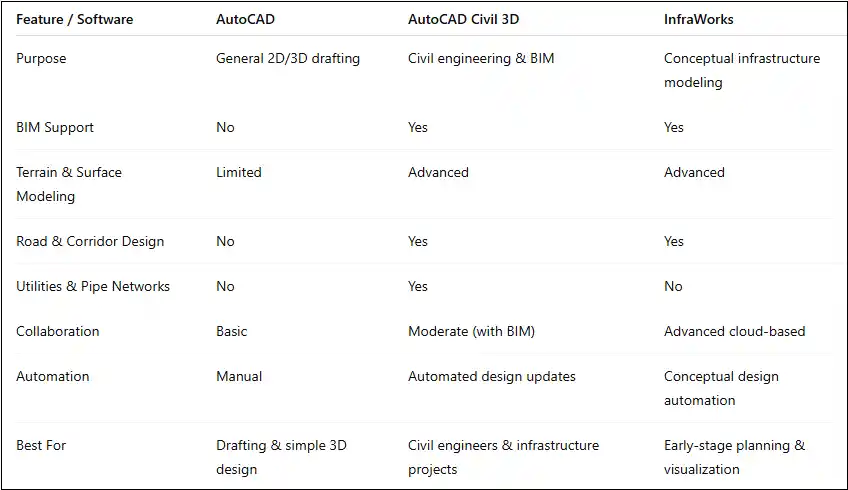
AutoCAD Civil 3D vs AutoCAD vs InfraWorks comparison table
AutoCAD Civil 3D Licensing Options
Autodesk offers flexible licensing models to suit individuals, firms, and educational institutions.
1. Subscription-Based Licensing
Civil 3D is available through:
-
Monthly subscription
-
Annual subscription
-
Multi-year subscription
Subscriptions include access to the latest updates, cloud services, technical support, and security enhancements.
2. Single-User License
Best suited for individual professionals or small teams, this license is assigned to a named user and can be accessed across devices.
3. Multi-User (Network) License
Designed for organizations with shared usage needs, allowing multiple users to access licenses from a central pool (availability may depend on Autodesk policies).
4. Educational License
Students, educators, and academic institutions receive free access to Civil 3D for learning and teaching purposes (non-commercial use only).
5. AutoCAD Civil 3D in Autodesk Collections
Civil 3D is included in Autodesk collections, offering excellent value for multidisciplinary teams that need access to multiple design and construction tools.
System Requirements for AutoCAD Civil 3D
To ensure smooth performance, Autodesk recommends the following specifications:
-
Operating System: 64-bit Windows
-
Processor: Multi-core CPU (Intel or AMD)
-
Memory: Minimum 16 GB RAM (32 GB recommended for large projects)
-
Graphics: Dedicated GPU with certified drivers
-
Storage: SSD for faster load times and data access
Meeting or exceeding recommended system requirements ensures optimal performance, faster processing, and stability when working with large models and datasets.