

Blog
How to Activate Microsoft Office 2019 Professional Plus | Step-by-Step Guide

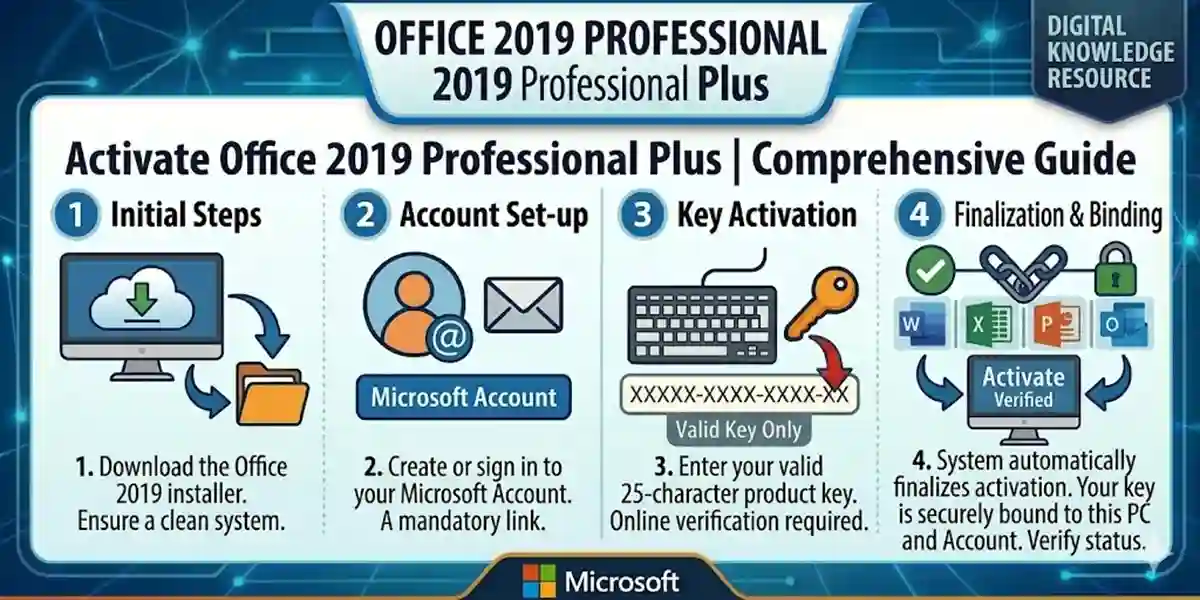
Introduction
Microsoft Office 2019 Professional Plus is a full-featured productivity suite designed for professionals, students, and organizations that need reliable tools for document creation, data management, presentations, and email communication. Unlike Microsoft 365, which requires a subscription, Office 2019 Professional Plus offers a one-time purchase with lifetime access, providing access to Word, Excel, PowerPoint, Outlook, Publisher, and Access.
Activating Office 2019 Professional Plus ensures that your installation is genuine, verified, and secure, allowing uninterrupted use across your PC. This guide provides a step-by-step activation process, highlights common issues and fixes, explains licensing requirements, and outlines all features and benefits. Verified keys can be purchased from esoftwarestore.
Key Features of Microsoft Office 2019 Professional Plus
- Lifetime Activation – A one-time purchase ensures permanent access without recurring fees.
- Full Productivity Suite – Word, Excel, PowerPoint, Outlook, Publisher, Access.
- Advanced Productivity Tools – Includes templates, charts, PivotTables, Power Query, and professional presentation tools.
- Secure & Verified Key – Official Microsoft key guarantees authenticity.
- Windows Compatibility – Optimized for Windows 10 and 11.
- Professional Use – Ideal for businesses, offices, academic institutions, and students.
- Offline & Online Functionality – Full offline use with optional cloud integration via OneDrive.
- Enhanced Collaboration – Easily share and edit documents across multiple devices.
- Easy Installation – Quick setup with verified 1PC or multi-PC keys.
- Reliable Updates – Security updates to keep your Office suite stable and safe.
Common Errors During Activation & How to Fix Them
Even verified keys may encounter activation issues. Below are the most common errors and solutions:
Error 0xC004F074 – Server Not Available
Cause: The PC cannot reach Microsoft activation servers.
Fix:
- Ensure internet connectivity.
- Check date and time settings.
- Disable firewall temporarily.
- Retry activation.
Error 0x80070005 – Permission Denied
Cause: Office does not have sufficient access rights.
Fix:
- Run Office as Administrator.
- Install the latest Windows updates.
- Retry activation.
Error 0xC004C003 – Product Key Already Used
Cause: The key has been used on another device.
Fix:
- Verify key using esoftwarestore Product Key Verification.
- Contact Microsoft Support if needed.
Error 0xC004F210 – Wrong Product Version Installed
Cause: Installed edition does not match the key.
Fix:
- Uninstall the incorrect Office version.
- Reinstall Office 2019 Professional Plus from esoftwarestore download.
Activation Required Pop-Ups
Cause: License not properly bound.
Fix:
- Sign in with the Microsoft account used for activation.
- Re-enter the product key via File → Account → Change License.
Methods to Activate Office 2019 Professional Plus
Method 1: Activate via Microsoft Account
- Visit Microsoft Setup.
- Sign in with your Microsoft account.
- Enter the 25-character Office 2019 Professional Plus key.
- Select your region and language.
- Download and install Office.
- Sign in to complete activation.
Method 2: Activate Through an Office App
- Open Word, Excel, or PowerPoint.
- Click File → Account → Activate Product.
- Enter your key when prompted.
- Sign in with your Microsoft account.
- Activation completes instantly.
Method 3: Offline / Telephone Activation (Advanced)
- Install Office 2019 normally.
- Select Telephone Activation when prompted.
- Call Microsoft’s activation center and provide the installation ID.
- Enter the confirmation ID provided to complete activation.
Licensing of Office 2019 Professional Plus
Office 2019 Professional Plus uses single-PC or multi-PC keys:
- 1PC License: Valid for one device, lifetime activation.
- 5PC License: Install on up to five devices.
- Secure & Verified Keys: Ensure authentic, legal software.
Conclusion
Activating Microsoft Office 2019 Professional Plus ensures that your suite of productivity apps is secure, verified, and fully functional. Whether you have a 1PC or 5PC license, following these activation steps guarantees lifetime access to Word, Excel, PowerPoint, Outlook, Publisher, and Access. Verified keys from trusted sources like esoftwarestore make activation easy and reliable.
Office 2019 Professional Plus remains a cost-effective, professional-grade productivity solution for businesses, teams, and students, providing all essential tools without recurring subscription fees.
Frequently Asked Questions (FAQs)
Q1: Can I use Office 2019 Professional Plus on multiple PCs?
A1: Only if you purchase a multi-PC license (5PC). The standard license is for one device.
Q2: Do I need an internet connection to activate?
A2: Yes, for account binding and online activation. Offline activation is possible via telephone.
Q3: Can I reinstall Office after formatting my PC?
A3: Yes, use the same key on the licensed PC(s).
Q4: What apps are included?
A4: Word, Excel, PowerPoint, Outlook, Publisher, Access.
Q5: How is Office 2019 different from Microsoft 365?
A5: Office 2019 is a one-time purchase; Microsoft 365 is subscription-based with cloud features.