

Blog
How to Activate Office 2019 Professional Plus | 1PC, Lifetime Key

Introduction
Microsoft Office 2019 Professional Plus is a powerful productivity suite designed for business professionals, students, and home users who need robust desktop applications. Unlike Microsoft 365, which uses a subscription model, Office 2019 Professional Plus offers a one-time purchase license with lifetime access.
This edition includes Word, Excel, PowerPoint, Outlook, Publisher, and Access, providing comprehensive tools for document creation, data management, and professional presentations. The 1PC license ensures the software is bound to a single device, offering secure activation, verified licensing, and uninterrupted usage.
In this guide, we cover everything you need to know about activating your Office 2019 Professional Plus key, troubleshooting common issues, understanding licensing, and maximizing your productivity.
Key Features of Office 2019 Professional Plus
Office 2019 Professional Plus is packed with features to enhance productivity:
- Lifetime Activation – One-time purchase ensures permanent access.
- Full Suite of Applications – Word, Excel, PowerPoint, Outlook, Publisher, Access.
- Advanced Productivity Tools – Includes templates, charts, data management, and presentation enhancements.
- Secure and Verified Key – Official Microsoft key guarantees authenticity.
- Windows Compatibility – Fully optimized for Windows 10 and Windows 11.
- Professional Use – Ideal for businesses, organizations, and academic purposes.
- Offline & Online Functionality – Apps work offline, with optional cloud integration via OneDrive.
- Enhanced Data Analysis – Advanced Excel formulas, PivotTables, and Power Query support.
- Presentation Tools – PowerPoint templates, animations, and multimedia features.
- Easy Installation – Quick setup with a 1PC license for secure activation.
Methods to Activate Office 2019 Professional Plus (1PC, Lifetime Key)
Activation ensures your Office installation is genuine and fully functional. Below are the most reliable methods:
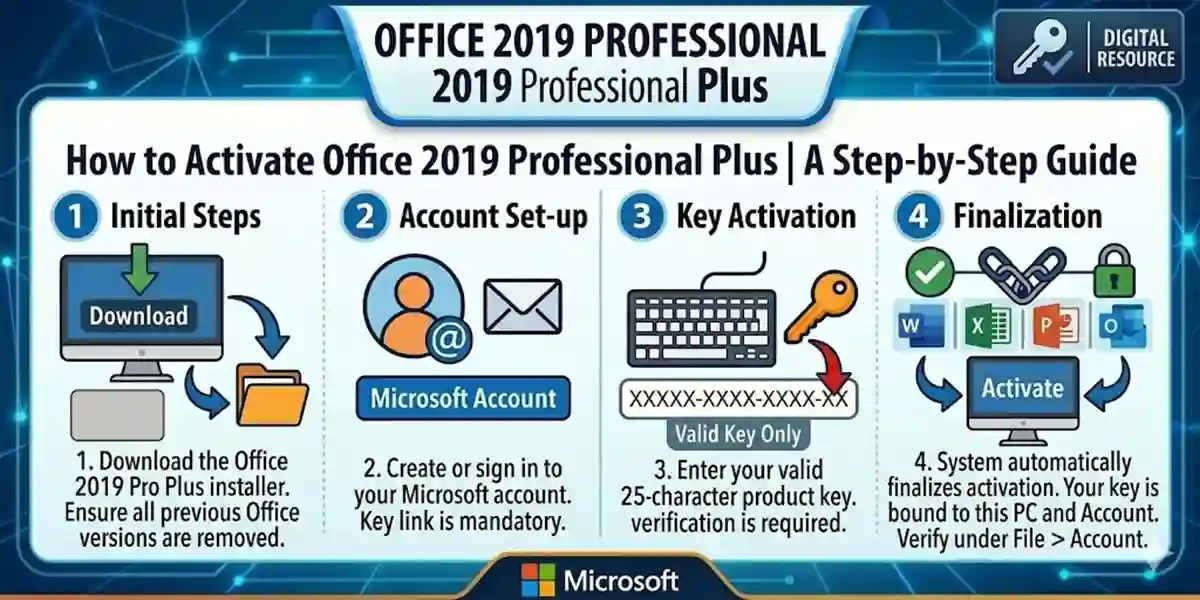
Method 1: Activate via Microsoft Account (Recommended)
- Go to Microsoft Setup.
- Sign in with your Microsoft account.
- Enter the 25-character Office 2019 Professional Plus key.
- Select your region and language.
- Download the Office installer.
- Install Office on your PC.
- Sign in with the same Microsoft account to complete activation.
Method 2: Activate Through an Office App
- Open any Office application (Word, Excel, PowerPoint).
- Go to File → Account → Activate Product.
- Enter your product key when prompted.
- Sign in with your Microsoft account.
- Activation completes immediately.
Method 3: Manual/Offline Activation (Advanced)
- Install Office normally.
- Select Telephone Activation if prompted.
- Call Microsoft’s activation center and provide your installation ID.
- Receive a confirmation ID and enter it to complete activation.
Common Activation Errors & How to Fix Them
Even official keys can encounter errors during activation. Here are common ones:
Error 0xC004F074 – Server Not Available
Cause: PC cannot reach Microsoft activation servers.
Fix:
- Check internet connectivity.
- Verify date and time settings.
- Disable firewall temporarily.
- Retry activation.
Error 0x80070005 – Permission Denied
Cause: Office lacks sufficient access.
Fix:
- Run Office as Administrator.
- Ensure Windows updates are installed.
- Retry activation.
Error 0xC004C003 – Key Already Used
Cause: Key is activated on another account.
Fix:
- Verify the key with esoftwarestore verification.
- Contact Microsoft Support if needed.
Error 0xC004F210 – Wrong Product Version
Cause: Installed edition does not match key.
Fix:
- Uninstall incorrect Office version.
- Reinstall Office 2019 Professional Plus from esoftwarestore download.
Error: Activation Required Pop-Up
Cause: License not bound correctly.
Fix:
- Sign in with the Microsoft account used for activation.
- Re-enter the key under File → Account → Change License.
Office 2019 Professional Plus Licensing
Office 2019 Professional Plus uses a 1PC license:
- Bound to One PC: Cannot be transferred to other devices.
- Lifetime Activation: No subscription fees required.
- Verified Key: Official Microsoft key ensures genuine installation.
Conclusion
Activating Office 2019 Professional Plus Key (1PC, Lifetime) is simple with Microsoft’s recommended methods. It provides lifetime access to Word, Excel, PowerPoint, Outlook, Publisher, and Access, supporting professional, academic, and home productivity. Using verified keys from trusted sources like esoftwarestore ensures secure activation and uninterrupted use.
Office 2019 Professional Plus is ideal for single-PC users seeking reliable, advanced productivity software without recurring subscription fees, delivering robust tools for document creation, data management, and presentations.
Frequently Asked Questions (FAQs)
Q1: Can I use the Office 2019 Professional Plus key on multiple PCs?
A1: No, the license is valid for one PC only.
Q2: Do I need an internet connection to activate Office 2019?
A2: Yes, for initial activation and account binding.
Q3: Can I reinstall Office after formatting my PC?
A3: Yes, you can reinstall using the same PC and key.
Q4: What apps are included in Office 2019 Professional Plus?
A4: Word, Excel, PowerPoint, Outlook, Publisher, and Access.
Q5: How is Office 2019 Professional Plus different from Microsoft 365?
A5: Office 2019 is a one-time purchase; Microsoft 365 is subscription-based with cloud features.