

Blog
How to Activate Office 2021 Home & Student (1PC BIND ACCOUNT)

Introduction
Microsoft Office 2021 Home & Student is a productivity suite designed for students, home learners, and casual users who need essential tools for academic and personal projects. With Word, Excel, and PowerPoint included, it provides a professional-grade environment for creating documents, managing data, and designing presentations. Unlike subscription-based Microsoft 365, this edition is a one-time purchase with lifetime access, making it perfect for users who want a secure, cost-effective solution.
Key Features of Office 2021 Home & Student
Microsoft Office 2021 Home & Student offers the following features:
- Lifetime Activation – Pay once and enjoy Office without recurring fees.
- Account-Bound License – Tied to a Microsoft account for secure reinstallation.
- Core Apps – Word, Excel, and PowerPoint included for all productivity needs.
- Windows & Mac Compatible – Works seamlessly across platforms.
- Offline and Online Access – Full functionality even without internet access after activation.
- Enhanced Collaboration Tools – Easily share documents through OneDrive.
- Professional Document Tools – Advanced templates, formatting, and editing features.
- Secure and Verified Activation – Official Microsoft key ensures genuine software use.
- User-Friendly Interface – Easy navigation for students and home users.
- Ideal for Academic and Home Use – Perfect for assignments, presentations, and personal projects.
Methods to Activate Office 2021 Home & Student (1PC BIND ACCOUNT)
Activation ensures your Office suite is genuine and fully functional. There are several methods to activate Office 2021 Home & Student:
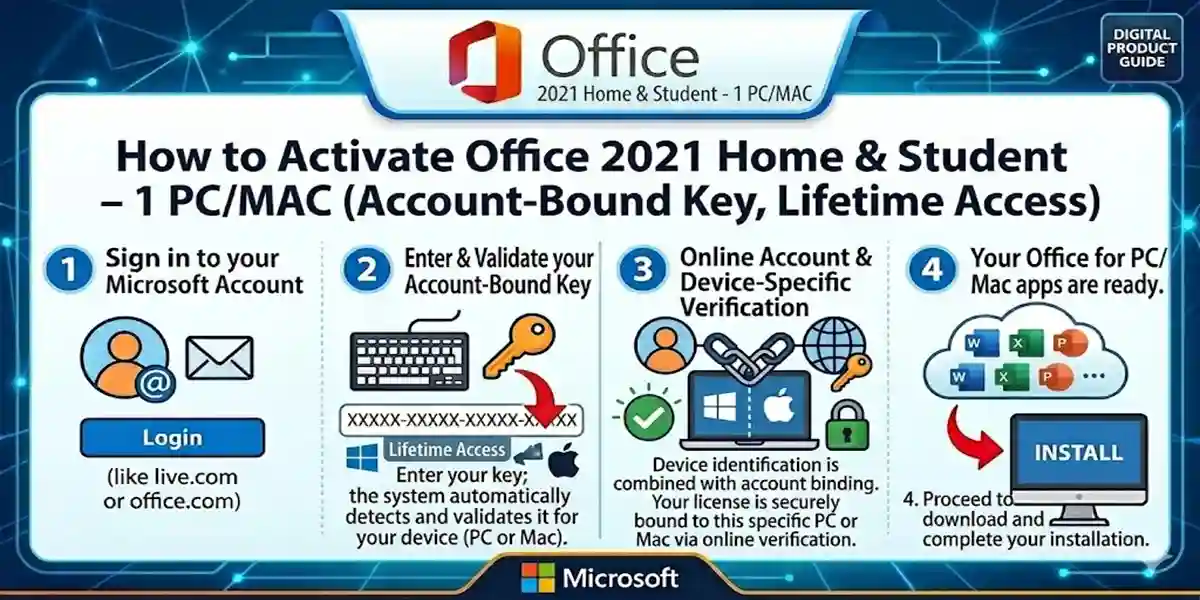
Method 1: Activate via Microsoft Account (Recommended)
- Go to office.
- Sign in with your Microsoft account.
- Enter your 25-character product key.
- Select your region and language.
- Download the Office installer.
- Install Office and sign in with the same Microsoft account.
- Activation completes automatically.
This method binds the license to your account for secure, lifetime activation.
Method 2: Activate Through an Office App
- Open Word, Excel, or PowerPoint.
- Click File → Account → Activate Product.
- Enter your product key when prompted.
- Sign in with your Microsoft account if required.
- Activation completes immediately.
This is useful if the installer does not prompt activation automatically.
Method 3: Manual/Offline Activation (Advanced)
- Install Office 2021 normally.
- When asked for activation, select Telephone Activation.
- Call the Microsoft activation center.
- Provide the installation ID displayed.
- Enter the confirmation ID from Microsoft to complete activation.
Note: Offline activation is rare but helpful for systems without internet connectivity.
Common Errors & Fixes
Even with official keys, you might encounter errors. Here are common problems and fixes:
Error 1: 0xC004F074 – Server Not Available
Cause: Your PC cannot reach Microsoft activation servers.
Fix:
- Check internet connectivity.
- Correct date and time settings.
- Temporarily disable firewall or antivirus.
- Retry activation.
Error 2: 0x80070005 – Permission Denied
Cause: Office does not have sufficient access.
Fix:
- Run Office as Administrator.
- Update your Windows system.
- Retry activation.
Error 3: 0xC004C003 – Product Key Already Used
Cause: Key was activated on another account.
Fix:
- Use a fresh key.
- Verify key with esoftwarestore verification.
- Contact Microsoft Support if necessary.
Error 4: 0xC004F210 – Wrong Product Version Installed
Cause: Installed edition does not match key.
Fix:
- Uninstall current version.
- Reinstall Office 2021 Home & Student from esoftwarestore download.
Error 5: “Activation Required” Pop-Up
Cause: License not bound properly.
Fix:
- Sign in with the Microsoft account used for activation.
- Re-enter the product key under File → Account → Change License.
Licensing & Account-Bound Activation
The account-bound license links your Office copy directly to your Microsoft account:
- Easy Reinstallation: Reinstall anytime on the same PC.
- License Management: Track your activation.
- Security: Reduces risk of key loss or piracy.
Unlike device-bound licenses, account-bound activation ensures seamless reinstallation after formatting or system changes. (microsoft.com)
Conclusion
Activating Office 2021 Home & Student (1PC BIND ACCOUNT) is straightforward and secure when following Microsoft’s recommended methods. With a single account-bound key, you gain lifetime access to Word, Excel, and PowerPoint. This edition is perfect for students and home users who want professional productivity tools without subscription fees. Using verified keys from trusted sources like esoftwarestore ensures safe, hassle-free activation and uninterrupted productivity.
Frequently Asked Questions (FAQs)
Q1: Can I use the key on multiple PCs?
A1: No, it is limited to one PC and one Microsoft account.
Q2: Do I need internet to activate?
A2: Yes, internet is required to bind the license to your Microsoft account.
Q3: Can I reinstall Office after formatting?
A3: Yes, sign in with the same Microsoft account for easy reinstallation.
Q4: What if my key shows an error?
A4: Refer to the errors & fixes section above or contact Microsoft Support.
Q5: How is Office 2021 Home & Student different from Microsoft 365?
A5: Office 2021 is a one-time purchase; Microsoft 365 is subscription-based with cloud features.