

Blog
How to Activate Microsoft Office 2024 Home & Student – Windows & Mac | Step by Step Guide

Introduction
Microsoft Office 2024 Home & Student is the newest version of Microsoft’s iconic productivity suite, designed to help students, professionals, and home users create, edit, and collaborate on documents, spreadsheets, and presentations. It includes Word, Excel, PowerPoint, and OneNote, all fully compatible with both Windows and macOS. Whether you’re working on school projects, business plans, or personal documents, Office 2024 provides reliable, fast, and modern tools to get the job done.
Activating your Microsoft Office 2024 Home & Student suite legally ensures ongoing updates, access to cloud features, and uninterrupted usage. In this comprehensive guide, we’ll walk you through features, legal activation steps, common errors and fixes, license types, and tips to keep your software running smoothly.
Key Features of Microsoft Office 2024 Home & Student
Microsoft Office 2024 Home & Student offers a powerful set of productivity tools tailored for everyday needs:
1. Enhanced Productivity Tools
Office 2024 includes:
- Microsoft Word – writing and editing documents
- Microsoft Excel– spreadsheets and analysis
- Microsoft PowerPoint – presentations
- Microsoft OneNote – digital note‑taking
2. Cross‑Platform Compatibility
Office 2024 works on both:
- Windows 11 and Windows 10
- macOS Ventura and later
3. Modern User Interface
The UI is updated with streamlined menus and better accessibility features to help users find tools quickly.
4. Cloud Integration
With Microsoft OneDrive, you can save files to the cloud and access them anywhere, on any device.
5. Updates and Security
Office 2024 Home & Student receives important security updates and feature enhancements to keep your documents safe and the software current.
6. Offline Ready
Even without internet access, you can create and edit files — then sync when online again.
Understanding Office 2024 Licenses
Before activation, it’s important to understand the types of licenses available:
Perpetual License
- A one‑time purchase.
- Office stays yours forever.
- No renewal fee.
- Ideal for students and home users.
Subscription License (Microsoft 365)
Sometimes sold as an upgrade:
- Recurring subscription (monthly/yearly).
- Includes cloud storage and ongoing updates.
- Can be shared across multiple devices.
Differences in a Nutshell
| License Type | One‑time Purchase | Cloud Features | Multiple Devices |
|---|---|---|---|
| Office 2024 Home & Student | ✔️ | Limited | 1–2 Devices |
| Microsoft 365 Subscription | ✔️ | ✔️ | Multiple Devices |
Legal Methods to Activate Microsoft Office 2024 Home & Student
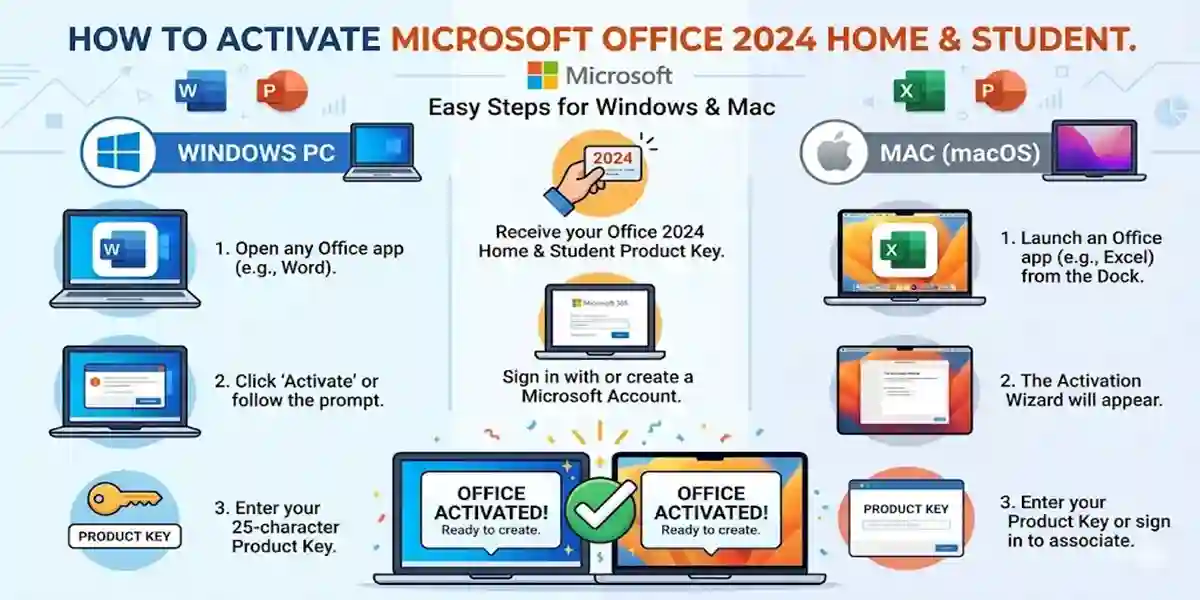
Method 1 – Activate During Installation
- Install Office 2024 from the Microsoft installer or from your purchase page.
- When prompted, sign in with your Microsoft Account (Outlook, Hotmail, etc.).
- Enter your 25‑character product key (if required).
- Click Activate.
- Wait for confirmation.
Method 2 – Activate After Installation
If you installed Office but haven’t activated:
On Windows
- Open Word or Excel.
- Go to File > Account.
- Click Change Product Key.
- Enter your key and select Activate.
On Mac
- Open any Office app.
- You’ll be prompted to sign in.
- Use the Microsoft Account tied to your license.
Common Activation Errors & Fixes
Here are the most common activation issues and how to solve them:
Error: “Invalid Product Key”
Cause:
- Typo
- Used key already
- Wrong version
Fix:
- Re‑enter the key carefully.
- Ensure you’re using the correct Office edition key.
- Contact support if the key was purchased from a trusted seller.
Error: “Activation Failed – Sign In Required”
Cause:
Mismatch between Microsoft Account and license.
Fix:
- Sign out and sign back in with the account you used to buy Office.
- Use the account email shown in your purchase confirmation.
Error: “Office Cannot Connect to Your Account”
Cause:
- Internet issues
- Firewall blocking access
Fix:
- Check your connection.
- Allow Office through your firewall.
- Try activating later.
Error: “Subscription Required” (If It Asks for Microsoft 365)
Cause:
Using a license tied to Microsoft 365 instead of Office 2024.
Fix:
- Make sure you purchased the correct Home & Student license.
- Cancel the subscription prompt if not needed.
Tips to Avoid Activation Problems
Always buy Office from an authorized seller like esoftwarestore.
Keep your Microsoft Account login secure.
Do not share your product key publicly.
Update Office regularly for security and stability.
Conclusion
Activating Microsoft Office 2024 Home & Student legally ensures you get full access to essential productivity tools like Word, Excel, PowerPoint, and OneNote on both Windows and Mac. With a one‑time purchase license, ongoing updates, and cloud features, Office 2024 is perfect for students, families, and home users. By following the official activation steps and understanding common issues, you’ll be up and running quickly and securely.