

Blog
What Is Autodesk InfoDrainage? Complete Drainage Design & Analysis Guide

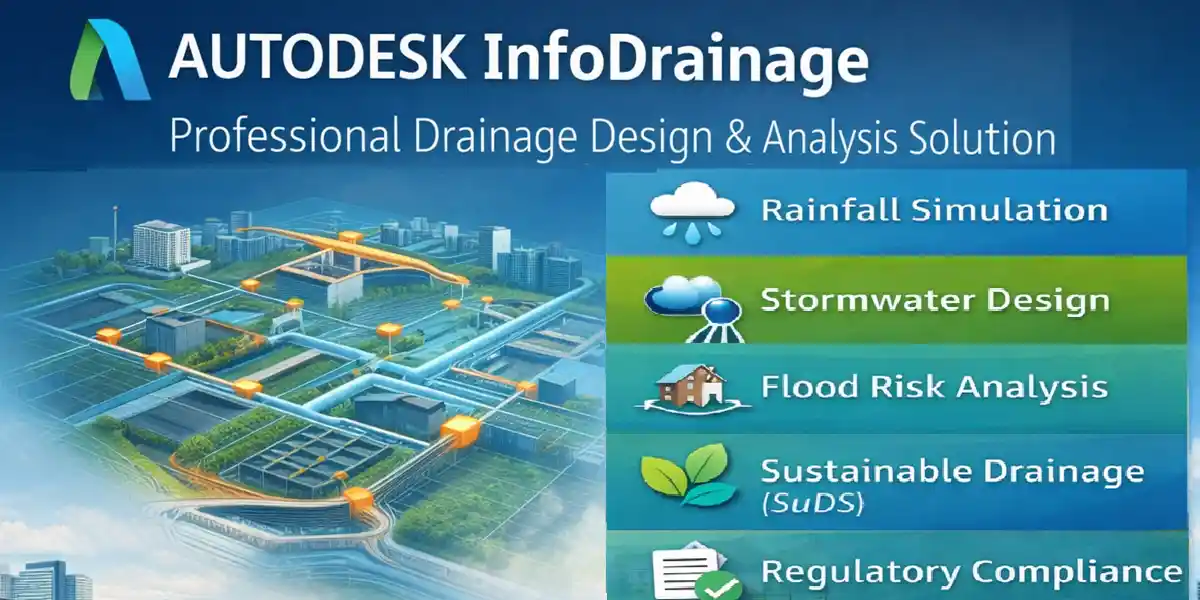
Introduction to Autodesk InfoDrainage
Autodesk InfoDrainage is an advanced, cloud-enabled drainage design and analysis software developed to help civil engineers, infrastructure designers, and consultants plan, design, and validate drainage systems with accuracy and confidence. It is widely used for surface water management, stormwater drainage, flood risk mitigation, and sustainable urban drainage system (SuDS) design.
With increasing regulatory pressure, climate-change impacts, and urbanization challenges, modern drainage design requires more than traditional calculations. Autodesk InfoDrainage bridges this gap by combining hydraulic analysis, rainfall simulation, and BIM-ready workflows into a single, intuitive platform.
InfoDrainage supports compliance with global standards and integrates seamlessly with Autodesk Civil 3D and Autodesk Construction Cloud, making it a preferred choice for professionals involved in land development, transportation, utilities, and environmental engineering projects.
What is Autodesk Infodrainge?
Autodesk InfoDrainage is a specialized civil engineering solution designed to help engineers, consultants, and planners design, analyze, and validate drainage systems with confidence and regulatory accuracy. It focuses on stormwater and surface water management, an increasingly critical aspect of modern infrastructure due to urbanization and climate-driven extreme weather events.
Design Stormwater and Surface Water Drainage Systems
InfoDrainage enables engineers to design complete drainage networks, including pipes, channels, manholes, ponds, and attenuation structures. The software provides an intuitive, graphical environment where systems can be laid out efficiently while maintaining hydraulic accuracy. This helps ensure that drainage designs are both functional and constructible from the earliest stages of a project.
Model Rainfall and Runoff Behavior
Using industry-standard hydrological methods, InfoDrainage simulates how rainfall converts into runoff across different surfaces and catchments. Engineers can define soil types, land use, and rainfall profiles to accurately model real-world behavior, providing a reliable foundation for drainage decisions.
Analyze Flood Risks and System Capacity
InfoDrainage allows users to test drainage systems against a wide range of rainfall events, including design storms and extreme weather scenarios. This helps identify flood risks, bottlenecks, and capacity issues early—before construction—reducing costly redesigns and safety concerns.
Ensure Compliance with Regulations
The software supports compliance with local and international drainage standards, enabling engineers to generate reports and calculations required for planning approvals and regulatory submissions with minimal manual effort.
Optimize Sustainable Drainage Strategies
InfoDrainage supports sustainable drainage systems (SuDS), allowing engineers to evaluate infiltration, attenuation, and storage solutions that reduce environmental impact and improve long-term resilience.
Overall, Autodesk InfoDrainage provides a data-driven, regulation-ready approach to drainage design, suitable for projects ranging from small residential developments to complex urban infrastructure.
Autodesk InfoDrainage is widely adopted across industries where effective stormwater management, flood resilience, and regulatory compliance are essential. Its flexibility and technical depth make it suitable for both public- and private-sector projects.
Key Industries Using Autodesk InfoDrainage
Civil and Infrastructure Engineering
Civil and infrastructure engineers use InfoDrainage to design and validate surface water and stormwater systems for roads, utilities, residential developments, and large infrastructure projects. The software helps engineers model complex drainage networks, assess system performance under different rainfall events, and reduce flood risk while meeting design standards.
Urban Planning and Land Development
Urban planners and land developers rely on InfoDrainage during early planning stages to assess site feasibility and drainage constraints. By simulating runoff and storage requirements, planners can make informed decisions about land use, zoning, and sustainable development strategies—supporting smarter, climate-resilient urban growth.
Transportation and Highway Design
In transportation projects, InfoDrainage is used to design drainage systems for highways, rail corridors, airports, and bridges. Engineers can evaluate how surface water behaves across large paved areas, ensuring safe runoff management, protecting road assets, and minimizing disruption caused by water accumulation.
Environmental and Water Engineering
Environmental and water engineers use InfoDrainage to design sustainable drainage systems (SuDS) that reduce environmental impact. The software supports infiltration, detention, and attenuation strategies, helping projects meet environmental protection goals while managing water quality and quantity.
Construction and Engineering Consultancies
Consultancies benefit from InfoDrainage’s ability to standardize workflows, produce compliant reports, and reduce rework. Faster modeling and clear documentation improve project delivery and client confidence.
Government and Regulatory Agencies
Public authorities use InfoDrainage to review drainage proposals, assess flood risks, and ensure compliance with planning and environmental regulations—supporting safer and more sustainable communities.
Core Features of Autodesk InfoDrainage
1.Advanced Stormwater Drainage Design
Autodesk InfoDrainage provides a comprehensive environment for designing complete, end-to-end stormwater drainage networks, enabling engineers to model both simple and highly complex systems with confidence and precision. InfoDrainage allows engineers to design interconnected pipe networks, open channels, and culverts that safely convey stormwater across a site. Users can select appropriate diameters, shapes, materials, and gradients, ensuring optimal flow capacity while minimizing the risk of surcharge or blockage under peak rainfall conditions. The software supports detailed modeling of manholes and junctions, allowing engineers to define invert levels, connections, and inspection access points. This ensures smooth flow transitions, reduces energy losses, and supports long-term system maintenance and constructability.InfoDrainage enables accurate definition of outfalls and discharge locations, including connections to watercourses, sewers, or soakaways. Engineers can assess downstream impacts, confirm safe discharge rates, and ensure compliance with environmental and regulatory requirements.The software supports the design of attenuation ponds, underground tanks, and other storage structures used to control runoff and reduce flood risk. Engineers can size and position these elements to manage peak flows effectively while supporting sustainable drainage strategies.
2. Rainfall Simulation and Hydraulic Analysis
One of Autodesk InfoDrainage’s strongest capabilities is its ability to accurately simulate rainfall events using realistic hydrological and meteorological data. Engineers can model design storms based on regional rainfall standards and test systems using critical storm duration analysis to identify worst-case conditions. By applying return period modeling—such as 1-in-10, 1-in-30, or 1-in-100-year storms—designers can evaluate how drainage systems perform under both typical and extreme weather scenarios. Time-of-concentration calculations ensure runoff timing is modeled precisely, enabling highly accurate predictions of water movement through the network.
3. Flood Risk and Exceedance Flow Analysis
InfoDrainage enables proactive flood risk assessment by identifying system limitations before construction. Engineers can analyze flood depth and volume, detect surcharge points, and model exceedance flow routing when system capacity is exceeded. Color-coded visual outputs make risks easy to interpret, helping teams redesign vulnerable areas and improve overall site resilience.
4. Sustainable Urban Drainage Systems (SuDS)
The software fully supports SuDS and Low-Impact Development (LID) strategies. Designers can model permeable pavements, green roofs, swales, filter drains, detention and retention basins, soakaways, and infiltration systems. InfoDrainage calculates infiltration rates, storage volumes, and runoff reduction, enabling environmentally responsible designs that meet sustainability goals
5. Regulatory Compliance and Standards Support
InfoDrainage simplifies approvals by supporting UK, European, and local drainage standards, including customizable compliance criteria. Engineers can configure rule checks and generate authority-ready reports, reducing review cycles and approval risk.
6. Dynamic Simulation Engine
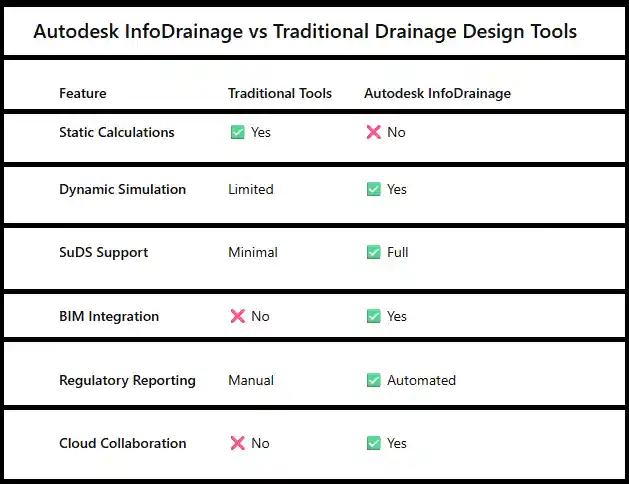
Unlike static methods, InfoDrainage uses a dynamic hydraulic engine that models system behavior over time. This delivers realistic flow routing, accurate surcharge prediction, and deeper insight into long-term performance and resilience.
7. Integration with Autodesk Civil 3D
Seamless integration with Autodesk Civil 3D allows bi-directional exchange of pipe networks, terrain data, and surfaces. This enables BIM-based drainage workflows, minimizes rework, and improves coordination across civil teams.
8. BIM and Digital Construction Compatibility
InfoDrainage supports BIM-ready collaboration via Autodesk Construction Cloud. Centralized data access, version control, and change tracking enhance multidisciplinary coordination and project transparency.
9. Visualization and Reporting Tools
Powerful visualization tools—plan views, profiles, hydrographs, flow and depth plots, and color-coded indicators—make performance easy to understand. Professional reports for clients and regulators can be generated quickly and consistently.
10. Cloud-Based Access and Collaboration
As a cloud-enabled solution, InfoDrainage allows teams to work from anywhere, collaborate securely across locations, and reduce reliance on local hardware—supporting modern, flexible engineering workflows.
Uses of Autodesk InfoDrainage
Autodesk InfoDrainage is a comprehensive stormwater and drainage analysis solution used throughout the entire project lifecycle, from early concept planning to long-term asset management. Its flexibility and analytical depth make it suitable for both new developments and existing infrastructure upgrades.
1. Conceptual Design
During the early stages of a project, Autodesk InfoDrainage supports feasibility studies and initial drainage planning. Engineers can quickly test multiple layout options to understand how rainfall and runoff will behave across a site. The software enables early drainage strategy development, helping teams determine whether infiltration, attenuation, or discharge-based solutions are most suitable. Preliminary flood risk assessments can be carried out using real rainfall data, allowing stakeholders to identify potential risks before detailed design begins. This early insight helps reduce costly design changes later in the project.
2. Detailed Engineering Design
In the detailed design phase, InfoDrainage is used for final drainage network sizing and hydraulic analysis. Engineers can accurately size pipes, channels, storage structures, and control devices to meet peak flow and volume requirements. The software performs advanced hydraulic optimization, ensuring systems operate efficiently under both normal and extreme storm conditions. Built-in standards and customizable regulations help teams achieve compliance validation with local, national, and international drainage codes.
3. Planning and Regulatory Submissions
Autodesk InfoDrainage plays a critical role in planning approvals and regulatory documentation. Engineers can generate professional drainage strategy reports, detailed calculations, and graphical outputs required by authorities. The software supports the creation of flood risk assessment documents that clearly demonstrate system performance. High-quality drawings and reports streamline the regulatory approval process, reducing delays and improving communication with governing bodies.
4. Construction and Implementation Support
During construction, InfoDrainage provides construction-ready drainage layouts that align with BIM workflows. Integration with tools like AutoCAD Civil 3D and Revit helps reduce clashes and coordination errors. Engineers can validate designs during execution, ensuring the installed system matches the approved design. This minimizes rework, cost overruns, and on-site issues.
5. Asset Management and Future Planning
Beyond construction, InfoDrainage is valuable for asset performance evaluation and long-term planning. Existing drainage systems can be reviewed to assess capacity and efficiency. Engineers can conduct scenario testing for future climate conditions, including increased rainfall intensity. The software also supports capacity upgrades and retrofitting, helping organizations adapt infrastructure to evolving environmental and regulatory demands.
Benefits of Using Autodesk InfoDrainage
Autodesk InfoDrainage delivers significant advantages for civil engineers, planners, and infrastructure professionals by combining advanced hydrological analysis with modern design workflows. Its benefits extend across technical accuracy, efficiency, compliance, and long-term sustainability.
1. Improved Design Accuracy
Autodesk InfoDrainage uses dynamic hydraulic modeling and real-world rainfall simulation to produce highly accurate drainage designs. Engineers can analyze how systems respond to different storm events, durations, and intensities rather than relying on static calculations. This results in drainage networks that perform reliably under both normal conditions and extreme weather scenarios. The ability to model runoff, storage, and flow paths in detail greatly reduces the risk of under- or over-designed systems.
2. Time and Cost Efficiency
The software significantly reduces design time through automation, reusable templates, and intelligent calculations. Engineers can quickly modify layouts and instantly see the impact on system performance. Seamless integration with tools like AutoCAD Civil 3D eliminates repetitive data entry and minimizes errors. By shortening design cycles and reducing rework, InfoDrainage helps lower overall project costs.
3. Enhanced Regulatory Approval Success
Autodesk InfoDrainage includes built-in compliance checks aligned with regional and international drainage standards. It generates clear, professional reports and calculations that regulators can easily review. This transparency increases confidence among approval authorities and reduces the likelihood of revisions, resubmissions, or delays during the approval process.
4. Sustainability and Environmental Protection
InfoDrainage strongly supports Sustainable Drainage Systems (SuDS) such as infiltration basins, green roofs, and attenuation ponds. These features help control runoff at source, improve water quality, and reduce pressure on traditional drainage infrastructure. By encouraging sustainable design, the software contributes to water conservation, pollution reduction, and climate resilience.
5. Better Risk Management
Advanced flood risk analysis and exceedance modeling allow engineers to identify vulnerable areas before construction begins. InfoDrainage helps visualize where water will flow when system capacity is exceeded, enabling proactive risk mitigation. This reduces the likelihood of flooding, property damage, and future liability.
6. Seamless Collaboration
With cloud-based access and BIM integration, Autodesk InfoDrainage improves collaboration across multidisciplinary teams. Designers, engineers, planners, and stakeholders can share data, review designs, and coordinate changes efficiently. Improved communication leads to fewer conflicts and smoother project delivery.
7. Scalability for Any Project Size
Autodesk InfoDrainage is highly scalable, making it suitable for small residential developments as well as large, multi-phase infrastructure and urban projects. Its flexible modeling capabilities allow teams to manage increasing complexity without sacrificing performance or accuracy.
Autodesk InfoDrainage Software: Full Features, Uses & Benefits Guide
Autodesk InfoDrainage Licensing: Overview
Autodesk InfoDrainage is provided through a subscription-based licensing model, tied to your Autodesk account. Unlike older perpetual licenses, which allowed indefinite usage on a single machine, subscription licenses offer secure, user-specific access. This ensures that each license is assigned to a named user, giving organizations control over who uses the software while enabling cloud-based features, regular updates, and integration with other Autodesk tools like Civil 3D.
License Types
Autodesk InfoDrainage offers multiple subscription options to suit different project needs and organizational strategies:
1.Annual Subscription
-
-
Billed once per year, this is ideal for organizations or projects requiring consistent, long-term use.
-
Includes full access to all features, updates, and Autodesk cloud services.
-
Cost-effective for teams committed to extended drainage projects or multi-phase civil works.
2.Monthly Subscription
-
Provides flexible access on a short-term basis, perfect for contractors or consultants handling temporary projects.
-
Allows teams to scale up or down based on active project demands.
-
Ideal for trial deployments or seasonal workloads without long-term commitments.
3.Multi-Year Subscription
-
Locks in pricing over multiple years, giving budget predictability for large organizations or long-term infrastructure plans.
-
Ensures uninterrupted access to updates, standards compliance, and enterprise deployment.
-
-
-
Key benefits of all subscription types:
-
Continuous updates to drainage standards
-
Cloud-enabled features
-
Seamless Civil 3D integration
-
Access to Autodesk support and learning resources
User-Based Licensing
Autodesk InfoDrainage follows a named-user licensing model, meaning each license is tied to a specific Autodesk account:
-
Users must sign in with their Autodesk credentials to activate the software.
-
If multiple users need access, multiple subscriptions are required.
-
Administrators can assign and manage licenses centrally via the Autodesk Business or Enterprise Account portal.
This approach increases security and ensures proper accountability across teams.
License Management
Managing Autodesk InfoDrainage subscriptions is straightforward:
-
Sign in to your Autodesk Account.
-
Navigate to User Management.
-
From here, administrators can:
-
Assign or revoke licenses
-
Monitor active subscriptions
-
Group licenses for departments or project teams
-
Internal Resource: For step-by-step guidance, see our esoftwarestore Autodesk InfoDrainage Guide — covering setup, SuDS workflows, and BIM integration.
Trial Licenses
Autodesk InfoDrainage also offers a free trial, typically for 30 days:
-
Provides full access to all features without restrictions.
-
Allows teams to evaluate functionality, integrations, and workflows before purchasing.
-
Trial must be converted to a paid subscription before expiry to retain project data and avoid workflow interruption.
Frequently Asked Questions (FAQ)
1. What is Autodesk InfoDrainage used for?
Autodesk InfoDrainage is used for designing, analyzing, and validating stormwater and surface water drainage systems.
2. Who should use Autodesk InfoDrainage?
Civil engineers, drainage engineers, environmental consultants, urban planners, and infrastructure designers.
3. Is Autodesk InfoDrainage suitable for SuDS design?
Yes. InfoDrainage fully supports sustainable urban drainage systems and infiltration-based solutions.
4. Can InfoDrainage integrate with Civil 3D?
Yes. It integrates seamlessly with Autodesk Civil 3D for BIM-based drainage workflows.
5. Does InfoDrainage support flood risk assessment?
Yes. It includes flood modeling, exceedance flow analysis, and surcharge identification.
6. Is Autodesk InfoDrainage cloud-based?
Yes. It supports cloud collaboration through Autodesk Construction Cloud.
7. Can InfoDrainage handle large infrastructure projects?
Yes. It is scalable and suitable for large, complex drainage networks.
8. Does InfoDrainage support regulatory compliance?
Yes. It supports multiple international and regional drainage standards.
9. Is Autodesk InfoDrainage beginner-friendly?
While professional-grade, its intuitive interface and templates make it accessible to new users with engineering knowledge.
10. What are the main advantages of InfoDrainage over manual calculations?
Higher accuracy, dynamic simulation, better risk assessment, faster approvals, and improved collaboration.
Conclusion
Autodesk InfoDrainage is a powerful, modern drainage design and analysis solution that addresses the growing complexity of stormwater management and sustainable infrastructure development. By combining advanced hydraulic simulation, regulatory compliance tools, SuDS support, and BIM integration, InfoDrainage enables engineers to design safer, more efficient, and environmentally responsible drainage systems.
Its ability to simulate real-world rainfall events, assess flood risks, and support sustainable drainage strategies makes it an essential tool for today’s civil engineering and infrastructure projects. Whether used for small developments or large urban systems, Autodesk InfoDrainage improves accuracy, reduces risk, and enhances project outcomes.
For organizations seeking reliable drainage design software that aligns with modern BIM and sustainability standards, Autodesk InfoDrainage stands out as a future-ready solution.