

Blog
Autodesk Flame – Ultimate High-End VFX & Finishing Software for Film and Broadcast

Autodesk Flame – Ultimate High-End VFX & Finishing Software for Film and Broadcast
Introduction: Why Autodesk Flame Is the Gold Standard of High-End VFX
Autodesk Flame is widely recognized as one of the most powerful, prestigious, and production-proven visual effects (VFX) and finishing software solutions in the world. Designed specifically for high-end film, television, advertising, and broadcast production, Flame has earned its reputation as a Hollywood-grade post-production tool trusted by leading studios, creative agencies, and elite finishing artists.
Reminder: Unlike general-purpose editing or compositing tools, Autodesk Flame is purpose-built for real-time visual effects, advanced compositing, cinematic color grading, and professional finishing workflows. It enables artists to work at exceptional speed while maintaining absolute visual precision, even on 4K, 8K, HDR, and color-critical projects.
Whether you are working on feature films, episodic TV, OTT streaming content, commercials, or broadcast graphics, Autodesk Flame delivers the creative control, performance stability, and reliability demanded by the most demanding post-production environments.
What Is Autodesk Flame?
Autodesk Flame is a high-end visual effects, compositing, color grading, and finishing software used in professional post-production pipelines around the world. It uniquely combines real-time node-based compositing, timeline-based editing, advanced color management, and GPU-accelerated performance into a single, unified application.
Unlike entry-level or mid-range tools, Flame is designed for senior VFX artists, finishing editors, creative directors, and VFX supervisors who require complete control over every pixel, frame, layer, and color value. Its architecture supports high-resolution workflows, client-attended sessions, and fast-turnaround commercial production.
Key Features of Autodesk Flame
1. Real-Time Node-Based Compositing
Autodesk Flame offers a powerful node-based compositing environment that allows artists to build complex VFX pipelines with precision and flexibility. Each node represents a visual operation, enabling clean, modular, and scalable compositing workflows.
The real-time feedback system allows artists to see results instantly, dramatically reducing iteration time and minimizing guesswork. This is especially critical for commercials, trailers, and broadcast projects where deadlines are tight and creative decisions must be made quickly.
2. Integrated Timeline & Batch Workflow
One of Flame’s most distinctive advantages is its seamless integration of timeline editing and node-based compositing. Artists can move effortlessly between editorial timelines and complex compositing batches without exporting, re-importing, or round-tripping between different applications.
This unified workflow significantly reduces errors, saves time, and improves creative continuity, making Flame ideal for high-pressure production environments where efficiency and accuracy are critical.
3. Industry-Leading Color Grading Tools
Autodesk Flame includes a comprehensive suite of professional color grading and color management tools designed for cinematic production standards. These tools support:
-
High-precision color correction for accurate tonal control
-
HDR workflows for modern display formats
-
ACES color management for color consistency across pipelines
-
LUT support for creative and technical color transforms
-
Shot-to-shot color matching for visual continuity
Together, these capabilities ensure cinematic consistency and broadcast compliance, even across large, complex productions.
4. Advanced 3D Compositing & VFX
Flame supports advanced 3D compositing and visual effects workflows, including deep compositing, 3D text creation, camera tracking, rotoscoping, keying, and particle effects. These tools allow artists to create cinema-quality visuals directly inside the finishing environment, without relying on multiple external applications.
This makes Flame a powerful choice for high-end commercials, title sequences, and feature film finishing.
5. GPU-Accelerated Performance
Autodesk Flame is heavily optimized for high-performance GPU acceleration, enabling smooth, real-time playback and interaction even when working with:
-
4K and 8K footage
-
EXR-based pipelines
-
Complex multilayer composites
This performance advantage allows artists to focus on creativity rather than technical limitations, making Flame ideal for fast-paced broadcast and commercial production.
6. Superior Keying & Rotoscoping
Flame’s keying and rotoscoping tools are widely regarded as some of the best in the industry. They deliver clean edges, accurate mattes, and fine control, even with challenging green-screen footage, motion blur, or uneven lighting.
This level of precision is essential for professional VFX compositing and high-end finishing.
7. Professional Finishing Tools
Autodesk Flame excels in final-stage finishing tasks, including:
-
Broadcast-safe color compliance
-
Final visual polish and cleanup
-
High-end titles and motion graphics
-
Client-attended review sessions
These capabilities make Flame a preferred solution for commercial finishing suites and broadcast post-production houses.
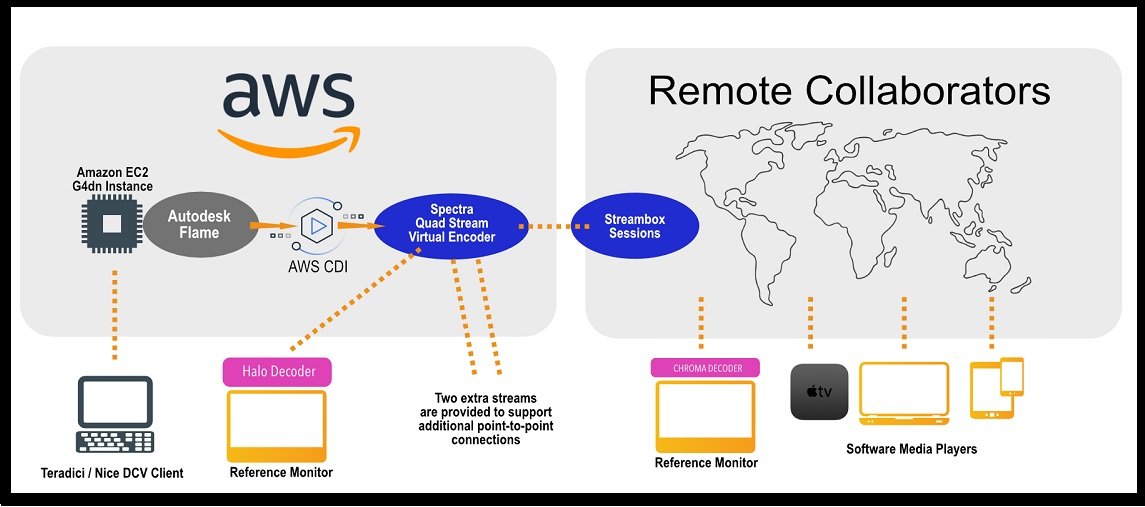
8. Collaborative Studio Pipelines
Flame integrates seamlessly into professional studio pipelines, supporting shared storage environments, version control systems, and collaborative workflows. Multiple artists and departments can work together efficiently while maintaining consistency and control.
Autodesk Flame high-end VFX and finishing software for cinematic film and broadcast production
Benefits of Using Autodesk Flame
Unmatched Creative Control
Autodesk Flame delivers exceptional creative precision that few post-production tools can match. Artists have granular control over compositing, motion graphics, visual effects, color grading, and final finishing, all within a single environment. Every pixel, layer, mask, and color value can be manipulated with absolute accuracy, making Flame the preferred choice for high-stakes, high-visibility projects such as global advertising campaigns, cinematic trailers, and broadcast branding. This level of control empowers artists to push creative boundaries while maintaining technical perfection.
Speed Without Compromise
Flame is engineered for real-time performance, enabling artists to work faster without cutting corners. With powerful GPU acceleration, real-time playback, and interactive tools, teams can iterate instantly, review changes live with clients, and make creative decisions on the spot. This speed is critical in environments with tight deadlines, such as commercial production, broadcast graphics, and promotional content, where quality cannot be sacrificed for turnaround time. Flame proves that speed and excellence can coexist.
Industry Credibility & Career Value
Autodesk Flame is synonymous with top-tier professional post-production. Mastery of Flame is a recognized mark of expertise across the global VFX and finishing industry. Artists skilled in Flame are highly sought after by Hollywood studios, premium VFX houses, broadcast networks, and elite post-production facilities. Using Flame not only enhances project quality but also elevates professional credibility, making it a powerful asset for studios and individual artists alike.
All-in-One Professional Solution
Unlike workflows that rely on multiple disconnected applications, Autodesk Flame offers a fully integrated, all-in-one platform. Editing, compositing, advanced VFX, color grading, finishing, and delivery are unified in a single ecosystem. This consolidation reduces pipeline complexity, minimizes data transfer issues, and eliminates compatibility bottlenecks. The result is a more efficient, reliable, and streamlined workflow, especially valuable for high-end productions where precision and consistency are non-negotiable.
Future-Ready Technology
Autodesk Flame is built to evolve with the industry. Continuous updates from Autodesk ensure support for modern and emerging production standards, including HDR workflows, UHD and higher resolutions, ACES color management, advanced color pipelines, and cloud-assisted collaboration. This future-ready architecture protects long-term investments and ensures that studios remain competitive as technology and audience expectations continue to advance.
Final Takeaway
Autodesk Flame is more than a VFX tool—it is a complete high-end finishing ecosystem designed for professionals who demand creative freedom, speed, reliability, and long-term relevance. For studios and artists working at the highest level of visual storytelling, Flame remains a trusted and future-proof choice.
Who Uses Autodesk Flame?
Autodesk Flame is trusted by the world’s most demanding post-production environments, where speed, precision, and creative excellence are critical. Its adoption spans multiple industries that rely on premium visual quality and real-time finishing.
Feature Film Studios
Major feature film studios use Autodesk Flame for high-end visual effects, advanced compositing, and final finishing on cinematic productions. Flame is often deployed in the finishing stages of films, where absolute color accuracy, clean compositing, and seamless integration with VFX pipelines are essential. It supports complex workflows involving HDR, ACES color management, and ultra-high-resolution formats, making it ideal for theatrical releases and premium cinema content.
Television Networks
Leading television networks rely on Flame for broadcast graphics, show packaging, promos, and episodic finishing. Its real-time tools enable rapid turnarounds while maintaining broadcast-safe standards. Flame’s reliability and consistency are crucial for live TV, episodic content, and high-volume broadcast schedules, where deadlines are non-negotiable and quality must remain consistent across episodes and seasons.
OTT & Streaming Platforms
With the rise of OTT and streaming services, Autodesk Flame has become a key tool for delivering platform-ready content that meets strict technical and creative requirements. Studios use Flame to finish trailers, original series, branded content, and promotional assets in HDR, UHD, and multiple delivery formats. Its flexibility allows teams to adapt content quickly for different platforms while maintaining premium visual standards.
Advertising & Creative Agencies
Top advertising agencies use Autodesk Flame to produce high-impact commercials, brand films, and digital campaigns. Flame’s real-time client review capabilities allow agencies to collaborate directly with brands, make instant creative adjustments, and finalize visuals during supervised sessions. This makes Flame ideal for high-budget commercials where creative precision, speed, and client confidence are essential.
Broadcast Design Studios
Broadcast design studios depend on Flame for motion graphics, channel branding, show openers, and on-air packages. Flame’s powerful compositing and animation tools allow designers to create visually striking graphics that integrate seamlessly with live broadcast systems. Its performance and stability make it a trusted choice for 24/7 broadcast environments.
High-End Post-Production Houses
Elite post-production houses use Autodesk Flame as a core finishing and VFX platform. It enables them to handle everything from complex compositing and beauty work to color grading and final delivery within a single system. Flame’s reputation and reliability make it a preferred tool for facilities servicing film studios, broadcasters, and global brands.
Summary: Why Professionals Choose Autodesk Flame
Autodesk Flame is used wherever creative stakes are high and deadlines are tight. From Hollywood films to global advertising campaigns, it delivers the speed, precision, and professional credibility required by top-tier production environments.
Autodesk Flame Licensing & Costs
License Type: Subscription-Based Professional Licensing
Autodesk Flame is offered exclusively through a subscription licensing model, reflecting its position as a premium, continuously evolving professional VFX and finishing solution. This subscription-based approach ensures that studios and artists always have access to the latest features, performance improvements, security patches, and official Autodesk support.
Unlike perpetual licenses that may become outdated over time, the Flame subscription guarantees:
-
Continuous access to new tools and workflow enhancements
-
Ongoing compatibility with modern production standards
-
Reliable security updates and bug fixes
-
Direct access to Autodesk’s professional technical support
This model is particularly beneficial for high-end post-production environments, where staying current with industry standards is critical for competitiveness and compliance.
Pricing Overview
Autodesk Flame pricing varies depending on region, currency, reseller agreements, and subscription duration, but it is consistently positioned as a premium professional solution for high-end studios.
Common Subscription Options Include:
Monthly subscription
Designed for short-term projects or temporary production needs, the monthly plan offers flexibility but comes at a higher per-month cost.
Annual subscription
The most popular option for studios and professionals. It offers a significant cost advantage over monthly billing and is ideal for ongoing production pipelines.
Multi-year subscription plans
Available for studios, enterprises, and post-production houses, multi-year agreements provide long-term cost predictability, simplified license management, and potential volume benefits.
While Autodesk Flame represents a higher investment compared to entry-level VFX tools, it delivers enterprise-grade performance, real-time workflows, and client-attended finishing capabilities that justify the cost in professional environments.
System Requirements: Built for High-End Studio Environments
Autodesk Flame is engineered for maximum performance and real-time interaction, which means it requires powerful, professional-grade hardware.
Typical Requirements Include:
-
High-performance workstations
-
Professional GPUs certified by Autodesk
-
Large amounts of RAM for complex compositing
-
Fast SSD or NVMe storage for real-time playback
-
Optimized storage and networking solutions for studio pipelines
Flame is not intended for casual users or entry-level systems. Its architecture is designed specifically for studio-grade workflows, supervised sessions, and mission-critical production.
Autodesk Flame vs Other VFX Software
Understanding how Flame compares to other industry tools helps clarify where it excels.
Flame vs After Effects
Adobe After Effects is widely used for motion graphics, title animation, and lighter compositing, especially in small teams or individual workflows.
Autodesk Flame, on the other hand, is built for:
-
High-end finishing
-
Real-time compositing and color workflows
-
Client-attended review sessions
-
Broadcast and commercial delivery
Flame is preferred when speed, precision, and real-time interaction are critical, especially in supervised studio environments.
Flame vs Nuke
Nuke is a powerful node-based compositor designed for large-scale VFX pipelines, complex simulations, and feature film compositing.
Autodesk Flame excels in:
-
High-end commercial VFX
-
Finishing and color integration
-
Fast turnarounds with real-time playback
-
Unified editing, compositing, and delivery
Many studios use Nuke for deep VFX work and Flame for finishing and client-facing production, making them complementary rather than competing tools.
Security, Trust & Enterprise Reliability
Autodesk Flame benefits from Autodesk’s enterprise-grade security and trust framework, which is essential for mission-critical production environments handling high-value content.
Key security and reliability benefits include:
-
Secure subscription licensing
-
Verified and authenticated software downloads
-
Regular security updates
-
Professional technical support from Autodesk
-
Compliance with enterprise IT standards
This makes Flame a trusted choice for Hollywood studios, global broadcasters, advertising agencies, and premium post-production facilities.
Conclusion: Is Autodesk Flame Worth the Investment?
Autodesk Flame stands as one of the most powerful and respected high-end VFX and finishing solutions in the post-production industry. Designed for environments where creative precision, real-time performance, and reliability are non-negotiable, Flame consistently delivers results that meet the highest professional standards.
While it requires a premium subscription and high-performance hardware, Flame justifies its cost by offering an all-in-one workflow that combines compositing, editing, color grading, and finishing into a single, cohesive platform. Its real-time GPU-accelerated performance, client-attended workflow capabilities, and enterprise-grade stability make it a preferred choice for feature films, commercials, broadcast, and OTT content.
For studios, agencies, and professionals working on high-stakes, high-visibility projects, Autodesk Flame is not just software—it’s a long-term investment in speed, quality, and industry credibility. If your workflow demands excellence without compromise, Flame remains one of the most future-ready and trusted solutions available.
Frequently Asked Questions (FAQ)
What is Autodesk Flame used for?
Autodesk Flame is used for high-end visual effects, compositing, color grading, finishing, and broadcast graphics. It is commonly used in feature films, commercials, television, and streaming content where real-time performance and precision are critical.
Is Autodesk Flame suitable for beginners?
Autodesk Flame is primarily designed for professional artists and studios. While beginners can learn it, Flame has a steep learning curve and is best suited for users with prior experience in compositing, VFX, or post-production workflows.
Is Autodesk Flame subscription-based?
Yes. Autodesk Flame is available only as a subscription license. This ensures users always have access to the latest features, updates, security patches, and Autodesk professional support.
How much does Autodesk Flame cost?
Pricing varies by region and reseller, but Autodesk Flame is positioned as a premium professional product. Monthly, annual, and multi-year subscription options are available, with annual and multi-year plans offering better value.
What are the system requirements for Autodesk Flame?
Autodesk Flame requires high-performance workstations, professional-grade GPUs, large amounts of RAM, and fast storage. It is built for studio-level hardware, not entry-level or consumer systems.
How does Autodesk Flame compare to After Effects?
After Effects is best for motion graphics and lighter compositing, while Autodesk Flame is designed for high-end finishing, real-time compositing, and client-attended sessions. Flame excels where speed, precision, and reliability are essential.
How does Autodesk Flame compare to Nuke?
Nuke is a node-based compositor used heavily in large VFX pipelines, while Autodesk Flame shines as a finishing and high-end commercial VFX tool. Many studios use both together, with Nuke for deep compositing and Flame for finishing.
Is Autodesk Flame used in Hollywood and broadcast studios?
Yes. Autodesk Flame is widely used by Hollywood film studios, broadcast networks, advertising agencies, and high-end post-production houses worldwide.
Does Autodesk Flame support modern workflows like HDR and ACES?
Absolutely. Flame supports HDR, UHD, ACES color management, and modern delivery formats, making it suitable for current and future production standards.
Is Autodesk Flame secure for enterprise environments?
Yes. Autodesk Flame benefits from Autodesk’s enterprise-grade security, including secure licensing, verified downloads, and professional technical support—making it suitable for mission-critical production environments.