

Blog
How to Activate Office 2024 Pro Plus MAK / Volume Key for 100 PCs | Step-by-Step Guide

Introduction
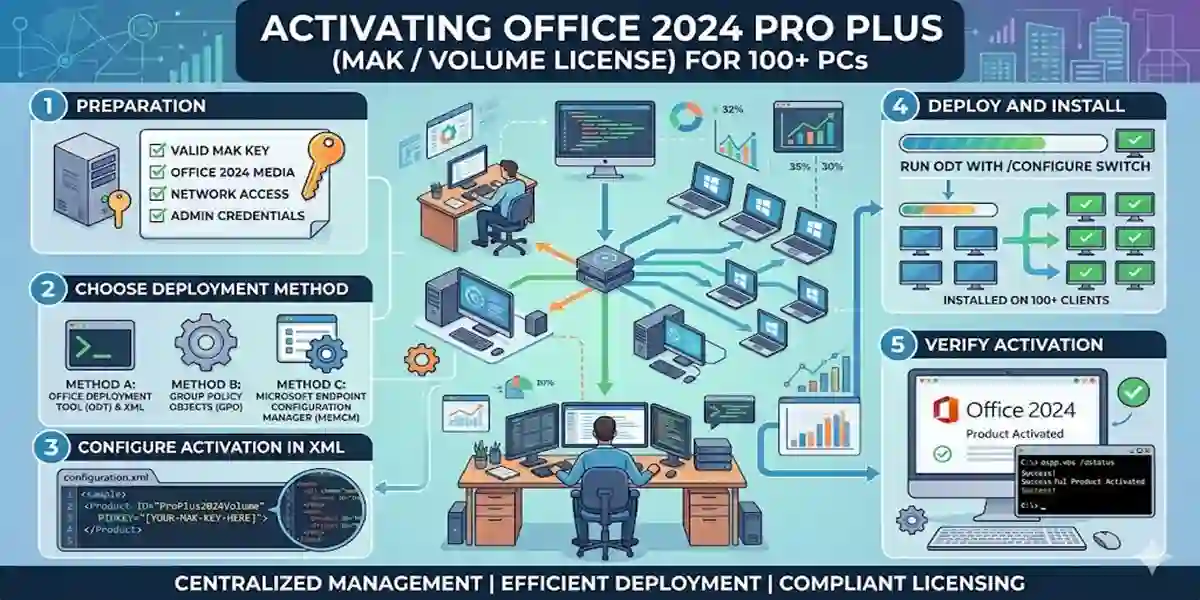
Managing Microsoft Office deployments for large organizations can be time-consuming without the proper tools. The Office 2024 Pro Plus MAK / Volume Key for 100 PCs allows IT administrators to deploy and activate Office 2024 across 100 computers quickly and efficiently. This guide provides step-by-step instructions to ensure smooth bulk activation, troubleshoot common errors, and understand licensing requirements.
Office 2024 Pro Plus includes Word, Excel, PowerPoint, Outlook, Access, Publisher, and OneNote, enhanced with AI-powered features, cloud integration, and real-time collaboration. Whether for corporate offices, educational institutions, or enterprises, this volume license streamlines deployment, reduces administrative overhead, and ensures compliance with Microsoft licensing policies. By following this comprehensive guide, IT teams can simplify bulk activation, ensure proper configuration, and maximize productivity across all devices.
Features of Office 2024 Pro Plus 100 PC Enterprise License
- Bulk Deployment: Activate up to 100 devices using a single MAK / Volume Key.
- Complete Office Suite: Access Word, Excel, PowerPoint, Outlook, Access, Publisher, and OneNote.
- Centralized Management: Monitor activations and license compliance across 100 PCs.
- AI-Powered Productivity Tools: Smart templates, formula suggestions, design insights.
- Collaboration & Cloud Integration: Teams and SharePoint integration for seamless teamwork.
- Enterprise-Grade Security: Data encryption, user-level permissions, secure cloud storage.
- Cost-Effective Deployment: One-time volume license reduces recurring subscription costs.
- High Scalability: Suitable for large enterprises, schools, and multi-location offices.
- Enhanced Admin Tools: Automate updates, manage user licenses, and deploy efficiently.
- Future-Proof Version: Optimized for Office LTSC 2024 for maximum speed and stability.
Common Errors During Activation & How to Fix Them
Activating Office 2024 Pro Plus on 100 PCs can occasionally produce errors. Here’s how to troubleshoot:
Error 1: Invalid Product Key
- Cause: Key entered incorrectly or already in use.
- Fix: Double-check the 25-character MAK key. Ensure it hasn’t been used beyond its limit.
Error 2: Activation Limit Reached
- Cause: The key has reached its maximum allowed activations.
- Fix: Contact Microsoft support to reset activations or request additional activations.
Error 3: Sign-in Required
- Cause: Microsoft account mismatch.
- Fix: Sign in with the account linked to the MAK / Volume License.
Error 4: Network or Proxy Issues
- Cause: Firewall or proxy blocking activation servers.
- Fix: Disable firewall temporarily or adjust proxy settings.
Error 5: Permission Denied
- Cause: Lack of admin privileges.
- Fix: Use an IT admin account with Global Admin permissions.
Methods to Activate Office 2024 Pro Plus for 100 PCs
1. MAK / Volume Key Activation
Steps:
- Open any Office app (Word, Excel, PowerPoint).
- Navigate to File > Account > Change Product Key.
- Enter the 25-character MAK / Volume Key.
- Click Activate.
- Repeat for all PCs or use bulk deployment scripts.
2. Microsoft 365 Admin Center Activation
Steps:
- Sign in at Microsoft 365 Admin Center.
- Navigate to Users > Active Users.
- Select the accounts for Office 2024 deployment.
- Assign the Volume License under Licenses & Apps.
3. PowerShell Bulk Deployment
Connect-MsolService
Set-MsolUserLicense –UserPrincipalName user@company.com –AddLicenses “office:ProPlusVolume”
4. Volume Licensing Service Center (VLSC)
Use the Volume Licensing Service Center for managing multiple activations efficiently.
Office 2024 Licensing Explained
- Volume License vs Single License:
- Volume license allows deployment on 100 devices with a single MAK key.
- Single license is for individual devices.
- MAK (Multiple Activation Key):
- Activate multiple PCs at once.
- Track usage centrally.
- KMS (Key Management Service):
- Network-based activation for larger organizations.
- Ideal for servers and frequently changing devices.
- Client Access Licenses (CALs):
- Required for shared services like Office servers.
- User CALs for individuals, Device CALs for shared computers.
Conclusion
The Office 2024 Pro Plus MAK / Volume Key – 100 PCs is the ideal solution for large enterprises and schools requiring efficient, secure, and compliant bulk deployment. With centralized license management, full Office suite access, AI-powered tools, and cloud integration, your organization can maximize productivity while reducing IT overhead. This volume license ensures reliable, scalable, and cost-effective deployment across 100 PCs.
FAQ
Q1: Can I activate all 100 PCs at once?
A1: Yes, using scripts, MAK key, or Microsoft 365 Admin Center.
Q2: What is a MAK key?
A2: Multiple Activation Key allows Office 2024 activation on multiple devices within its limit.
Q3: Are updates included?
A3: Yes, lifetime access includes security and feature updates.
Q4: What if the key reaches its activation limit?
A4: Contact Microsoft support to reset or extend activations.
Q5: Is this compliant with Microsoft licensing?
A5: Yes, it’s fully licensed for enterprise use.
Q6: Can I use offline?
A6: Yes, after activation, Office apps work offline.