

Blog
What Is Autodesk Product Design & Manufacturing Collection? Full Overview & Uses


Introduction to Autodesk PDMC
The Autodesk Product Design & Manufacturing Collection (PDMC) is the definitive software suite for modern engineering. In 2026, it has evolved from a simple bundle of tools into a cloud-connected ecosystem driven by Autodesk AI.
Whether you are building complex machinery or consumer electronics, PDMC eliminates data silos by integrating professional-grade 3D design, advanced simulation, and 5-axis CAM into a single subscription. This collection is the backbone for companies adopting Digital Twin technology and Generative Design to outpace the competition.
What Is Autodesk Product Design & Manufacturing Collection (PDMC)?
The Autodesk Product Design & Manufacturing Collection (PDMC) is a comprehensive, subscription-based suite of professional Autodesk software designed specifically for product designers, mechanical engineers, manufacturers, industrial designers, and engineering teams.
Rather than purchasing individual licenses for multiple design, engineering, simulation, and manufacturing tools, PDMC provides a unified, cost-effective ecosystem that includes everything needed to take a product from concept → design → simulation → visualization → manufacturing → documentation—all within a single subscription.
This collection is engineered to support the entire product development lifecycle, making it ideal for industries such as automotive, aerospace, industrial equipment, consumer products, electronics, machinery manufacturing, and smart manufacturing enterprises.
Core Software Included in Autodesk PDMC
The Autodesk Product Design & Manufacturing Collection (PDMC) includes 15+ professional-grade applications that collectively support the entire product development and manufacturing lifecycle. Below are the most critical and widely used tools, along with a detailed explanation of their capabilities.
In 2026, the Autodesk Product Design & Manufacturing Collection (PDMC) is not just a bundle of tools; it is a unified digital ecosystem. Below is a comprehensive elaboration on the core software components, highlighting the revolutionary 2026 updates that drive professional efficiency.
1. Autodesk Inventor Professional (The AI-Powered Flagship)
Inventor remains the powerhouse for mechanical engineering, but the 2026 release introduces a paradigm shift through Design Copilot.
-
Design Copilot: This AI assistant functions as an intelligent engineering partner. It uses natural language processing to let you type commands like “Create a bracket with 4 mounting holes for a 50mm flange,” and it generates the geometry instantly. It also analyzes your modeling patterns to suggest the “next logical step” in your workflow.
-
Complex Assembly Management: Handles massive models (100,000+ parts) with improved performance, ensuring your workstation stays responsive during large-scale industrial design.
-
Integrated Simulation: Perform Linear/Non-Linear Stress Analysis and Thermal Simulation directly within the design interface to validate performance before physical prototyping.
2. AutoCAD (Intelligence in 2D/3D Drafting)
While often seen as a 2D tool, AutoCAD 2026 provides the essential documentation and layout foundation for the entire collection.
-
Smart Blocks & Search: Using Autodesk AI, AutoCAD now scans your drawings to identify repetitive geometry and automatically converts them into blocks. It can even detect text variations (like room numbers) and turn them into intelligent block attributes.
-
Activity Insights: This feature acts as a multi-user event log. It tracks every change, who made it, and when, providing a “What’s Changed” visual history that helps teams stay aligned without manual revision logs.
-
Specialized Toolsets: Includes access to Electrical, Mechanical, and Architecture toolsets, giving you thousands of pre-built symbols to speed up schematic design.
3. Autodesk Fusion (The Cloud-Native Bridge)
Fusion is the collection’s “Design-to-Make” bridge, connecting the office directly to the shop floor.
-
Generative Intelligence: Unlike traditional CAD, you don’t just draw; you define goals. Input constraints like “minimum weight” and “CNC machining,” and Fusion generates hundreds of high-performance design alternatives.
-
External by Default: The 2026 update introduces a new assembly structure where components are “external by default,” significantly improving version tracking and cross-team collaboration.
-
Integrated CAM: Features advanced 5-axis milling, turning, and additive manufacturing (3D printing) toolpaths that update automatically if the 3D model changes.
4. Navisworks Manage (The “Single Source of Truth”)
Navisworks is essential for model aggregation—bringing data from Inventor, AutoCAD, Revit, and even non-Autodesk files into one environment.
-
Clash Detective: The 2026 version features Priority-Based Clash Matrix Tables. You can prioritize “Hard Clashes” (physical overlaps) versus “Soft Clashes” (clearance requirements), reducing the noise in your reports.
-
4D & 5D Simulation: Connect your project schedule (Time) and cost data (Money) to the model. You can visualize a “construction walkthrough” that shows the project’s progress over months and its budget impact in real-time.
-
Real-World Logic: Use sectioning and redlining to coordinate with subcontractors and architects, ensuring that mechanical assemblies fit perfectly within the building’s structural constraints.
5. Autodesk Vault Professional (The Central Nervous System)
Vault manages your data so your team doesn’t lose time searching for files or working on outdated revisions.
-
Automated PDF/DXF Creation: Version 2026.1 automatically attaches a neutral 2D PDF to every Item you update. This ensures that the machine shop always has access to the current print without an engineer having to manually export it.
-
Concurrent Design: Multiple designers can work on the same assembly simultaneously. Vault manages “ownership” so no one accidentally overwrites another person’s work.
-
Intelligent Copy Design: Rapidly iterate on new products by copying an existing assembly and only modifying the specific parts that need changing, while preserving all metadata.
6. Factory Design Utilities (The Digital Factory)
This is a specialized workflow that uses both AutoCAD and Inventor to plan optimized production lines.
-
2D-to-3D Associativity: Lay out your factory floor in a familiar 2D AutoCAD environment. The utilities automatically generate a 3D Inventor model from those 2D blocks, allowing for instant visualization.
Material Flow Optimization: Analyze the “travel distance” of parts through your factory. The software identifies bottlenecks where machines are too far apart or where material flow crosses paths, saving thousands in operational costs.
Key Features of Autodesk PDMC
The Autodesk Product Design & Manufacturing Collection (PDMC) is built to streamline modern engineering and manufacturing workflows by combining powerful tools, intelligent automation, and seamless collaboration into one unified platform.
1. End-to-End Product Development
PDMC supports the entire product lifecycle from initial idea to final production and documentation:
Concept → Design → Simulation → Manufacturing → Documentation
This end-to-end approach ensures that all stages of product development are connected and data flows smoothly between tools.
Key Advantages:
-
Eliminate data loss between design stages
-
Maintain design intent throughout revisions
-
Reduce handoff errors between teams
-
Accelerate time-to-market
-
Enable a true digital product development workflow
Engineers can move confidently from concept sketches to manufacturable designs without switching disconnected software platforms.
2. Advanced Simulation & Analysis
PDMC enables engineers to validate and optimize designs using advanced simulation tools before physical production.
Engineers can perform:
-
Stress analysis
Evaluate structural strength and identify failure points under real-world loads. -
Thermal analysis
Analyze heat distribution and thermal behavior to prevent overheating or material degradation. -
Motion simulation
Test mechanical movement, joints, and kinematics to ensure proper operation and avoid collisions. -
Fatigue analysis
Predict long-term performance by simulating repeated stress cycles over time.
Benefits:
-
Reduce physical prototyping costs
-
Detect failures early in the design stage
-
Improve product reliability and safety
-
Optimize materials and weight
-
Meet regulatory and industry standards
3. Integrated CAM & Manufacturing
PDMC includes built-in CAM (Computer-Aided Manufacturing) tools that connect design directly to production.
With integrated CAM tools, manufacturers can:
-
Reduce production errors
Eliminate manual data translation between CAD and CAM systems. -
Improve machining accuracy
Generate precise toolpaths directly from 3D models. -
Save time on CNC programming
Automate toolpath creation and machining strategies.
Additional Manufacturing Benefits:
-
Faster transition from design to shop floor
-
Support for CNC milling, turning, and fabrication
-
Improved consistency in production output
-
Reduced scrap and rework
This tight CAD-to-CAM integration helps manufacturers achieve higher efficiency and quality.
4. Cloud & Collaboration Ready
PDMC is designed for modern, distributed engineering teams, enabling seamless collaboration across locations.
Cloud-enabled features include:
-
Cloud storage support
Securely store and access design files anytime, anywhere. -
Remote collaboration
Multiple users can work on shared projects simultaneously. -
Secure access control
Role-based permissions ensure data security and compliance.
Business Impact:
-
Faster decision-making
-
Improved teamwork across departments
-
Reduced dependency on local infrastructure
-
Support for hybrid and remote work environments
5. Data Management with Vault
PDMC includes Autodesk Vault, a professional data management system that helps teams control and organize design data.
Vault helps teams:
-
Prevent file overwrites
Ensure only authorized users can modify designs. -
Track design history
Maintain complete version and revision control. -
Improve team productivity
Reduce time spent searching for files and resolving conflicts.
Additional Advantages:
-
Centralized data repository
-
Secure file check-in/check-out
-
Accurate bill of materials (BOM) tracking
-
Better collaboration between engineering and manufacturing teams
6. Interoperability
PDMC supports a wide range of industry-standard file formats, enabling smooth collaboration with partners, suppliers, and customers.
Supported formats include:
-
STEP – Neutral 3D exchange format
-
IGES – CAD interoperability standard
-
DWG – Native AutoCAD drawing format
-
DXF – Data exchange for 2D designs
-
STL – 3D printing and prototyping format
Why Interoperability Matters:
-
Work seamlessly with external vendors
-
Integrate with non-Autodesk software
-
Reduce file conversion errors
-
Support global supply chains
7. Cost-Effective Licensing
One of the strongest advantages of PDMC is its cost-efficient subscription model.
Key Cost Benefits:
-
One subscription replaces multiple individual licenses
-
Lower total cost of ownership
-
Access to premium tools at a reduced price
-
Predictable annual software expenses
-
Ideal for startups, SMEs, and large enterprises
By bundling high-value tools into a single collection, PDMC delivers enterprise-grade capabilities at exceptional value.
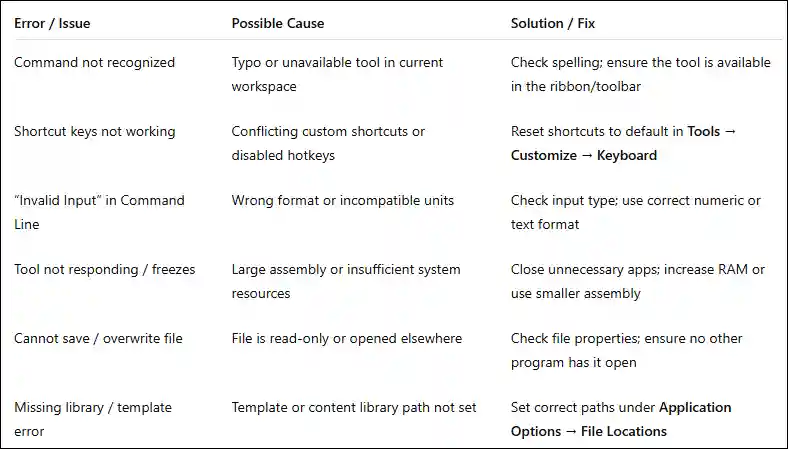
Autodesk PDMC command errors
Benefits of Autodesk Product Design & Manufacturing Collection
The Autodesk Product Design & Manufacturing Collection (PDMC) delivers measurable business, engineering, and financial advantages by unifying design, simulation, manufacturing, and data management tools into a single, integrated subscription.
1. Significant Cost Savings
Purchasing Autodesk Inventor, AutoCAD, Vault, Navisworks, and manufacturing tools as separate licenses can be extremely expensive and difficult to manage.
PDMC consolidates these tools into one subscription, reducing overall software expenditure by up to 60% compared to buying individual licenses.
Cost-Saving Advantages:
-
One license replaces multiple standalone products
-
Lower total cost of ownership (TCO)
-
Simplified license management
-
Predictable annual budgeting
-
Access to premium tools without premium pricing
This makes PDMC a high-value investment for organizations of all sizes.
2. Faster Time to Market
PDMC accelerates product development by eliminating workflow bottlenecks and disconnected tools.
Key Contributors:
-
Streamlined workflows
Seamless data flow between CAD, CAE, and CAM reduces delays. -
Reduced rework
Early detection of design issues minimizes costly redesigns. -
Faster design iterations
Parametric modeling and simulation enable quick optimization cycles.
Business Impact:
-
Shorter product development cycles
-
Faster response to market demands
-
Competitive advantage in fast-moving industries
3. Improved Product Quality
PDMC empowers engineers to validate designs early using advanced digital tools.
Quality Enhancements:
-
Early-stage simulation
Identify stress, thermal, and motion issues before production. -
Design validation
Ensure designs meet performance, safety, and regulatory requirements. -
Fewer manufacturing defects
Accurate digital prototypes reduce shop-floor errors and scrap.
Result:
-
Higher reliability and durability
-
Reduced warranty claims
-
Stronger customer satisfaction
4. Enhanced Team Collaboration
PDMC promotes efficient collaboration across design, engineering, and manufacturing teams.
Collaboration Benefits:
-
Centralized data
All design files stored in a single, secure repository. -
Real-time updates
Team members always work on the latest design version. -
Secure version control
Vault prevents file overwrites and tracks revision history.
Organizational Impact:
-
Improved communication between departments
-
Fewer conflicts and errors
-
Higher team productivity and accountability
5. Scalability
PDMC is designed to grow with your organization, making it suitable for a wide range of business sizes and structures.
Perfect for:
-
Small teams
Access enterprise-grade tools without large upfront costs. -
Large manufacturing enterprises
Support complex workflows, large assemblies, and global teams. -
Growing startups
Scale licenses and capabilities as business needs expand.
Scalability Benefits:
-
Flexible subscription model
-
Easy user addition or removal
-
Supports evolving product complexity
-
Future-ready for digital transformation
Uses of Autodesk PDMC Across Industries
Autodesk Product Design & Manufacturing Collection (PDMC) is a powerful suite of integrated tools that supports the complete product development lifecycle—from concept and design to simulation and manufacturing. It is widely adopted across manufacturing and automotive industries for its accuracy, efficiency, and advanced engineering capabilities.
Manufacturing & Industrial Design
Machine Design
Autodesk PDMC enables engineers and designers to create complex machinery and industrial equipment with high precision. Using advanced 3D modeling tools, teams can design mechanical systems such as conveyors, packaging machines, CNC machines, and automation equipment. The collection supports parametric modeling, motion studies, and interference checks, allowing designers to verify functionality and performance before manufacturing. This reduces design errors, shortens development cycles, and improves overall machine reliability.
Tooling
PDMC is extensively used for designing manufacturing tools and molds, including injection molds, dies, jigs, and fixtures. Engineers can simulate tool performance under real production conditions to identify potential issues early. Integrated CAM capabilities allow seamless transition from design to machining, ensuring tools are optimized for accuracy, durability, and cost efficiency. This helps manufacturers achieve consistent quality and faster production turnaround.
Production-Ready Drawings
One of the key strengths of Autodesk PDMC is its ability to generate high-quality, production-ready 2D drawings from 3D models. These drawings include precise dimensions, tolerances, annotations, and bills of materials (BOMs). Standard-compliant documentation ensures clear communication between design, manufacturing, and quality control teams, reducing misinterpretation, rework, and production delays.
Automotive Industry
Vehicle Components
In the automotive industry, PDMC is used to design and optimize individual vehicle components such as engine parts, chassis elements, suspension systems, and body panels. Engineers can evaluate material usage, weight reduction, and structural integrity to meet strict safety and performance standards. This results in lighter, stronger, and more efficient vehicle components.
Assemblies
Automotive products consist of thousands of interconnected parts. Autodesk PDMC supports the creation and management of large, complex assemblies, allowing engineers to digitally assemble entire vehicle systems. Designers can check clearances, alignment, and part interactions while identifying potential design conflicts early. This improves manufacturability, simplifies assembly processes, and reduces costly last-minute design changes.
Simulation Testing
Simulation is a critical capability of Autodesk PDMC. Automotive engineers use built-in simulation tools to perform stress, fatigue, thermal, vibration, and motion analysis. These simulations help predict real-world behavior under various operating conditions, ensuring durability, safety, and performance before physical prototyping. By reducing the need for multiple prototypes, manufacturers save time and development costs while improving product reliability.
Aerospace & Defense
Autodesk Product Design & Manufacturing Collection (PDMC) plays a critical role in aerospace and defense industries, where precision, safety, and regulatory compliance are essential.
Lightweight Design
PDMC enables engineers to design lightweight yet highly durable components using advanced materials and optimization techniques. Through parametric modeling and simulation, designers can reduce unnecessary weight while maintaining structural strength. Lightweight designs improve fuel efficiency, payload capacity, and overall aircraft and defense system performance.
Precision Engineering
Aerospace and defense components require extremely tight tolerances and high accuracy. Autodesk PDMC supports precision engineering through advanced 3D modeling, assembly validation, and tolerance analysis. Engineers can ensure every component fits perfectly within complex systems such as aircraft structures, propulsion systems, and defense equipment, minimizing errors during manufacturing and assembly.
Compliance-Ready Documentation
Regulatory compliance is critical in aerospace and defense. PDMC helps organizations generate standardized, compliance-ready documentation, including detailed drawings, material specifications, and traceable bills of materials (BOMs). These documents support industry standards and regulatory requirements, making audits, certifications, and quality checks faster and more reliable.
Consumer Products
Autodesk PDMC is widely used in the consumer products industry to balance innovation, aesthetics, cost, and manufacturability.
Product Visualization
PDMC provides powerful visualization tools that allow designers to create high-quality, realistic product renderings. These visuals help teams evaluate design aesthetics, materials, colors, and finishes before production. Product visualization also supports marketing, stakeholder approvals, and customer presentations.
Rapid Prototyping
With integrated design and simulation tools, PDMC accelerates rapid prototyping. Designers can quickly iterate concepts, test form and function, and prepare models for 3D printing or CNC machining. This fast feedback loop reduces development time and helps bring innovative consumer products to market faster.
Mass Production Workflows
PDMC supports scalable mass production workflows by connecting design with manufacturing processes. Engineers can optimize designs for manufacturability, generate accurate production drawings, and integrate CAM workflows. This ensures consistent product quality, reduced waste, and efficient high-volume manufacturing.
Factory & Plant Layout Planning
Autodesk PDMC also supports factory and plant layout planning, helping manufacturers design efficient production environments.
Equipment Layout
Using 3D layout tools, engineers can plan and visualize factory equipment placement, including machines, workstations, conveyors, and storage areas. This helps identify space constraints, safety concerns, and accessibility issues before physical installation.
Workflow Optimization
PDMC allows teams to simulate production workflows and material movement within the factory. By analyzing process flow, engineers can reduce bottlenecks, improve throughput, and enhance worker efficiency. Optimized workflows lead to faster production cycles and lower operational costs.
Space Utilization
Efficient use of floor space is essential in modern manufacturing. Autodesk PDMC helps organizations maximize space utilization by optimizing layout designs and equipment positioning. This enables higher production capacity without expanding facility size, resulting in significant cost savings.
Autodesk Product Design & Manufacturing Collection (PDMC) is offered through a flexible subscription-based licensing model, allowing individuals, businesses, and educational institutions to choose a plan that best fits their usage and budget. This approach ensures access to the latest software updates, cloud services, and technical support throughout the subscription period.
Subscription Durations
1-Year Subscription
The 1-year subscription is ideal for professionals, small teams, or organizations with short-term or project-based requirements. It provides full access to all PDMC tools and features for one year, along with regular updates and Autodesk support. This option offers flexibility without long-term commitment.
3-Year Subscription
The 3-year subscription is best suited for businesses and enterprises with long-term design and manufacturing needs. It offers cost savings compared to annual renewals, predictable budgeting, and uninterrupted access to the PDMC suite. Organizations benefit from stable workflows and long-term project continuity.
License Types
Single-User License (Named User)
The single-user license is assigned to a specific individual and is authenticated through an Autodesk account. It allows the named user to access PDMC on multiple devices, provided only one active session is used at a time. This license type is ideal for engineers, designers, and professionals who need personal, secure access to the software.
Commercial License
The commercial license is designed for businesses and professionals using Autodesk PDMC for revenue-generating work. It includes full commercial usage rights, access to all tools in the collection, and eligibility for Autodesk support and cloud services. This license ensures compliance with Autodesk’s legal and usage terms for professional environments.
Educational License (Students & Institutions)
The educational license is available at no cost to eligible students, educators, and academic institutions. It provides access to most PDMC features for learning, teaching, and research purposes. While functionally similar to the commercial version, it is strictly limited to non-commercial, educational use, helping students gain industry-relevant skills.
System Requirements for Autodesk PDMC
To ensure smooth performance and full functionality, Autodesk Product Design & Manufacturing Collection (PDMC) applications require a modern, high-performance system. Meeting or exceeding the recommended specifications helps improve stability, speed, and overall productivity—especially when working with large assemblies, simulations, and complex designs.
Operating System
Autodesk PDMC is supported on Windows 10 and Windows 11 (64-bit) operating systems. A 64-bit OS is essential to handle large datasets, advanced simulations, and memory-intensive design tasks. Keeping the operating system up to date ensures compatibility with the latest PDMC features and security updates.
Graphics Processing Unit (GPU)
A dedicated graphics card is strongly recommended for optimal performance. Professional or high-end consumer GPUs help accelerate 3D rendering, real-time visualization, and large assembly handling. Dedicated GPUs provide better stability and smoother interaction compared to integrated graphics, especially when working with detailed models and complex visual effects.
Memory (RAM)
Autodesk PDMC requires a minimum of 16 GB RAM to run effectively for standard design tasks. However, 32 GB RAM or more is recommended for advanced workflows such as large assemblies, simulation analysis, and multitasking across multiple PDMC applications. Higher memory capacity ensures faster processing, reduced lag, and improved overall system responsiveness.
Why Buy Autodesk PDMC from eSoftwareStore?
When investing in Autodesk Product Design & Manufacturing Collection (PDMC), choosing the right reseller is just as important as choosing the software. eSoftwareStore is a trusted platform that delivers genuine Autodesk licenses with reliable service, expert support, and complete peace of mind.
Competitive Pricing
eSoftwareStore offers competitive and transparent pricing on Autodesk PDMC subscriptions. Customers benefit from cost-effective licensing options without compromising on authenticity or support. Flexible subscription choices help individuals and businesses optimize software investment while staying within budget.
Instant Delivery
With eSoftwareStore, Autodesk PDMC licenses are delivered instantly after purchase. This allows users to start designing and manufacturing without delays, eliminating downtime caused by lengthy procurement processes. Instant delivery is especially valuable for urgent projects and fast-moving teams.
Expert Pre-Sales Guidance
eSoftwareStore provides expert pre-sales consultation to help customers choose the right PDMC subscription, license type, and duration. Their knowledgeable team assists with system compatibility, usage requirements, and licensing clarity—ensuring customers make informed decisions before buying.
License Compliance Assurance
All Autodesk PDMC licenses from eSoftwareStore are 100% genuine and compliance-ready. This ensures adherence to Autodesk’s licensing policies, protecting businesses from legal risks, audits, and operational disruptions. Customers gain confidence knowing their software usage is fully authorized.
Dedicated Customer Support
eSoftwareStore offers dedicated customer support throughout the purchasing and post-purchase process. From activation assistance to renewal guidance and troubleshooting, their support team ensures a smooth and hassle-free experience, helping customers stay productive at all times.
Frequently Asked Questions (FAQs)
Q1. What does Autodesk PDMC include?
Autodesk Product Design & Manufacturing Collection (PDMC) includes a comprehensive set of professional tools such as Autodesk Inventor, AutoCAD, Fusion, Navisworks, Vault, AutoCAD Mechanical, Factory Design Utilities, and additional utilities for simulation, visualization, and manufacturing. Together, these tools cover the complete product lifecycle—from concept and design to production and data management.
Q2. Is Autodesk PDMC better than buying Inventor alone?
Yes. While Inventor is a powerful mechanical design tool, PDMC offers significantly more value by bundling multiple complementary applications at a lower combined cost. Users gain flexibility to handle 2D drafting, 3D modeling, simulation, CAM, collaboration, and data management without purchasing separate licenses.
Q3. Can small businesses use Autodesk PDMC?
Absolutely. PDMC is ideal for startups, small businesses, and SMEs due to its scalability and cost efficiency. Small teams can start with essential tools and gradually adopt advanced features as their business grows, without changing software platforms.
Q4. Is Autodesk PDMC cloud-based?
PDMC includes a mix of desktop and cloud-enabled tools. Core applications like Inventor and AutoCAD run locally, while tools such as Fusion and Vault enable cloud collaboration, version control, and data accessibility. This hybrid approach provides both performance and flexibility.
Q5. Does PDMC support CNC machining?
Yes. Autodesk PDMC fully supports CNC machining workflows through Inventor CAM and Fusion CAM. Users can create toolpaths, simulate machining operations, and generate machine-ready G-code, making it suitable for both prototyping and production environments.
Q6. Is training required to use Autodesk PDMC?
Basic CAD knowledge is helpful, but not mandatory. Autodesk provides extensive learning resources, including tutorials, documentation, videos, and guided courses. These resources make it easier for beginners to learn while allowing experienced users to master advanced features quickly.
Q7. Can I upgrade from AutoCAD or Inventor to PDMC?
Yes. Existing AutoCAD or Inventor users can upgrade seamlessly to PDMC. This allows continued use of familiar tools while gaining access to additional applications, expanding capabilities without disrupting existing workflows.
Q8. Does PDMC include technical support?
Yes. Autodesk PDMC subscriptions include official Autodesk technical support, software updates, and access to knowledge bases. This ensures users stay up to date and receive assistance when needed.
Q9. Is PDMC suitable for education?
Yes. Autodesk offers free educational licenses of PDMC for eligible students, educators, and academic institutions. These licenses help learners develop industry-relevant skills using the same tools employed by professionals worldwide.
Q10. Where can I buy genuine Autodesk PDMC licenses?
You can purchase 100% genuine Autodesk PDMC licenses from authorized resellers such as eSoftwareStore, ensuring license compliance, authenticity, and reliable support.
Conclusion
Autodesk Product Design & Manufacturing Collection (PDMC) is more than just a software bundle—it is a complete digital manufacturing ecosystem. By combining industry-leading tools for design, simulation, manufacturing, collaboration, and data management, PDMC enables businesses to innovate faster, reduce development costs, and deliver high-quality products with confidence.
Whether you are a startup, an established manufacturer, or an educational institution, PDMC provides the flexibility, scalability, and power needed for modern engineering workflows. If you are serious about mechanical design excellence, manufacturing efficiency, and future-ready product development, Autodesk PDMC is one of the smartest long-term investments you can make.