

Blog
“Master AutoCAD Plant 3D: Top 3D Plant Modeling & Piping Design Software”

Introduction to Autodesk Plant 3D
Autodesk Plant 3D is an industry-leading 3D plant design software that empowers engineers, designers, and plant professionals to create accurate, detailed, and collaborative plant models. Designed as a part of the Autodesk ecosystem, AutoCAD Plant 3D integrates seamlessly with AutoCAD, Revit, and other Autodesk tools, providing a robust environment for designing process plants, piping systems, structural layouts, and instrumentation.
In modern industrial projects, precision, collaboration, and efficiency are paramount. Industrial design software like Autodesk Plant 3D allows engineers to reduce errors, streamline workflows, and ensure compliance with international standards. From designing pipelines to modeling entire plants in 3D, Autodesk Plant 3D offers a comprehensive solution for plant engineering professionals.
Key Benefits of Using Autodesk Plant 3D:
-
Realistic 3D plant modeling with precise dimensions
-
Efficient collaboration across engineering teams
-
Integration with BIM plant design for data-rich models
-
Faster turnaround for piping and instrumentation design
What Is Autodesk Plant 3D?
Autodesk Plant 3D is an industry-leading software designed specifically for the design, modeling, and documentation of industrial plants. It enables engineers, designers, and project teams to collaborate efficiently while creating accurate representations of complex process facilities. From oil and gas to water treatment, the software is versatile and tailored for plant engineering workflows. Its integration with Autodesk’s BIM ecosystem ensures that plant designs are coordinated, standardized, and ready for construction or maintenance.
Key Capabilities of Autodesk Plant 3D
1. 3D Plant Modeling
Autodesk Plant 3D allows engineers to create fully detailed three-dimensional models of process plants. This includes:
-
Equipment modeling: Pumps, tanks, reactors, compressors, and other industrial machinery can be accurately represented.
-
Pipeline systems: Design and visualize the routing of pipes across the plant in 3D.
-
Valves and instruments: Insert valves, sensors, and control instruments at the right locations.
-
Structural elements: Add supporting structures like beams, ladders, platforms, and walkways.
Benefit: 3D modeling ensures that the entire plant can be visualized before construction, helping identify clashes, bottlenecks, or design flaws early.
2. Piping Design Software
The software is specialized in piping system design, allowing engineers to:
-
Route pipelines with proper slope, diameter, and fittings.
-
Automatically add supports, flanges, and valves according to industry standards.
-
Use intelligent components that know their specifications and interconnections.
-
Validate pipe routing against design rules and project standards.
Benefit: Reduces design errors, prevents construction clashes, and ensures piping systems meet regulatory and engineering requirements.
3. Plant Engineering Software
Autodesk Plant 3D simplifies engineering documentation:
-
Generate isometric drawings for piping fabrication.
-
Produce orthographic drawings for construction documentation.
-
Create BOMs (Bill of Materials) automatically from the 3D model.
-
Track project data for equipment, pipe components, and supports.
Benefit: Automation accelerates the documentation process, increases accuracy, and ensures that fabrication and construction teams have precise data.
4. BIM Plant Design
The software integrates seamlessly with Building Information Modeling (BIM):
-
Connect plant designs with architectural and structural models.
-
Use shared project data to maintain consistency across multiple disciplines.
-
Enable clash detection and coordination with other BIM models.
Benefit: Ensures efficient collaboration across teams, reduces design conflicts, and improves project lifecycle management.
5. Process Plant Software
Autodesk Plant 3D supports the entire lifecycle of plant design:
-
Conceptual design: Plan layouts and preliminary routing.
-
Detailed engineering: Model equipment, piping, and structures in detail.
-
Construction documentation: Generate drawings, BOMs, and reports.
-
Maintenance planning: Use the model for facility management and retrofitting.
Benefit: From planning to operation, Autodesk Plant 3D helps engineering teams manage the complexity of industrial projects, saving time and cost while improving accuracy.
Features of Autodesk Plant 3D
Autodesk Plant 3D comes packed with features that make it one of the best industrial design software solutions in the market:
1. 3D Modeling of Equipment and Structures
-
Model tanks, vessels, pumps, and columns with precision.
-
Create structural steel and support frameworks directly in the 3D environment.
-
Integrate mechanical, electrical, and instrumentation components.
2. Piping Design and Routing
-
Supports intelligent piping design with real-world specifications.
-
Automatically generates pipe supports, flanges, valves, and fittings.
-
Includes standard piping libraries and the option to customize materials.
3. Isometric Drawing Generation
-
Automatically produces isometric drawings for fabrication.
-
Reduces manual drafting errors.
-
Supports export to PDF, DWG, and other CAD formats.
4. BIM Integration
-
Fully compatible with Autodesk Revit and BIM 360.
-
Allows engineers to incorporate plant designs into BIM workflows.
-
Enables clash detection and coordination with building and structural projects.
5. Data Management
-
Store design data centrally for team collaboration.
-
Access component properties, specifications, and project information.
-
Generates BOMs, pipe schedules, and reports automatically.
6. Collaboration Tools
-
Multiple users can work simultaneously on the same project.
-
Cloud-based storage ensures up-to-date project data.
-
Supports revision tracking and version control.
7. Standard and Custom Libraries
-
Predefined catalogs for piping, equipment, valves, and instruments.
-
Users can create and manage custom parts for specialized projects.
8. Support for International Standards
-
Compliant with ISO, ANSI, DIN, and other global standards.
-
Automatically validates dimensions, clearances, and tolerances.
Benefits of Using Autodesk Plant 3D
Adopting Autodesk Plant 3D brings multiple advantages to engineering and design teams:
1. Improved Design Accuracy
-
Reduce errors with intelligent piping and equipment modeling.
-
Automatically checks for design conflicts and standard compliance.
-
Accurate 3D models help visualize complex plant layouts before construction.
2. Faster Project Completion
-
Automates repetitive tasks like isometrics and BOM generation.
-
Streamlines collaboration between design, mechanical, and structural teams.
-
Enables faster approval cycles with clear, standardized drawings.
3. Enhanced Collaboration
-
Cloud integration allows global teams to work simultaneously.
-
BIM workflow ensures coordination across multiple disciplines.
-
Version control minimizes data loss and miscommunication.
4. Cost Savings
-
Reduced rework and errors translate into lower project costs.
-
Efficient piping and equipment design optimize material usage.
-
Helps avoid expensive changes during construction.
5. Compliance with Industry Standards
-
Built-in checks for international piping and equipment standards.
-
Ensures projects meet regulatory and safety requirements.
6. Scalability
-
Suitable for small plants, industrial facilities, and large-scale process projects.
-
Adapts to the needs of engineers, contractors, and large engineering firms.
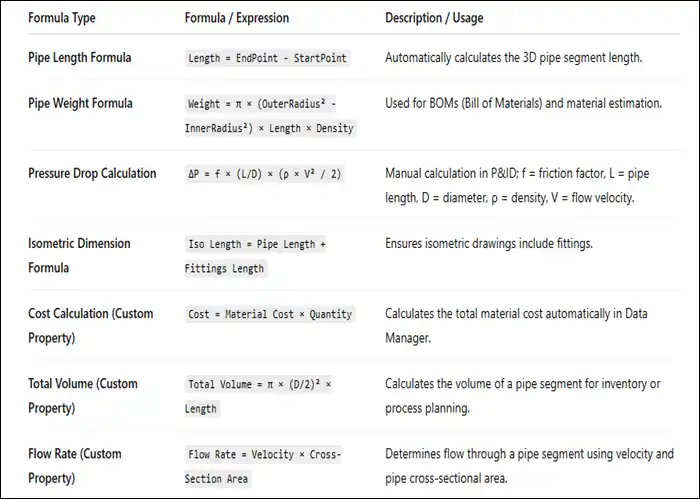
Autodesk Plant 3D formulas
Uses of Autodesk Plant 3D
Autodesk Plant 3D is versatile and widely used in industrial plant design projects:
1. Oil & Gas Industry
-
Pipeline routing, tank farm design, and offshore facility modeling.
-
Planning and optimization of fuel and chemical processing plants.
2. Chemical and Pharmaceutical Plants
-
Design of process systems, reactors, and piping layouts.
-
Ensures compliance with safety and environmental regulations.
3. Water & Wastewater Treatment Plants
-
Pumps, tanks, and filtration system design.
-
Integration with structural and electrical components.
4. Power Generation
-
Steam pipelines, turbines, and cooling systems.
-
Planning of thermal and renewable power plants.
5. Food & Beverage Processing
-
Piping and process system modeling for clean-in-place (CIP) systems.
-
Equipment layout for production lines and storage facilities.
6. General Industrial Applications
-
Any facility requiring complex piping, structural, or process design.
-
Used for manufacturing plants, refineries, and chemical storage facilities.
Licensing Options for Autodesk Plant 3D
Autodesk Plant 3D is available under a subscription-based licensing model, offering flexibility depending on project requirements and team size:
1. Monthly Subscription
-
Ideal for short-term projects.
-
Flexible: start or stop as needed.
-
Provides access to the latest software version and updates.
2. Annual Subscription
-
Most popular option for ongoing usage.
-
Cost-effective compared to monthly subscriptions.
-
Includes access to updates, technical support, and cloud services.
3. Multi-Year Subscription
-
Locked-in pricing for 2–3 years.
-
Best suited for large companies or long-term projects.
-
Ensures uninterrupted access to Autodesk Plant 3D and related tools.
4. Named-User Licensing
-
Licenses are tied to specific users.
-
Ensures accountability and tracking of software usage.
-
Ideal for companies managing multiple engineers and designers.
5. Trial Version
-
Autodesk offers a free trial (usually 30 days) to evaluate features.
-
Full access to 3D plant modeling, piping tools, and collaboration features.
-
Allows companies and individuals to test the software before committing to a subscription.
Frequently Asked Questions (FAQ)
Q1: What is the difference between AutoCAD Plant 3D and Autodesk Plant 3D?
A: AutoCAD Plant 3D is the base platform integrated with AutoCAD, while Autodesk Plant 3D includes full 3D modeling, BIM integration, and industry-specific tools for plant engineering.
Q2: Can Autodesk Plant 3D integrate with Revit?
A: Yes, Autodesk Plant 3D supports BIM workflows and integrates with Revit and BIM 360 for multi-disciplinary collaboration.
Q3: Is Autodesk Plant 3D suitable for small plants?
A: Absolutely. It scales from small projects to large industrial plants, providing flexibility for engineers and designers.
Q4: Does it support international piping standards?
A: Yes, Autodesk Plant 3D includes ISO, ANSI, DIN, and other international standards for piping and equipment.
Q5: Can I collaborate with a remote team using Autodesk Plant 3D?
A: Yes, cloud-based collaboration and data management allow multiple users to work on the same project simultaneously.
Q6: Does Autodesk Plant 3D include 3D plant modeling libraries?
A: Yes, it provides extensive libraries for piping, equipment, valves, structural elements, and custom parts.
Q7: Is training required to use Autodesk Plant 3D?
A: While the software is user-friendly, training is recommended to fully leverage advanced features like BIM integration, piping automation, and isometric generation.
Q8: Can Autodesk Plant 3D help reduce project costs?
A: Yes, by reducing design errors, automating documentation, and optimizing layouts, it significantly lowers material waste and rework costs.
Conclusion
Autodesk Plant 3D is a comprehensive 3D plant design software that revolutionizes the way engineers and designers approach industrial plant projects. With advanced piping design software, 3D plant modeling, BIM integration, and automated documentation, it offers unparalleled efficiency, accuracy, and collaboration.
Whether you are designing chemical plants, oil & gas pipelines, water treatment facilities, or food processing plants, Autodesk Plant 3D ensures your project adheres to industry standards while minimizing errors and reducing costs.
Choosing Autodesk Plant 3D as your plant engineering software means faster project turnaround, improved collaboration, and reliable, data-rich 3D models for construction and operations. Its subscription-based licensing makes it accessible for professionals, businesses, and large enterprises alike.