

Blog
Autodesk Navisworks Software Guide: Features, Benefits, Uses & Licensing Details

Introduction: Why Autodesk Navisworks Is Essential for Modern Construction
In today’s construction and infrastructure industry, project complexity has reached unprecedented levels. Buildings and infrastructure projects now involve multiple disciplines, massive datasets, tight schedules, and strict compliance requirements. Even small coordination errors can lead to costly delays, rework, and disputes.
Autodesk Navisworks was developed to solve exactly these challenges.
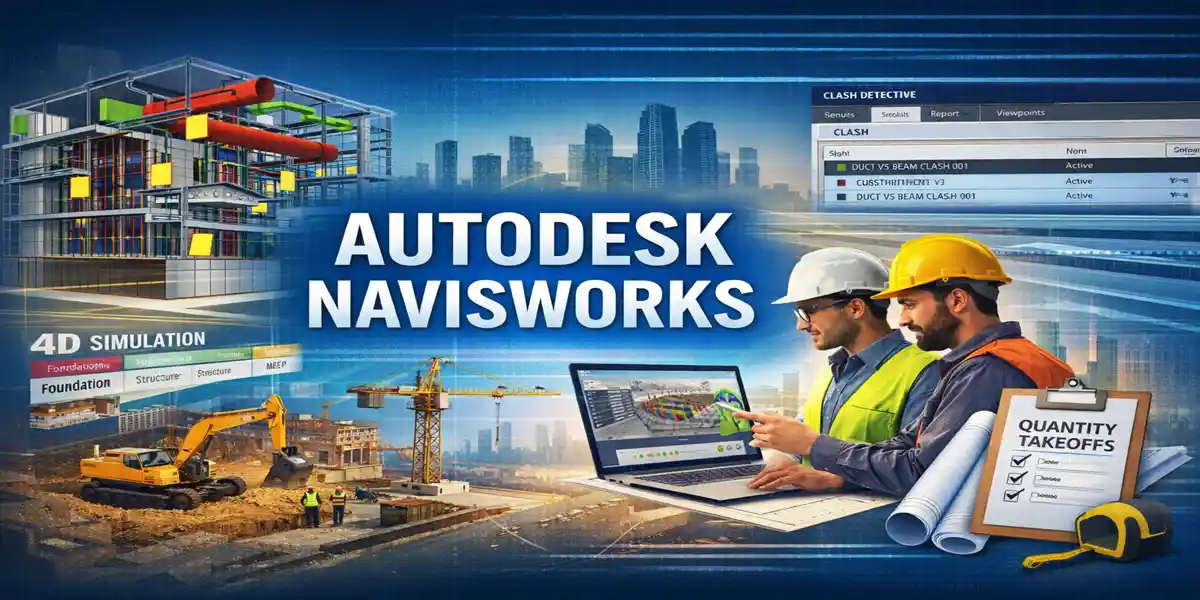
Navisworks is a powerful project review and coordination software that allows architects, engineers, contractors, and project managers to combine, analyze, simulate, and review 3D BIM models from multiple sources in one unified environment. Rather than replacing design tools like Revit or Civil 3D, Navisworks complements them by focusing on coordination, clash detection, construction simulation, and project visualization.
What Is Autodesk Navisworks?
Autodesk Navisworks is a powerful BIM coordination and project review software widely used in architecture, engineering, and construction (AEC) projects. It is designed to bring together models from multiple disciplines into a single, coordinated environment for analysis and review.
Combining 3D Models from Multiple Disciplines
Navisworks allows teams to aggregate 3D models created in different software platforms, such as architectural, structural, and MEP tools. These models are combined into one federated model, enabling a comprehensive view of the entire project without altering the original files.
Clash Detection Between Architectural, Structural, and MEP Systems
One of Navisworks’ most valuable features is clash detection. It identifies conflicts between building elements, such as pipes intersecting beams or ducts clashing with walls. Detecting these issues early helps avoid costly rework and construction delays.
Construction Sequencing Simulation (4D BIM)
Navisworks supports 4D BIM by linking model elements with construction schedules. This allows teams to simulate construction sequencing over time, visualize project phasing, and identify potential scheduling conflicts before work begins on site.
Real-Time Review of Large Models
The software is optimized to handle large, complex models smoothly. Project teams can navigate, review, and analyze models in real time, even for large-scale infrastructure or high-rise projects.
Improved Collaboration Across Project Teams
By providing a shared coordination platform, Navisworks improves communication among architects, engineers, contractors, and stakeholders. Everyone works from the same coordinated model, reducing misunderstandings and improving decision-making.
Unlike authoring tools, Autodesk Navisworks does not modify original design files. Instead, it preserves design intent while enabling in-depth analysis, coordination, and project visualization, making it an essential tool for efficient BIM-based project delivery.
Autodesk Navisworks Product Variants
Autodesk offers Navisworks in two primary versions, each designed to support different stages and responsibilities within BIM-based project workflows. Both versions focus on model aggregation and review rather than model authoring, making them essential coordination tools in the AEC industry.
1. Navisworks Simulate
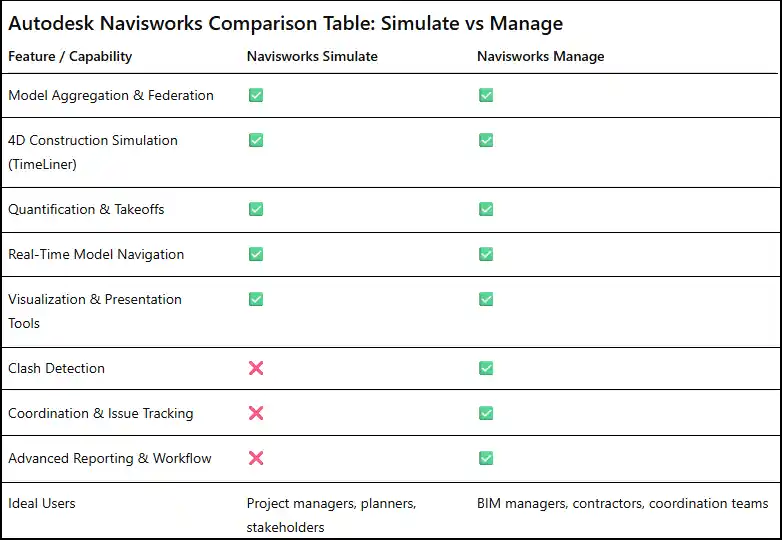
Navisworks Simulate is designed for model review, visualization, and construction simulation. It allows users to combine 3D models from multiple disciplines into a single federated model for comprehensive review.
Key capabilities include:
-
High-performance visualization of large and complex models
-
Model navigation, sectioning, and walkthroughs
-
4D construction sequencing by linking models with project schedules
-
Quantification and takeoff tools for material estimation
Navisworks Simulate is commonly used by project managers, planners, and stakeholders who need to understand design intent, construction phasing, and overall project flow without modifying design data. It is ideal for presentations, design reviews, and planning discussions.
2. Navisworks Manage
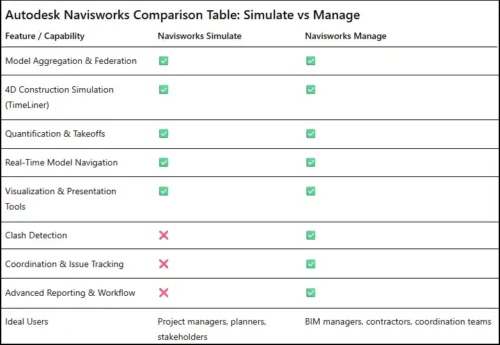
Navisworks Manage includes all the features of Navisworks Simulate, plus powerful clash detection and coordination tools. This version is specifically built for identifying and resolving conflicts between architectural, structural, and MEP systems before construction begins.
Additional capabilities include:
-
Automated clash detection between multiple model disciplines
-
Clash grouping, prioritization, and reporting
-
Issue tracking and coordination workflows
-
Support for BIM coordination meetings and resolution tracking
Navisworks Manage plays a critical role in reducing rework, minimizing construction delays, and improving overall project quality.
Key Features of Autodesk Navisworks
1. Model Aggregation and Federation
Autodesk Navisworks can combine 3D models from multiple platforms, including Revit, Civil 3D, AutoCAD, IFC, and Bentley formats. Since each discipline typically works in its own authoring software, Navisworks creates a single federated model without requiring teams to change tools. This unified project view improves coordination while preserving original design data.
2. Advanced Clash Detection
Clash detection is the most widely used feature in Navisworks. It identifies hard clashes (physical overlaps), soft clashes (clearance issues), and time-based clashes related to construction sequencing. Clashes can be grouped, prioritized, assigned to teams, and tracked until resolution. Resolving conflicts digitally before construction saves time, cost, and disputes.
3. 4D Construction Simulation (TimeLiner)
Navisworks TimeLiner links BIM models with construction schedules from tools like Primavera or MS Project. This enables visual construction sequencing, schedule validation, detection of sequencing conflicts, and creation of stakeholder-friendly animations. Teams can virtually “build” the project before construction begins.
4. Quantification and Takeoffs
Navisworks supports model-based quantity takeoffs, allowing users to extract quantities directly from BIM models. This improves cost estimate accuracy and supports 5D BIM workflows compared to traditional 2D methods.
5. Real-Time Model Navigation
Navisworks efficiently handles very large models with smooth navigation. Walkthroughs, fly-throughs, sectioning, object isolation, and saved viewpoints make it ideal for coordination meetings and design reviews.
6. Issue Tracking and Coordination Workflow
The software supports structured coordination by assigning clashes, tracking issue status, exporting reports, and integrating with BIM workflows—creating accountability across teams.
7. Visualization and Presentation Tools
Navisworks enables animations, phased visuals, and construction simulations that clearly communicate complex designs to non-technical stakeholders.
Benefits of Using Autodesk Navisworks
1.Reduced Rework and Cost Overruns
One of the most significant benefits of Autodesk Navisworks is its ability to identify design and coordination issues early in the project lifecycle. By performing clash detection before construction begins, Navisworks helps teams prevent costly problems that typically arise on site.
Early clash identification eliminates on-site conflicts such as pipes intersecting beams, ducts clashing with cable trays, or structural elements blocking access routes. Resolving these issues digitally is far less expensive and time-consuming than fixing them during construction, when changes often involve demolition, redesign, and reinstallation.
Navisworks also helps reduce material waste by ensuring that construction elements are correctly coordinated before procurement and installation. When clashes are resolved in advance, materials are installed correctly the first time, minimizing scrap, reordering, and unnecessary labor costs.
In addition, early coordination significantly reduces schedule delays. Construction delays are often caused by unexpected design conflicts discovered on site. Navisworks’ clash detection and 4D sequencing tools allow teams to anticipate and resolve these issues during the planning phase, keeping projects on track and avoiding costly downtime.
Beyond direct cost savings, reduced rework improves overall project efficiency, strengthens collaboration between disciplines, and lowers the risk of contractual disputes. Contractors, engineers, and owners benefit from greater confidence in the constructability of the design.
By enabling teams to detect and resolve problems before construction begins, Autodesk Navisworks plays a critical role in delivering projects on time, within budget, and with higher quality outcomes.
2. Faster Project Delivery
Autodesk Navisworks significantly accelerates project delivery by improving coordination across all disciplines. When architectural, structural, and MEP models are reviewed together, design conflicts are identified early, reducing the number of Requests for Information (RFIs) and redesign cycles during construction. With fewer interruptions and less rework, construction teams can maintain momentum, avoid delays, and adhere more closely to planned schedules. This streamlined coordination helps projects move from planning to completion more efficiently.
3. Improved Collaboration
Navisworks acts as a neutral coordination platform that brings architects, engineers, contractors, and subcontractors together in a shared environment. Since it aggregates models without altering original design files, all stakeholders can collaborate confidently while preserving design ownership. Coordination meetings become more productive as teams review the same federated model, discuss issues visually, and agree on resolutions, improving communication and alignment across disciplines.
4. Higher Construction Quality
By validating designs digitally before construction begins, Navisworks contributes to higher construction quality. Clash detection and model review ensure that building systems fit together as intended, leading to cleaner installations and fewer field changes. This reduces on-site improvisation, improves workmanship, and ensures that the constructed facility closely matches the approved design intent.
5. Better Decision-Making
Navisworks provides leadership with powerful analytical tools such as 4D construction simulations and clash analytics. These insights help project managers and decision-makers evaluate construction sequences, identify high-risk areas, and allocate resources more effectively. Data-driven visualization supports informed decisions that improve project outcomes, reduce risk, and enhance overall project control.
Common Uses of Autodesk Navisworks
1. BIM Coordination
Autodesk Navisworks is widely used by BIM managers as a central coordination platform for multidisciplinary projects. It brings together architectural, structural, mechanical, electrical, plumbing, and civil models into a single federated environment. By reviewing all disciplines together, teams can identify design conflicts early, align system layouts, and ensure constructability before work begins on site.
2. Clash Detection Workshops
Navisworks is the industry standard tool for clash detection workshops and coordination meetings. Project teams use it during weekly or biweekly sessions to identify, review, and resolve clashes between building systems. Clashes can be grouped, assigned to responsible parties, and tracked through resolution, creating a structured and accountable coordination workflow that significantly reduces construction risks.
3. Construction Planning
Navisworks supports construction planning through 4D simulations that link BIM models with project schedules. These simulations help teams plan site logistics, crane movements, material staging areas, and phased construction activities. Visualizing construction sequences allows planners to identify potential scheduling conflicts and optimize workflows before physical construction begins.
4. Stakeholder Communication
Complex construction projects often involve non-technical stakeholders. Navisworks uses visual models, animations, and simulations to clearly communicate design intent and construction sequencing. These visuals reduce misunderstandings, improve stakeholder confidence, and support faster approvals from clients, consultants, and regulatory authorities.
5. Infrastructure and Large-Scale Projects
Navisworks is particularly well-suited for large, complex projects such as airports, metro rail systems, highways, industrial plants, and data centers. Its ability to handle massive models smoothly makes it ideal for coordinating multiple systems, phases, and contractors across large-scale infrastructure developments.
Autodesk Navisworks Licensing Explained
Autodesk Navisworks is offered under a subscription-based, named-user licensing model, designed to provide flexibility, scalability, and easy management for organizations of all sizes. This model ensures users always have access to the latest features, security updates, and cloud-enabled services.
Available Subscription Options
Autodesk provides multiple subscription durations to suit different project and business needs:
-
Monthly Subscription: Ideal for short-term projects or temporary staffing requirements. This option allows organizations to use Navisworks without long-term commitments.
-
Annual Subscription: Best suited for professionals and teams requiring continuous access throughout the year. It offers better value compared to monthly plans and ensures uninterrupted productivity.
-
Multi-Year Subscription: A cost-effective option for long-term planning, locking in pricing and ensuring consistent access over multiple years, often preferred by large organizations and enterprise users.
License Types
Autodesk Navisworks is available in two license variants:
-
Navisworks Simulate: Focused on model review, visualization, 4D simulation, and quantification.
-
Navisworks Manage: Includes all Simulate features plus advanced clash detection, coordination workflows, and issue tracking tools.
Each license is assigned to a specific Autodesk account user, enabling secure access from any compatible device.
Key Licensing Benefits
-
Automatic Updates: Users always receive the latest software enhancements and security fixes without manual upgrades.
-
Cloud Collaboration Compatibility: Seamless integration with Autodesk cloud services supports modern BIM collaboration workflows.
-
Flexible Scaling for Teams: Licenses can be easily added, reassigned, or removed via the Autodesk Admin Console as team needs change.
System Requirements and Performance
Autodesk Navisworks is designed to efficiently handle large-scale BIM projects and complex 3D models. Its performance depends on hardware configuration and optimization.
1. Optimized for Large Models
Navisworks excels at managing very large models that may be too heavy or complex for standard authoring tools like Revit or AutoCAD. Users can combine multiple disciplines, including architectural, structural, MEP, and civil models, into a single federated environment. This capability ensures smooth navigation, clash detection, and 4D simulations even when working with models containing millions of objects.
2. High-Performance GPUs
Graphics performance is critical when navigating detailed 3D models in Navisworks. High-performance GPUs (graphics processing units) enable smooth model rotation, walkthroughs, and fly-throughs. They also accelerate visualization of materials, shadows, and textures, which is essential for coordination meetings, presentations, and construction simulations.
3. Multi-Core Processors
Navisworks leverages multi-core processors to improve computational efficiency for tasks like clash detection, quantification, and 4D simulations. Multi-threaded processing allows faster analysis of large datasets, helping teams detect issues and generate reports more quickly, which accelerates project workflows.
4. Handles Models Beyond Authoring Tool Limits
A key strength of Navisworks is its ability to process and visualize models that exceed the limits of authoring software. While tools like Revit may struggle with extremely large projects, Navisworks can manage massive datasets without crashing or significant slowdowns. This makes it ideal for infrastructure projects, airports, industrial facilities, and large urban developments where multiple large models need to be integrated and analyzed simultaneously.
By optimizing for these hardware and performance factors, Navisworks ensures that users can coordinate, visualize, and simulate complex construction projects efficiently and reliably, even on large-scale projects with high data complexity.
-
Navisworks model aggregation
Frequently Asked Questions (FAQ)
Q1. What is Autodesk Navisworks used for?
A: Navisworks is used for BIM coordination, clash detection, construction planning (4D simulation), model review, visualization, and stakeholder communication across architecture, engineering, and construction projects.
Q2. What are the main versions of Navisworks?
A: There are two main versions:
-
Navisworks Simulate: For model review, 4D construction simulations, and quantification.
-
Navisworks Manage: Includes all Simulate features plus advanced clash detection and coordination tools.
Q3. Can Navisworks modify the original design files?
A: No. Navisworks aggregates models into a federated environment for review and analysis but does not alter the original design files.
Q4. What file formats does Navisworks support?
A: Navisworks supports multiple file formats, including Revit, AutoCAD, Civil 3D, IFC, Bentley formats, and other third-party BIM data.
Q5. What is the licensing model of Navisworks?
A: Navisworks uses a subscription-based, named-user licensing model with monthly, annual, or multi-year plans. Licenses are tied to specific Autodesk accounts.
Q6. What hardware is recommended for Navisworks?
A: High-performance GPUs, multi-core processors, and sufficient RAM are recommended to handle large models and complex simulations efficiently.
Q7. Is Navisworks suitable for large infrastructure projects?
A: Yes. It is ideal for airports, metro systems, highways, industrial facilities, and data centers due to its ability to manage extremely large models.
-
Conclusion
Autodesk Navisworks is a powerful BIM coordination and project review tool that streamlines design validation, clash detection, and construction planning. By aggregating models from multiple disciplines, simulating construction schedules, and providing real-time navigation, it helps teams reduce rework, improve collaboration, enhance construction quality, and accelerate project delivery.
Navisworks is particularly valuable for large-scale infrastructure projects, commercial buildings, and industrial facilities, where multiple disciplines must coordinate seamlessly. Its flexible licensing options, high-performance support for large models, and integration with Autodesk cloud services make it a reliable, industry-standard solution for modern BIM workflows.
Choosing between Simulate and Manage depends on your project needs: Simulate is ideal for visualization, review, and 4D planning, while Manage is essential for full coordination, clash detection, and team accountability.