

Blog
What Is Autodesk Vehicle Tracking? Features, Benefits, Uses & Licensing Explained

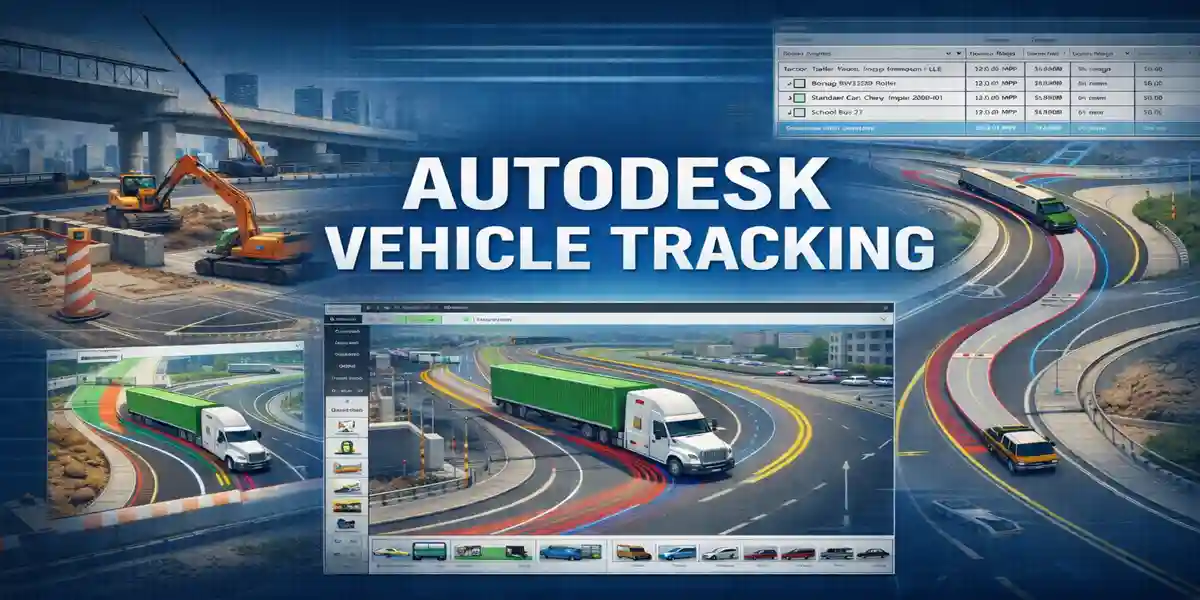
Introduction to Autodesk Vehicle Tracking
Autodesk Vehicle Tracking is a powerful transportation design and analysis software developed by Autodesk to help engineers, planners, architects, and infrastructure professionals simulate and analyze vehicle movements accurately. It is widely used in the design of roads, highways, intersections, roundabouts, parking facilities, loading docks, and site access points.
Modern infrastructure projects demand precision, safety, and regulatory compliance. Vehicle movements must be analyzed carefully to ensure that cars, trucks, buses, emergency vehicles, and specialized transport vehicles can safely and efficiently navigate proposed designs. Autodesk Vehicle Tracking provides advanced tools that allow professionals to visualize vehicle paths, evaluate turning radii, and verify compliance with local and international transportation standards.
What Is Autodesk Vehicle Tracking?
Autodesk Vehicle Tracking is a specialized design and analysis add-on used for:
1. Vehicle Swept Path Analysis
Swept path analysis is the process of simulating a vehicle’s movement along a roadway or within a site to determine the space it requires to maneuver safely.
-
It allows engineers to see exactly how different vehicles—like trucks, buses, or emergency vehicles—will navigate turns, intersections, or tight spaces.
-
By analyzing the swept path, designers can prevent potential collisions, bottlenecks, or unsafe maneuvers.
-
This feature is crucial for highways, industrial sites, airports, and any areas where large vehicles operate.
2. Parking Layout Design
Designing parking lots isn’t just about putting cars in rows; it requires precise planning for efficiency and safety.
-
Autodesk Vehicle Tracking can simulate how vehicles enter, exit, and park in lots.
-
It ensures proper aisle widths, turning radii, and parking space dimensions are maintained according to standards.
-
Helps optimize parking layouts to maximize space while ensuring smooth vehicle flow.
3. Roundabout and Junction Evaluation
Intersections and roundabouts are critical points in traffic networks, and proper design is essential for safety and traffic flow.
-
The software allows engineers to model how vehicles move through roundabouts, T-junctions, or multi-lane intersections.
-
It identifies areas where vehicles may conflict or where turning radii are insufficient.
-
Supports safer, more efficient traffic designs and helps avoid costly post-construction modifications.
4. Access and Circulation Planning
Access and circulation planning focuses on how vehicles navigate through sites, such as industrial facilities, campuses, hospitals, or commercial areas.
-
Vehicle Tracking ensures that entry and exit points, driveways, and internal roads are designed to handle the expected traffic.
-
Helps maintain smooth flow for all types of vehicles, including service trucks, delivery vans, and emergency vehicles.
-
Reduces congestion, prevents vehicle conflicts, and improves overall site functionality.
5. Compliance with Roadway and Transportation Standards
Transportation projects must follow specific regulations and standards for safety and functionality.
-
Autodesk Vehicle Tracking integrates local and international design standards, ensuring that your project meets legal and industry requirements.
-
Automatically checks lane widths, turning radii, vehicle types, and other parameters against relevant codes.
-
Helps designers avoid non-compliance issues, which can delay projects or increase costs.
Key Industries That Use Autodesk Vehicle Tracking
Autodesk Vehicle Tracking is a versatile tool that has become essential across multiple industries where vehicle movement, traffic management, and site planning are critical.
Civil and Transportation Engineering
This industry heavily relies on Autodesk Vehicle Tracking for designing roads, highways, intersections, and bridges. Engineers use the software to simulate vehicle movements, analyze turning paths, and ensure that both standard and large vehicles can navigate roadways safely. It also helps prevent costly errors by identifying potential conflicts in tight turns, curves, and junctions before construction begins.
Urban and Regional Planning
Planners use the software to assess traffic flow, accessibility, and circulation in urban and suburban areas. Autodesk Vehicle Tracking allows planners to model how vehicles will move through city streets, residential neighborhoods, and commercial zones, ensuring that designs support smooth traffic, minimize congestion, and improve public safety.
Infrastructure Development
Large-scale infrastructure projects, such as airports, bus terminals, railway stations, and ports, benefit from the software’s ability to manage complex vehicle movements. Designers can test routes for trucks, buses, and emergency vehicles to ensure efficient operations and prevent bottlenecks during peak usage periods.
Architecture and Site Planning
Architects and site planners integrate Vehicle Tracking into building layouts to plan driveways, service entrances, drop-off zones, and internal circulation paths. This ensures that buildings are accessible for all vehicles, including emergency and service vehicles, while maintaining functional and safe site design.
Logistics and Industrial Facility Design
Warehouses, factories, and distribution centers use the tool to plan truck routes, loading bays, and material handling areas. This helps optimize workflow, prevent collisions, and improve overall efficiency.
Government and Municipal Planning Departments
Public agencies rely on Autodesk Vehicle Tracking to design streets, intersections, roundabouts, and emergency access routes according to local and international standards. The software ensures compliance with regulations while enhancing public safety and traffic efficiency.
Core Features of Autodesk Vehicle Tracking
1. Swept Path Analysis
Swept path analysis is one of the most vital features of Autodesk Vehicle Tracking. It allows designers to simulate vehicle movements and visualize how vehicles navigate intersections, curves, and tight spaces. This feature provides accurate visualization of wheel paths, identifies potential conflicts with curbs, walls, or other obstacles, and supports complex maneuvers such as reversing or multi-point turns. By using swept path analysis, engineers can ensure designs are safe, functional, and efficient before construction begins.
2. Extensive Vehicle Library
The software comes with a comprehensive vehicle library containing hundreds of predefined vehicles, including passenger cars, buses, fire trucks, articulated trucks, trailers, and industrial vehicles. Designers can also customize vehicle dimensions to match project-specific requirements or regional regulations, allowing precise simulation of any type of vehicle expected on the site.
3. Parking Layout Design Tools
Autodesk Vehicle Tracking includes advanced tools for designing efficient parking layouts. It optimizes parking bay arrangements, verifies aisle widths, checks accessibility compliance, and analyzes circulation for both standard vehicles and service vehicles. This ensures smooth traffic flow and maximum use of available space.
4. Roundabout and Intersection Design
The software helps design safe and efficient intersections and roundabouts by analyzing entry and exit paths, visualizing conflict points, and verifying capacity and geometry. This ensures that intersections operate safely under real-world conditions.
5. Integration with AutoCAD and Civil 3D
Seamless integration with AutoCAD and Civil 3D allows engineers to work in familiar design environments, improving workflow efficiency and reducing training requirements.
6. Realistic Vehicle Simulation
Autodesk Vehicle Tracking simulates vehicle behavior accurately, accounting for steering angles, wheelbase, overhangs, axle articulation, and forward/reverse movements, providing realistic driving representations.
7. Standards Compliance
It supports global and regional standards such as AASHTO, Austroads, UK DMRB, and local municipal guidelines, ensuring designs meet legal and safety requirements.
8. Visualization and Reporting
The software generates clear visual outputs and detailed reports, helping designers communicate their intent effectively to stakeholders, clients, and regulatory authorities.
Benefits of Using Autodesk Vehicle Tracking
1. Improved Design Accuracy
Autodesk Vehicle Tracking allows engineers and planners to simulate real-world vehicle movements with precision. By visualizing how different vehicles navigate intersections, curves, and tight spaces, designers can minimize guesswork and reduce design errors. Accurate simulations ensure that turning radii, lane widths, and circulation paths are correctly planned, reducing the likelihood of costly rework during construction.
2. Enhanced Safety
Safety is a critical aspect of transportation and site design. Vehicle Tracking helps identify potential safety issues before construction begins. Designers can detect areas where vehicles may collide with curbs, walls, or other obstacles, as well as blind spots and conflict points at intersections. This proactive approach ensures safer roadways, parking lots, and access routes, protecting both drivers and pedestrians.
3. Time and Cost Savings
By catching design problems early, the software helps prevent expensive construction changes and project delays. Simulating vehicle behavior in advance allows engineers to optimize layouts without physically testing them on-site. This reduces the time spent revising plans and minimizes wasted resources, ultimately saving money and keeping projects on schedule.
4. Regulatory Compliance
Autodesk Vehicle Tracking supports local, regional, and international transportation standards, including AASHTO, Austroads, and UK DMRB. This ensures that designs meet regulatory requirements, making it easier to obtain approvals from municipal authorities and transportation agencies, and avoiding legal or compliance-related setbacks.
5. Better Stakeholder Communication
The software produces clear visualizations and detailed reports that make it easier to communicate design intent to clients, regulators, and non-technical stakeholders. Visual representations of vehicle paths, circulation patterns, and intersection layouts simplify complex designs, ensuring all parties understand the project clearly.
6. Scalability for Small and Large Projects
Whether designing a small parking lot or a large-scale highway or industrial facility, Autodesk Vehicle Tracking adapts to the project size. Its flexible tools and customizable vehicle library allow engineers to handle projects of any scale while maintaining accuracy and efficiency.
Uses of Autodesk Vehicle Tracking
1. Road and Highway Design
Autodesk Vehicle Tracking is widely used by civil engineers to design roads, highways, and intersections. The software allows accurate simulation of vehicle movements, ensuring that turning radii, lane widths, and corner geometries accommodate all types of vehicles—from small cars to large trucks. This helps prevent design errors, reduces accidents, and ensures smooth traffic flow.
2. Urban Planning and Smart Cities
Urban planners use Vehicle Tracking to optimize city traffic networks and develop smarter, more efficient transportation systems. The software can simulate vehicle circulation in residential neighborhoods, commercial districts, and downtown areas, helping reduce congestion, improve public safety, and plan future expansions for growing cities.
3. Commercial and Industrial Sites
For warehouses, factories, and distribution centers, Vehicle Tracking is essential for designing truck routes, service roads, and loading/unloading areas. It ensures that large delivery vehicles can maneuver safely without conflicts, while optimizing space for operational efficiency. This reduces delays and prevents accidents in busy industrial sites.
4. Emergency Vehicle Access Planning
Emergency access is a critical consideration for site planning. Vehicle Tracking allows designers to simulate paths for fire trucks, ambulances, and other emergency vehicles to verify that they can reach all areas quickly and safely. This ensures compliance with safety regulations and enhances emergency preparedness.
5. Parking Facilities and Structures
The software helps design functional, efficient, and accessible parking layouts for both surface lots and multi-level structures. Vehicle Tracking verifies aisle widths, circulation paths, and compliance with accessibility standards, ensuring smooth movement for all vehicles, including service and emergency vehicles.
6. Airports, Ports, and Logistics Hubs
Large transportation hubs involve complex vehicle operations, including buses, cargo trucks, and specialized service vehicles. Vehicle Tracking enables planners to simulate and manage these movements, preventing congestion, improving operational efficiency, and enhancing safety in busy airport, port, and logistics environments.
Autodesk Vehicle Tracking Licensing Explained
Autodesk Vehicle Tracking is offered through a subscription-based licensing model, providing flexibility for different project needs and organizational sizes. This model allows users to access the software legally, receive updates, and benefit from Autodesk support throughout the subscription period.
Subscription Options
Autodesk Vehicle Tracking offers multiple subscription plans to suit various requirements:
-
Monthly Subscription: This short-term option is ideal for project-based work or temporary needs. Engineers or planners can subscribe for a single month, providing access to all features without a long-term commitment.
-
Annual Subscription: Designed for professionals who require consistent, ongoing use, the annual plan is cost-effective and ensures continuous access to the latest updates and features.
-
Multi-Year Subscription: Best suited for organizations with long-term planning, multi-year subscriptions reduce overall licensing costs while securing uninterrupted software access over multiple years.
Named-User Licensing
Licenses are assigned to individual users rather than devices, ensuring that each user’s access is tied to their Autodesk account.
-
Each user signs in with their account to access the software.
-
Administrators can manage licenses, track usage, and assign or revoke access through the Autodesk Admin Console, simplifying license management for organizations of any size.
Trial Version
For those who want to evaluate the software before purchasing, Autodesk offers a free trial, usually valid for 30 days. This trial provides full access to all features, allowing users to explore capabilities such as swept path analysis, parking layout design, and intersection simulation. The trial period is an excellent way for professionals and organizations to test the software in real-world projects and determine whether it meets their design and planning requirements.
Overall, Autodesk Vehicle Tracking’s subscription model provides flexibility, cost-effectiveness, and ease of management, making it suitable for both individual users and large organizations working on diverse transportation, urban planning, and infrastructure projects.
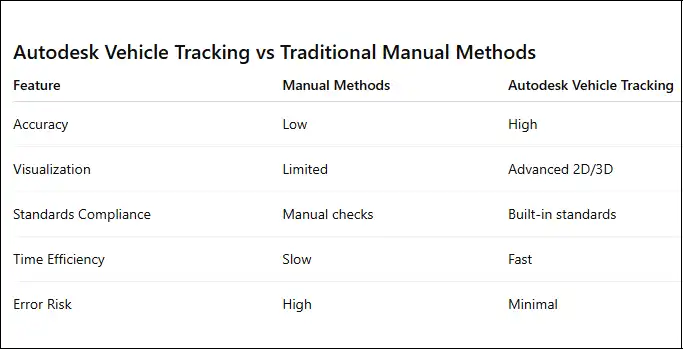
Autodesk Vehicle Tracking vs manual vehicle turning analysis comparison
Best Practices for Using Autodesk Vehicle Tracking
To get the most accurate and reliable results from Autodesk Vehicle Tracking, following best practices is essential. These practices ensure designs are safe, functional, and compliant with regulations.
1. Always Select the Correct Vehicle Type for Analysis
Choosing the appropriate vehicle is critical for accurate simulation. Vehicle Tracking offers a comprehensive library with cars, buses, trucks, emergency vehicles, and industrial machinery. Using the correct vehicle ensures that turning paths, overhangs, and clearance requirements are realistic. This prevents errors in roadway, parking, and site layouts and guarantees that designs accommodate the intended traffic mix.
2. Use Regional Design Standards Where Applicable
Transportation design standards vary by country and region. Autodesk Vehicle Tracking supports standards such as AASHTO, Austroads, and UK DMRB. Applying the correct regional standard ensures that lane widths, turning radii, and intersection geometry meet legal and safety requirements. This practice also simplifies approvals from local authorities and reduces compliance issues.
3. Validate Results with Real-World Site Constraints
Simulations should reflect actual site conditions, including obstacles, existing structures, and slope constraints. Validating designs against real-world constraints ensures that layouts are practical and buildable. This reduces costly changes during construction and increases project reliability.
4. Combine Swept Path Analysis with Visibility Checks
Swept path analysis identifies vehicle movement paths, but visibility and sightlines are equally important for safety. Designers should evaluate whether drivers have clear views of other vehicles, pedestrians, and obstacles at intersections, roundabouts, and parking areas. Combining these analyses ensures a safer, more functional design.
5. Document Simulations for Approvals
Clear documentation of simulations, including visuals and reports, is essential for communicating design intent to clients, stakeholders, and regulatory authorities. Providing well-organized simulation outputs supports approvals, demonstrates compliance, and facilitates collaboration across project teams.
Following these best practices ensures that Autodesk Vehicle Tracking is used efficiently, producing safe, accurate, and compliant designs across all transportation, urban planning, and infrastructure projects.
FAQs Frequently Asked Questions?
1. What is Autodesk Vehicle Tracking used for?
Autodesk Vehicle Tracking is used to simulate and analyze vehicle movements in roadways, parking areas, and site layouts to ensure safety and compliance.
2. Is Autodesk Vehicle Tracking included with AutoCAD?
No. It is a separate subscription but integrates with AutoCAD and Civil 3D.
3. Can I use Autodesk Vehicle Tracking for parking design?
Yes. It is widely used for parking layout optimization and circulation analysis.
4. Does Autodesk Vehicle Tracking support international standards?
Yes. It supports multiple global and regional transportation standards.
5. Is there a free trial available?
Yes. Autodesk typically offers a 30-day free trial.
6. Who should use Autodesk Vehicle Tracking?
Civil engineers, transport planners, architects, urban planners, and infrastructure designers.
7. Can Vehicle Tracking simulate emergency vehicles?
Yes. The software includes emergency vehicle templates and customization options.
8. Does it work with BIM workflows?
Yes. It integrates with Civil 3D and supports BIM-based infrastructure workflows.
9. Is Autodesk Vehicle Tracking cloud-based?
The software runs locally but uses cloud licensing and account-based access.
10. Where can I buy Autodesk Vehicle Tracking at a good price?
You can buy it from authorized resellers such as eSoftwareStore.
Conclusion
Autodesk Vehicle Tracking is an essential tool for modern transportation and infrastructure design. Its advanced simulation capabilities, extensive vehicle library, and seamless integration with Autodesk platforms make it a trusted solution for professionals worldwide. By enabling accurate vehicle movement analysis, it enhances safety, ensures compliance, and saves time and costs throughout the project lifecycle.
Whether you are designing a simple parking lot or a complex urban roadway network, Autodesk Vehicle Tracking provides the precision and confidence needed to deliver successful, regulation-compliant projects.
For reliable licensing and professional support, consider purchasing Autodesk Vehicle Tracking from eSoftwareStore, your trusted source for genuine Autodesk software solutions.